
How to Set up Meetings to Avoid Zoom Fatigue
It is essential to avoid video conferencing burnout and remain focused throughout the day.

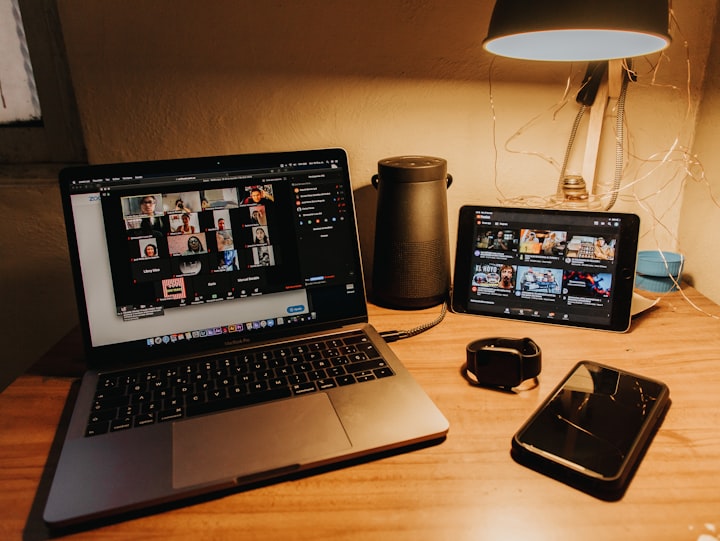
Given the pandemic, the 'work from home' culture has become the norm. With that, the discussions which used to take a two-minute conversation at the desk in the office now require a meeting to be set up.
Be it a one on one meeting or a discussion with a group of people; the default expectation now is to have a video conference. People presume you have your video turned on during the meeting. I have seen where the organizer asks the team members to switch on their cameras, even if they are not very comfortable about it at the given time.
Research conducted by Microsoft has established that video conferencing is more taxing and stressful for the attendees. Hence, if you are organizing a meeting, you should be cautious about when to have a video call and when to do it audio-only.

Here is one simple point to keep in mind as an organizer while setting up a meeting.
Don’t Presume Everything Is a Video Meeting
While setting up a meeting, don’t expect that everyone will be ok with turning on their camera. It is always good to give a clear indication of your expectations while sending the calendar invite.
Hence, be prescriptive about the format expectation in the subject line of the meeting request.
Here is a simple yet effective way to make your video related expectation clear. Add one of the below statements in the subject line of the invite email.
Video Required
Add the statement 'Video Required' to the subject line when the attendees must switch on their camera during the meeting. Anyone who is not comfortable with using their camera will have time to let you know beforehand.
This way, you can adjust the video requirement as per the attendee's interest. There are situations such as remote interviews where you want to make sure you are talking to the actual candidate. In such cases, if the attendee refuses to be on a video call, you can speak to the attendee and convey to them the reasons you want it to be a video call.
Making it explicit on the meeting invite helps everyone to be on their best get up and also keep their surrounding clean before they join the call.
Video Preferred
'Video Preferred' statement is needed when you prefer a video call, but you are ok if people do not switch on their camera. This gives a chance for people to decide which mode of communication they will prefer during the discussion.
People always prefer to have options to choose from when attending a meeting. Being on video often feels like an invasion of privacy, especially when most of us are now working from home. By giving attendees the option to chose from, you are already creating a cordial environment for the discussion.
Audio with Screen Share
Add the statement 'Audio with Screen Share' to the subject line when you do not want a video meeting, but you expect people to share their screen when required. This will let people know that they should not switch on the camera, but they can expect some screen sharing.
Many of our teammates do not feel good when a lot of people switch on their video when it is not required. First, it consumes a lot of bandwidth and slows down the internet speed. Second, it makes them feel uneasy when they are the only few who are not on video.
Hence, when the meeting organizer makes it clear that video-sharing should be disabled, it helps everyone attend the meeting comfortably without feeling the obligation to turn on their camera.
Audio Only
Add the texts 'Audio Only' to the meeting invite when you do not want attendees to switch on their cameras or share their screen. This will give everyone a clear indication that they should not use video or start a screen share during the meeting.
Audio only calls are always helpful for people with slow internet speed. Hence, it is advisable to have the video or screen share to the meeting only when it is absolutely necessary.
With hundreds of calls that I have attended in the last eight months of work from home, I have seen most participants never switch on their camera. It is quite clear that audio-only calls are the most preferred way of communication for regular meetings among team members.
Final Thought
Try the above-mentioned simple points when you send your next meeting invite. It will help you and your attendees to have a less stressful meeting. Your discussions will be more productive, and the participants will appreciate your thoughtfulness.
About the Creator
Keep reading
More stories from Lokajit Tikayatray and writers in Journal and other communities.
Want a fulfilling career? You Need to Answer These Questions First
So you want a successful career that also provides fulfillment in life? Great! May I ask, what is your idea of a fulfilling career? If you don't know the answer to that question, it's unlikely that any job will be fulfilling for you.
By Lokajit Tikayatray4 years ago in Journal
The goals I did not achieve
Every writing goal I made for the year is a wash. It has been this way for a while, but I think it's important to be open about my failures and the reality of how life can get in the way. This is especially true considering the several times I have posted on Vocal about my writing goals, how I was changing my approach, and where I was hoping to be for the upcoming year. I will probably do that again in a couple months, but for now, it is time to acknowledge where I am today.
By Kay Husnick18 days ago in Journal
Why Kindred Spirit Connections Feel Calm Instead of Intense.
Kindred spirit connections are unique soul-level relationships marked by resonance, understanding, and emotional ease. Unlike romanticized or karmic connections, which often involve drama, high intensity, and emotional turbulence, kindred spirit relationships feel calm, peaceful, and aligned. Understanding why these connections create serenity rather than intensity can help you recognize, nurture, and maintain relationships that truly support your growth and well-being.
By Wilson Igbasia day ago in Journal
'20/20'
"Do It Again" the track that would ultimately open the Beach Boys final album on Capitol Records which was released on February 10th 1969 had originally been released as a single in August of 1968. The track was the first of many post-Pet Sounds era throwbacks to the early Beach Boys sound which would become continually more cliched and eventually lead the Beach Boys to the level of self-parody they would eventually succumb to in the 1980s while their closest contemporaries The Beatles nearing the end of their run in 1969 would go on to be viewed as the most influential band of all time. However, the song itself is not bad on its surface, and it opens with a futuristic sounding (for 1969) drumbeat captured by then-Beach Boys engineer Stephen Desper using tape delays on the drums performed by Dennis Wilson and John Guerin. The song has been re-recorded numerous times over the years on various Beach Boys-related projects most notably the 2011 re-recording at Capitol studios featuring the five surviving Beach Boys at the time backed instrumentally by various members of both the Brian Wilson Band and Mike Loves touring "Beach Boys" to promote the then upcoming Beach Boys 50th Anniversary reunion tour in 2012. The hammering and power drill sound at the end of the song was an excerpt from a track called "Workshop" that was to be a part of the uncompleted "SMiLE" album.
By Sean Callaghan8 days ago in Beat


Comments
There are no comments for this story
Be the first to respond and start the conversation.