
How To Reset Password on Digital WorkerBees?
Having trouble signing in? Don’t worry, You will get proper guidance from here.


Sometimes it’s hard to remember passphrases, but no worries, here you go with multiple password recovery options!
Note: Please provide additional information to help in the recovery process.
There are two options available to recover your password.
Option 1: Using Email Address & One Time Password (OTP)
Step 1: Go to the DigitalWorkerBees website and click on the “Forgot Password?” link.
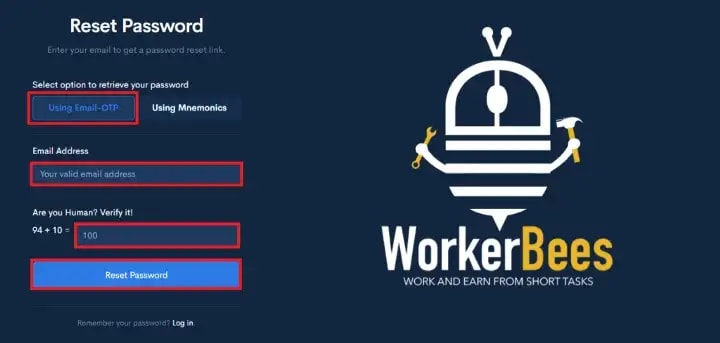
Step 2: Click on the “Using Email-OTP” option button
Step 3: Enter your valid registered email address
Step 4: Verify that you are human by entering the correct sum value for the displayed two digits.
Step 5: Click on the “Reset Password” button, It will send you OTP information via email.
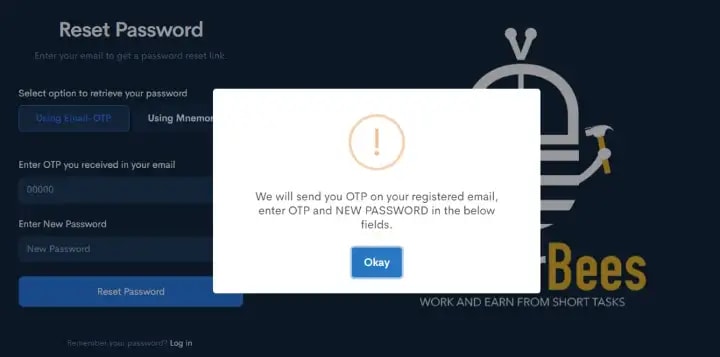
Step 6: Enter OTP received in your email, add your new password, and click on the “Reset Password” button.

That’s set, your password will be updated.
Option 2: Using Mnemonics

Remembered the Knuckle mnemonic which you used to count 30 or 31 days of months.
A mnemonic is a way for people to remember things more easily, but here you don’t need to remember anything.
Note: If you already downloaded (Mnemonics of 9 words to reset your password directly) the mnemonics and saved them somewhere then you can proceed further.

Step 1: As shown above in the image, select the “Using Mnemonics” button first when you landed on Forgot Password or Reset Password screen.
Step 2: Enter your registered email address
Step 3: Enter your secret mnemonics (At the end, You will know how to download the mnemonics), make sure you don’t have extra white space before or after copy-pasting the mnemonics.
Step 4: Enter your NEW PASSWORD.
Step 5: Verify the human test.
Step 6: It’s time for “Reset Password” button click in “Action”.
If your entered Email address and Mnemonic values are matching perfectly, then only your new password will be changed.
That’s set, now you can log in to the website.

How to Download and Store Mnemonics?
It is so simple to get your mnemonics. First there are a few prerequisites, which must be completed before moving further to obtain your mnemonics.
Prerequisites:
Your profile information must be saved. If it is not completed, Please fill it up.
Click on the Profile icon 👉 Click on the Profile Link 👉 About Me/e-KYC tab 👉 fill in the below information.
- First Name (As per your National Identity)
- Last Name (As per your National Identity)
- Date of Birth (As per your National Identity)
- Gender (Compulsory)
- Zip Code (As per your National Identity)
- Street 1 (As per your National Identity)
- Street 2 (As per your National Identity)
- Country (As per your National Identity)
- State (As per your National Identity)
- City (As per your National Identity)
- Phone Number
- Choose Security Question
- Choose the Answer for the selected security question (Case sensitive)
After filling up all form fields (mandatory ones), click on the “Save Changes” button. Now, follow these steps:
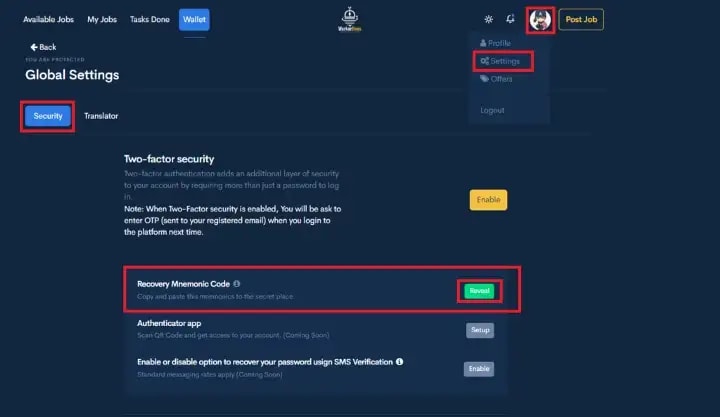
Step 1: Log in to your account, From the dashboard, click on your profile icon and select the Settings link.
Step 2: Click on the Security tab under the Global Settings page.
Step 3: Find for “Recovery Mnemonic Code” section and click on the “Reveal” button.
Step 4: It will ask you to enter information as shown below.

Your Date of Birth in YYYYMMDD format (If your Birthdate is 25-DEC-1965, then enter 19651225)
Answer your selected question in the profile (Case Sensitive)
Step 5: Click on the “Show Me Mnemonics” button to reveal your code.
It will show you 9 words of mnemonics as depicted below.
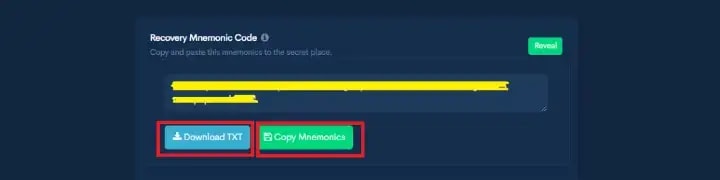
You can either copy or download the text file by clicking those two buttons, you can send mail to yourself or upload it on the drive, please keep in mind that, you need to put it in some secret place to make your account secure.

Disclaimer: For DigitalWorkerBees, The concept and its copyrights are bound to the platform itself and no one can make a copy of the software without any acknowledgment from us. The purpose of this article is to documentation on how to use the platform.
Originally Published on Digital WorkerBees - Medium.
Get my stories in your feeds by subscribing to me, or become a member to read all stories of thousands of other writers, participate in all challenges and get a payout with low fees and less payout threshold on Vocal Media.
I will get a small commission amount, but you don't have to pay extra for it, You can't believe it, it will help me out much. Thank you in advance.
You may also like,
About the Creator
Unbounded Soul
25, Poet, Learner, Searching for lots of adventures, Traveler.
Keep reading
More stories from Unbounded Soul and writers in Journal and other communities.
How To Be Productive In Less Time
1. "No." is a complete sentence. It does not require explanations or reasons. Don't be afraid to say no. 2. Never give accurate answers to security questions. Use a password manager and record which questions go with which fake answers. Normally, never share your real information unless it is required.
By Unbounded Soul4 years ago in Journal
What Is the Hanging Man Doji Pattern? Meaning, Strategy & Examples for 2025
Trading can feel confusing when market trends suddenly reverse. The hanging man doji is a critical candlestick pattern that traders rely on to identify possible reversals. For a deeper look at the hanging man doji, including its technical structure and real examples, traders often explore candlestick resources to refine their chart-reading skills. This guide will help you grasp its structure and how it indicates changes in market direction.
By Sanjeev Kumar7 days ago in Journal




Comments
There are no comments for this story
Be the first to respond and start the conversation.