
How to generate website/blog pages for free?
(Privacy Policy, Terms & Conditions, About Us, Contact, and Disclaimer)


As in the previous article you have completed blogger blog customization. Now, we are gonna create important pages.
1. About us 2. Privacy Policy 3. Terms and Conditions 4. Disclaimer 5. Contact us
Note: This article is a part of the Blogger Free Course. If you are not familiar with what you are gonna cover in this article or course, bother taking a look at the introductory article of the blogger-free course. Definitely, this course is to teach you how to create a successful blog and monetize it for earning. So by completing this course you will be able to manage and run your blog/website by yourself; thus, no need to pay high fees to the web developer.
Blogger Free Course - Step-by-Step Guide from Website Creation to Monetisation
Make a website or blog with blogger/blogspot and earn money by monetizing itmedium.com
Theme Selection for Blogger Blog and Its Customization
Why are these pages important?
These pages are the strength of any blog or website that allow visitors to clearly understand what your blog is about, what's its limitations and restrictions, and how they can contact you in case of any issue. These pages are also important for Adsense approval through which you will monetize your blog.
How to generate blog or website pages?
You know need to take its headache by writing yourself and you need to hire someone else. You can generate it with software or a website. I generate pages with blog earns. You can search on google, you will find many other options as well. Blog earns gives you the option to generate all type of pages totally free. I find it good for me if you know any other reliable website you can generate with that.

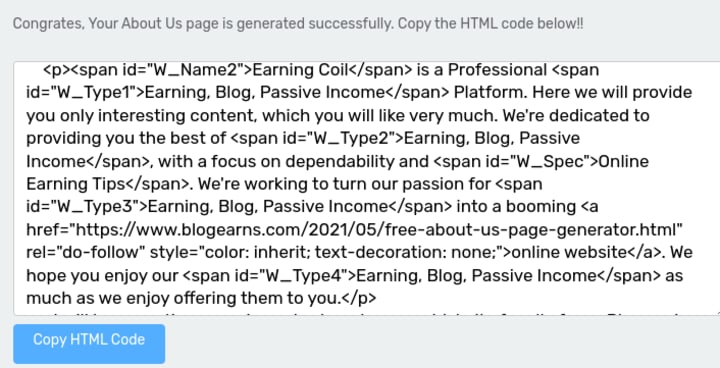
Go to blog earn website > click on generate about us page > fill the information required > click on generate page >copy the HTML text > come to blogger site > go to page section > click on create no page > write the title e.g about us in title section > go to side option like "<>" > click on HTML view > paste the copied content here and publish the page. You are done.

Click on Generate About Us Page. Copy HTML Code and Paste it your blogger pageFor all five pages repeat the process. Use the same website. I personally use it because here to you get option to create all type of pages. So you do not need to chatter here and there on the internet. Plus, it's easy to use.
For privacy policy page generating, choose "generate privacy policy page" and repeat the same process for other pages.

How to customize widgets and add these pages to your website widget?
You have already created pages in the pages section. But they will not appear on your website until you will not replace them with the template pages ( pages that are already added by the template owner). You have to customize your template according to yours. And you have to remove the template owner information and add yours.
For this purpose go to layout>choose link list at the bottom of your template (make sure it's the link list of your relevant pages )> copy your page links > and add to the link list.
For example:
- Copy the link to the about us page
- Come to layout
- Find out the link list of these five pages
- Open this widget
- Write about us in the title
- And paste your page in the below section URL section)
- Remove the theme pages and replace them with yours.
You are done with it!
About the Creator
makelivingonline
A passionate writer, freelancer, blogger, explorer, and learner. If you want to learn to survive in the online world, join me hear.
❦Freelancing ❦Blogging ❦Earning Money Online ❦Writing
@makelivingonline
Keep reading
More stories from makelivingonline and writers in Journal and other communities.
The goals I did not achieve
Every writing goal I made for the year is a wash. It has been this way for a while, but I think it's important to be open about my failures and the reality of how life can get in the way. This is especially true considering the several times I have posted on Vocal about my writing goals, how I was changing my approach, and where I was hoping to be for the upcoming year. I will probably do that again in a couple months, but for now, it is time to acknowledge where I am today.
By Kay Husnick16 days ago in Journal
Transitioning from Agency Work to Private Practice
Introduction The transition from an agency to a private therapy practice in 2026 represents a major professional shift from clinical execution to total business ownership. While agencies provide a safety net of consistent referrals and managed administrative tasks, they often limit a clinician’s autonomy and earning potential. Moving into private practice allows you to reclaim your schedule and specialize in a specific niche that aligns with your passions. This process requires a systematic approach to legal structuring, financial planning, and brand development to ensure long-term sustainability. Success in this journey depends on building a robust infrastructure before seeing your first independent client, allowing you to focus entirely on the therapeutic relationship once the doors open.
By Abdul Mueed6 days ago in Journal




Comments
There are no comments for this story
Be the first to respond and start the conversation.