
How Can Improve Mobile App Speed With Testing Tools
Improve Mobile App Testing App Speed Through Testing Tools


You tap on an app-nothing happens for two seconds. By the third second, you're already considering uninstalling it. Speed isn't just a luxury for mobile apps; it's a requirement. Performance is often the deciding factor between a user who stays engaged and one who bounces away to a competitor. Developers and QA engineers know this pain all too well.
I’ve been there-waiting for a feature to load during testing, wondering why performance dips only show up after deployment. That’s where automated mobile device testing steps in-not just to detect bugs, but to deeply analyze performance bottlenecks before users ever feel them.
This article dives into how you can harness the power of automation tools to improve mobile app speed, with practical advice and tools that make a real difference.
Why Speed Matters More Than Ever
Research shows that 53% of users abandon a mobile site if it takes longer than 3 seconds to load (Google Mobile UX Report, 2023). For apps, expectations are even higher-users expect near-instant responses. Poor app performance leads to:
- Higher uninstall rates
- Negative app store reviews
- Lower user retention
- Reduced revenue from in-app purchases or ads
Speed optimization isn't just backend tweaking or UI simplification-it's a systematic testing process, and automation is the key to scaling it.
What Is Automated Mobile Device Testing?
Automated mobile device testing refers to the use of specialized tools and frameworks that simulate real user interactions on mobile devices automatically.
This includes checking responsiveness, load time, memory usage, and how the app behaves under different network conditions or device loads.
Unlike manual testing, which is time-consuming and error-prone, automation allows consistent, repeatable, and comprehensive tests across a variety of real devices and emulators.
Key Testing Tools to Improve App Speed
Let’s explore tools that help identify and resolve speed-related issues-each serving different stages of the testing cycle.
1. TestEvolve -Low-Code Automation with Smart Reporting
TestEvolve is a modern, low-code mobile testing platform that simplifies automation and delivers smart insights-ideal for teams looking to move fast without deep scripting expertise.
Speed Optimization Capabilities:
- Quickly build tests using a visual editor or minimal code.
- Integrated performance tracking (like launch times, API latencies).
- Real-time reporting dashboards to spot slowdowns instantly.
- Supports cross-device and cross-platform testing out of the box.
TestEvolve is perfect for teams aiming to integrate performance testing early in the CI/CD pipeline without heavy setup or coding overhead.
2. Appium- The Cross-Platform King
Appium is an open-source tool that supports Android and iOS and allows test writing in multiple programming languages.
Speed Optimization Capabilities:
- Simulate real-world interactions and measure load times.
- Capture logs and performance metrics during test runs.
- Easily integrates with cloud testing platforms.
3. Firebase Performance Monitoring
This Google-backed tool offers deep insights into real-world app performance for Android and iOS.
What it tracks:
- Startup time
- Network latency
- UI rendering delays
- Screen-specific slowdowns
4. Espresso & XCUITest-Native UI Testing Tools
These are official tools from Google (Espresso for Android) and Apple (XCUITest for iOS), ideal for testing native components.
Why they matter:
- Fast execution and low maintenance.
- Allow profiling for rendering issues and load bottlenecks.
- Work seamlessly in local or CI environments.
How Testing Tools Directly Improve Speed
Simply integrating testing tools isn’t enough. Here's how they actively contribute to making your mobile apps faster:
Identify Code Bottlenecks
Automated performance testing reveals which parts of your code take the longest to execute. For instance:
- Slow API responses
- Unoptimized loops
- Unused animations or UI transitions
A 2024 survey by TechQA Labs found that 46% of app speed issues were traced back to inefficient backend integration.
Benchmarking Against Real Devices
Cloud-based platforms like BrowserStack, Kobiton, and Sauce Labs allow testing across hundreds of real devices.
This helps catch issues that may only appear on older or low-spec devices, which still account for a significant portion of global users.
Best Practices for Speed-First Automated Testing
Speed optimization through automated mobile device testing isn’t just about running scripts. You need a strategy.
Focus on These Areas:
1. App Startup Time
- Use Firebase or custom timers to measure cold/warm starts.
- Aim for under 2 seconds on average devices.
2. Network Request Timing
- Simulate 3G/4G/5G or airplane mode using test tools.
- Identify which requests are blocking UI render or load.
3. UI Rendering Performance
- Check frame drop rates using tools like Android Profiler or Instruments on iOS.
- Test UI transitions on older devices with lower GPU capabilities.
Automate These Test Scenarios
Not all performance tests are created equal. Here's what you should definitely automate:
- Cold app start vs warm start comparisons
- High traffic simulation (concurrent users)
- Offline mode and reconnection handling
- Battery usage under heavy load
- Memory leaks after long sessions
Automating these ensures consistency, speed, and thoroughness without draining your QA team’s resources.
Metrics That Matter
Here are some quantifiable performance metrics to track during testing:
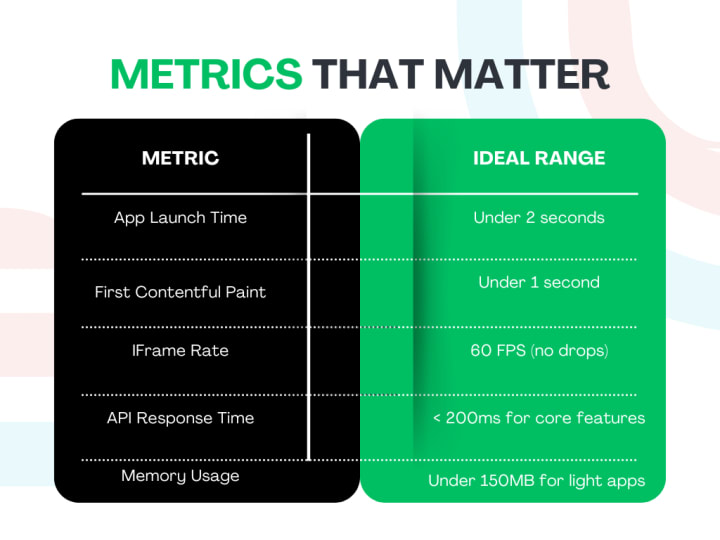
Tip: Regularly reviewing these numbers helps keep performance a living metric- not an afterthought.
Real-Life Wins With Automation
One mobile banking app reduced its crash rate by 32% and improved app launch speed by 1.7 seconds after automating key performance tests with Appium and Firebase, according to a 2023 internal study by FinAppsTech.
Let’s face it-users don’t care how elegant your backend code is if the screen takes forever to load. Automated mobile device testing helps ensure the app delivers a great experience every time.
To Wrap Up
Improving mobile app speed isn’t a one-time fix-it’s an ongoing commitment to quality and user satisfaction. Leveraging the right automated tools transforms your testing process from reactive to proactive, uncovering bottlenecks before they reach your users.
The beauty of automated mobile device testing lies in its scalability, precision, and ability to simulate real-world conditions with unmatched reliability. If performance is a priority-and it should be-make automation your best ally.
About the Creator
Leeanna marshall
Hello, I'm Leeanna Marshall, an ardent enthusiast of all things automation and a passionate blogger. visit my blog
Keep reading
More stories from Leeanna marshall and writers in Journal and other communities.
How to Scale JavaScript Test Automation in CI/CD Pipelines
I remember the first time I pushed a critical bug into production. It was late. I was tired. And worse, our JavaScript tests-meant to catch exactly that kind of thing-were flaky at best. We had a few unit tests running manually, but nothing that resembled automation or CI/CD. That night cost us a client and taught me a lesson I carry with me to this day:
By Leeanna marshall9 months ago in Journal
Author’s Advice
If you would’ve asked me 20 years ago did I know I’d become a writer and an author, I would’ve said “nope, ain’t happening”. As fate would have it I did become an author and I can honestly say I’m loving it so far. It really does feel good to be a writer. I’ve learned a lot on this journey and I feel like with even me being as new to this world as I am, there’s some wisdom I need to share with every other aspiring author.
By Joe Patterson4 days ago in Journal




Comments
There are no comments for this story
Be the first to respond and start the conversation.