
Hostinger Web Hosting Review: Is It the Best Choice for Beginners
Affordable, Fast, and Beginner-Friendly—Is Hostinger the Right Web Host for You?


Choosing the right web host lays the foundation for a successful online presence. For a beginner stepping into the world of websites, the hosting provider impacts site speed, uptime, security, and costs. A reliable host ensures pages load quickly, stays online nearly all the time, and offers easy-to-use tools—so you can focus on creating content rather than managing servers.
In this Hostinger web hosting review, we explore why Hostinger often tops lists as the best web hosting for beginners and whether it truly stands out among rivals.
Overview of Hostinger Web Hosting
Hostinger is a global web hosting provider known for budget-friendly plans and beginner-friendly features. Launched in 2004, it now powers over 29 million users worldwide across data centres in Europe, North America, Asia, and South America. Hostinger offers:
- Shared hosting: Entry-level service hosting multiple websites on one server.
- WordPress hosting: Optimised servers and tools for WordPress sites.
- VPS hosting: Virtual private servers offering dedicated resources for growing sites.
- Cloud hosting: Scalable resources distributed across multiple servers.
- Email hosting: Professional business email tied to custom domains.
Hostinger’s mission revolves around delivering cheap web hosting without compromising on performance or support.
Key Features of Hostinger for Beginners
Easy-to-Use Control Panel
At the heart of beginner-friendly hosting lies an intuitive dashboard. Hostinger’s proprietary hPanel simplifies site management. Instead of the complex menus of cPanel, hPanel presents clear sections for Domains, Emails, Files, Databases, and Website Builder—all navigable via an icon-based sidebar.
Beginners can:
- Install WordPress or other CMS with one click.
- Access file manager or FTP settings in a few taps.
- Manage email accounts without technical jargon.
- View resource usage (storage, bandwidth) in real time.
This streamlined interface minimises confusion and helps novices launch sites quickly.
Affordable Pricing Plans
Hostinger boasts some of the lowest entry-level prices:
- Single Shared Plan: from $2.19/month for one site, 30 GB SSD, and one email account.
- Premium Shared Plan: from $2.99/month for up to 100 sites, 100 GB SSD, unlimited bandwidth, and 100 email accounts.
- Business Shared Plan: from $3.99/month with daily backups and a free CDN.
- WordPress Starter: from $2.99/month with WordPress-specific tools.
- VPS Plans: from $3.95/month for 1 CPU, 1 GB RAM, full root access.
These Hostinger pricing plans come with a 30-day money-back guarantee, allowing beginners to test services risk-free. Despite low costs, features such as free SSL certificates, weekly or daily backups, and 24/7 live chat support are included even on entry tiers.
Speed and Performance
A fast website boosts user satisfaction and search rankings. Hostinger optimises performance via:
- LiteSpeed Web Server: A high-performance server alternative to Apache.
- LiteSpeed Cache plugin: Speed up WordPress sites with built-in caching.
- Cloudflare CDN (free on Business plans and above): Delivers content from edge servers globally.
- PHP-FPM support: Accelerated PHP processing for dynamic sites.
Independent tests show Hostinger achieving an average load time under 700 ms and 99.9% uptime.(Cybernews)
Customer Support Options
Beginners often need guidance. Hostinger offers:
- 24/7 live chat: Instant help in multiple languages after logging into hPanel.
- AI chatbot: Automated suggestions for common issues.
- Email/ticket support: In-depth help for complex problems.
- Knowledge base & tutorials: Hundreds of step-by-step articles on setup, DNS, SSL, and integrations.
- Video tutorials on YouTube: Visual guides for WordPress, DNS configuration, and site builder.
While phone support is not available, most beginners find live chat and detailed articles sufficient for quick solutions.(TechRadar)
Pros and Cons of Hostinger
Pros
- Easy-to-use web host: Intuitive hPanel and one-click installers.
- Cheap web hosting: Very low starting prices with bundled features.
- Optimised WordPress tools: Automatic updates, staging, and WP-CLI.
- Fast performance: LiteSpeed servers and free CDN.
- Global data centres: Nine locations for reduced latency.
- AI-powered features: AI website builder, content assistant, and Kodee AI for VPS.
- Strong uptime: 99.9% guarantee with real-world tests above 99.98%.
Cons
- Renewal price hikes: Introductory promos revert to higher rates.
- Limited phone support: No direct call option.
- No free migrations on VPS: Manual or paid migration needed.
- Frequent UI updates: hPanel undergoes redesigns that may confuse returning users.
- No dedicated hosting: Not suitable for very large enterprise sites.
- Comparing Hostinger with Other Popular Hosting Providers
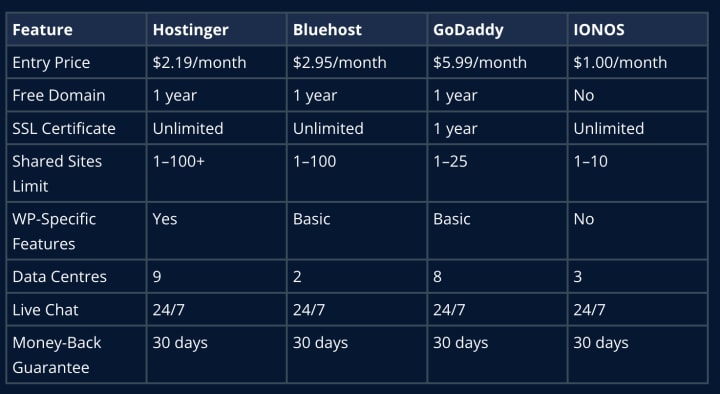
Compared with Bluehost, Hostinger usually offers faster load times and lower renewal fees. Against GoDaddy, Hostinger delivers more bundled extras (free SSL, multiple sites, staging).
While IONOS undercuts on price, it lacks WordPress staging and global CDNs that beginners find valuable.
Who Should Consider Hostinger?
Absolute beginners launching simple blogs, portfolios, or small business sites.
Budget-conscious users seeking reliable hosting with essential extras.
WordPress novices who want one-click installs, staging environments, and automated updates.
Growing websites ready to upgrade to VPS hosting without migrating to a new provider.
International audiences requiring content delivery via multiple data centres.
DIY learners who benefit from detailed tutorials and an intuitive control panel.
Hostinger may not suit large enterprises requiring dedicated servers or heavy-traffic sites needing advanced customisation.
Tips for Getting Started with Hostinger
- Choose the right plan: Start with the Premium Shared Plan for multiple sites or WordPress hosting if you prefer a guided setup.
- Select nearest data centre: Lower latency by picking the server location closest to your target audience.
- Use one-click installers: Save time installing WordPress, Joomla, or other CMS.
- Enable free SSL: Protect site data and boost SEO with AutoSSL.
- Set up automatic backups: Upgrade to Business plan for daily backups or install a plugin on Premium.
- Activate LiteSpeed Cache: Improve page load times for WordPress sites.
- Explore AI tools: Test the AI website builder and Kodee assistant on VPS for hands-free site optimisation.
- Read knowledge base: Search the Help Centre for DNS, email, and migration guides before contacting support.
- Monitor resource usage: Watch storage and bandwidth graphs in hPanel and upgrade when nearing limits.
- Plan renewals: Note renewal rates to budget accordingly and lock in longer terms for lower costs.
Conclusion: Is Hostinger the Best Web Host for Beginners?
In this Hostinger web hosting review, we found that Hostinger strikes an excellent balance between affordability, performance, and user-friendly tools. Its intuitive hPanel, low starting prices, and optimised WordPress features make it a standout best web hosting for beginners. The inclusion of free SSL, global CDNs, and a robust knowledge base further cements its reputation.
While renewal rates can climb and phone support is absent, most newcomers will appreciate the speed, ease of use, and 24/7 live chat support. For anyone seeking an easy-to-use web host with solid speed, reliable uptime, and scalable plans, Hostinger remains a compelling choice.
Frequently Asked Questions
1. Is Hostinger good for beginners?
Yes. Hostinger’s intuitive hPanel, one-click installers, and detailed tutorials make it one of the most beginner-friendly hosts available.(Cybernews)
2. What are Hostinger’s cheapest hosting plans?
Hostinger’s Single Shared plan starts at $2.19/month for one site and 30 GB SSD storage, while Premium begins at $2.99/month for up to 100 sites.(Hostinger)
3. How fast is Hostinger’s hosting?
Independent tests record average load times around 600–700 ms and uptime above 99.9%. LiteSpeed servers and free Cloudflare CDN on higher plans contribute to speedy performance.(TechRadar)
4. Does Hostinger offer VPS hosting?
Yes. VPS plans start at $3.95/month, offering dedicated CPU, RAM, SSD storage, full root access, and optional managed services. These plans suit growing sites needing more resources.
5. What support does Hostinger provide?
Hostinger provides 24/7 live chat, AI chatbot, email/ticket support, an extensive knowledge base, and video tutorials. Phone support is not offered.(TechRadar)
6. Can I migrate my site to Hostinger for free?
Free migrations are available for shared and WordPress plans. VPS migrations require manual steps or optional paid assistance.
7. Is Hostinger secure?
Hostinger includes free SSL certificates, DDoS protection, Malware Scanner, Web Application Firewall (on higher plans), and regular backups to safeguard your site
About the Creator
Mani Pathak
Mani Pathak is a leading SEO expert and founder of Webeotrends, known for simplifying complex SEO topics through data-driven insights, practical guides, and tool reviews that help brands grow organic traffic and strengthen online visibility
Keep reading
More stories from Mani Pathak and writers in Journal and other communities.
Bring some fruit-filled fun to the party with a hilarious and eye-catching banana outfit
Costumes are meant to spark laughter, start conversations, and make events more memorable. Few outfits accomplish that as effortlessly as a bright, oversized banana costume. Its bold yellow colour and playful shape guarantee instant visibility in any crowd. Whether you are heading to a themed party, Halloween event, fun run, or promotional gathering, this fruity ensemble delivers humour and charm in equal measure.
By Costumes in Australia4 days ago in Journal
Early March 2026: 4 Goals Accomplished
It's early March and I've now accomplished my 4th writing goal for the year of 2026. Before diving into the behind-the-scenes of it... why not tell you up front what that accomplishment was? I was published in a 2nd publication for this year. Published in Helix Literary Magazine out of Central Connecticut State University. You can read it for free right now!
By Stephen Kramer Avitabile4 days ago in Writers




Comments
There are no comments for this story
Be the first to respond and start the conversation.