
Gemini for the home: 100 ideas to get the most out of Google's new voice assistant
The Gemini voice assistant for the home is beginning its rollout in an early access phase and will allow users to interact with their smart devices with more conversational responses

Google has begun rolling out early access to its Gemini voice assistant for the home in the United States, a move that replaces Google Assistant with a more powerful conversational model capable of sustaining continuous dialogues.
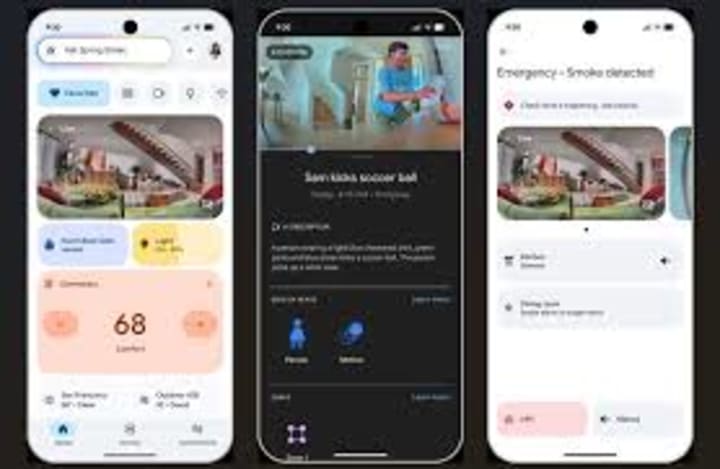
This rollout marks the first step toward a new generation of home assistants based on generative AI, which add advanced features such as camera analysis, voice-activated routine creation, and the generation of more complex responses. The company has already announced that this technology will expand to more countries in 2026.
Users who sign up for early access will receive the update at no additional cost on their compatible devices. However, features such as Gemini Live and advanced search within the camera history are subject to a premium subscription.

Google's proposal aims for users to experience the assistant in real-world, everyday situations and share feedback as it continues to evolve. The stated goal is to make home AI truly useful, not just for answering questions, but for performing specific tasks such as managing to-do lists, playing media, or controlling smart home devices.
There are two main ways to interact: the traditional "Hey Google" command for specific requests—answers, reminders, music playback—and the conversational mode, "Hey Google, let's chat," which enables continuous dialogue without needing to repeat the initial command. In this second mode, the user can interrupt, ask for clarification, or request that an explanation be made simpler or more technical, just as if they were speaking face-to-face with a person.
Below is an organized list with examples of everything you can try with the assistant, categorized into different everyday situations to illustrate the scope of this new experience.
100 things you can try with “Hey Google…”
1.To explain a concept to a child: “Hey Google, explain to my 7-year-old how electricity works.”
2.To clarify a difficult idea: “Hey Google, can you explain why looking at stars is like looking into the past?”
3.To keep up with current science: “Hey Google, give me a summary of recent advances in quantum computing.”
4.To learn interesting words: “Hey Google, what is the name for the smell of rain?”
5.To avoid language confusion: “Hey Google, what is the difference between ‘affect’ and ‘effect’? Give me examples.”
6.To understand basic economics: “Hey Google, what is a trade deficit and why does it matter?”
7.To impress with facts: “Hey Google, tell me a fun fact about the fastest swimming land mammal.”
8.To review sports history: “Hey Google, who are the top five scorers in basketball?”
9.For sports fantasies: “Hey Google, imagine a one-on-one match between X and Y at their prime; who would win?”
10.For complex calculations without a calculator: “Hey Google, what is the square root of 6,754?”
11.To never miss a game: “Hey Google, when does my team play and add it to my calendar?”
12.To understand a matchup: “Hey Google, what are the key matchups in Monday’s game?”
13.For instant results: “Hey Google, how did <name> do in the last race?”
14.To get the most out of your phone: “Hey Google, how do I use real-time translation on my headphones?”
15.To troubleshoot a technical issue: “Hey Google, why won't my laptop turn on?”
16.To get technical help with an audio device: “Hey Google, how do I use real-time translation on my Pixel Buds?”
17.To listen to music without reaching for your phone: “Hey Google, play <song name>.”
18.To request a song even if you don't remember the exact name: “Hey Google, play the song from the movie where they destroy an asteroid.”
19.To identify a new voice or artist: “Hey Google, who sings this song?”
20.To understand the message of a song: “Hey Google, what is this song about?”
21.To discover similar music: “Hey Google, show me songs similar to this one.”
22.To reminisce about past times: “Hey Google, play the song of the summer of 1998.”
23.To choose songs based on your mood: “Hey Google, I want a pop song about overcoming obstacles.”
24.To follow a podcast without touching your phone: “Hey Google, play the latest episode of <podcast name>.”
25.To find themed interviews: “Hey Google, play a podcast with Sundar Pichai.”
26.To delve into a specific interest: “Hey Google, play a podcast about ancient Rome.”
27.To learn with educational videos: “Hey Google, play a video explaining how skyscrapers are built.”
28.To follow your favorite creators: “Hey Google, play the latest video from <channel name>.”
29.To find content everyone is talking about: “Hey Google, what's the current popular children's movie with catchy songs?”
30.To control playback hands-free: “Hey Google, lower the volume.”
31.To move audio between rooms: “Hey Google, play the music on the living room speaker.”
32.To automate actions: “Hey Google, turn off all the lights except the living room.”
33.For timed routines: “Hey Google, turn off the lights in 10 minutes.”
34.For basic security: “Hey Google, lock all the doors.”
35.To monitor visual security: “Hey Google, show me the backyard camera.”
36.To quickly check energy consumption: “Hey Google, how many lights are on?”
37.To track purchases and deliveries: “Hey Google, were any packages delivered yesterday?”
38.To find out about household events: “Hey Google, what happened at home today?”
39.To see who arrived: “Hey Google, what time did Olivia arrive?”
40.To ask if your pet was taken care of: “Hey Google, did anyone walk the dog today?”
41.To solve backyard mysteries: “Hey Google, what animal was in my yard last night?”
42.To check the next day: “Hey Google, what do I have on my calendar tomorrow?”
43.To wake up better: “Hey Google, set an alarm 10 minutes before sunrise.”
44.To organize workouts: “Hey Google, add yoga class on Mondays at 6 pm.”
45.To adjust an existing appointment: “Hey Google, move my dinner with Julian to 7 pm.”
46.To add shared family appointments: “Hey Google, Jeremy has a dentist appointment on Wednesday at 3 pm.”
47.To create notes for group projects: “Hey Google, create a note called ‘vacation ideas’ and add ‘go to the beach’.”
48.To organize a family trip: “Hey Google, create a list for the family outing.”
49.To remember special nights: “Hey Google, remind us to go out and see the Geminids.”
50.To plan the day: “Hey Google, will it rain today?”
51.To choose the best time to go out: “Hey Google, which day is best for a bike ride this weekend?”
52.To check business hours: “Hey Google, what time does the nearby coffee shop close?”
53.To remember key dates: “Hey Google, remind me to order the turkey a week before Thanksgiving.”
54To plan the weekly menu: “Hey Google, create a list of Mediterranean meals for this week.”
55.To build the ingredient list: “Hey Google, add ingredients for lemon chicken to my shopping list.”
56.To calculate portions: “Hey Google, how much fish do I need for 4 people?”
57.To remember essential items: “Hey Google, add peanut butter and apple cider vinegar to my list.”
58.For quick dinner inspiration: “Hey Google, give me some ideas for something quick to make tonight.”
59.For health-conscious requests: “Hey Google, suggest a healthy salad dressing.”
60.For specific recipes: “Hey Google, give me a recipe for fluffy pancakes.”
61.To prepare less common dishes: “Hey Google, how do you make onsen tamago?”
62.To substitute ingredients: “Hey Google, I'm out of vanilla, what can I use?”
63.To convert measurements: “Hey Google, how many tablespoons are in half a cup?”
64.To improve technique: “Hey Google, how do I make really fluffy scrambled eggs?”
65.To control cooking time: “Hey Google, set a 7-minute timer for the pasta.”
66.To adjust times: “Hey Google, add 5 minutes to the chicken timer.”
67.To request times based on the desired result: “Hey Google, set a timer for a perfect soft-boiled egg.”
68.To announce to the whole house: “Hey Google, announce that dinner is ready.”
69.To search for destinations by climate/food: “Hey Google, give me vacation ideas for November.”
70.To choose accommodation based on activities: “Hey Google, where should I stay to go diving in Thailand?”
71.To plan itineraries: “Hey Google, make a list of the best museums in Shanghai.”
72.To find local activities: “Hey Google, is there an open climbing gym nearby?”
73.To organize a budget-friendly gathering: “Hey Google, give me creative ideas for a casual party.”
74.To suggest a complete barbecue menu: “Hey Google, suggest a menu with a main course, 3 side dishes, and a dessert.”
75For decorative details: “Hey Google, give me ideas for simple centerpieces.”
76.To improve a creative hobby: “Hey Google, can you help me paint better?”
77.To read more: “Hey Google, give me crime novels set in a historical period.”
78.To learn useful phrases: “Hey Google, how do you say ‘I want to book a table for four at 7 pm’ in Chinese?”
79.To be more efficient: “Hey Google, tips for studying better.”
80..For questions about game rules: “Hey Google, what does it mean to castle the king?”
81.For sports performance: “Hey Google, what should I eat before a 5k race?”
82.To choose gifts: “Hey Google, give me gift ideas for a friend who loves vinyl records and home decor.”
83.To call someone without taking out your phone: “Hey Google, call Jeremy.”
84.To relax: “Hey Google, play ocean sounds.”
85.o start mindfulness: “Hey Google, how do I start with mindfulness?”
86.For themed jokes: “Hey Google, tell me a joke about penguins.”
87.For quick riddles: “Hey Google, give me a riddle.”
88.For classic stories: “Hey Google, tell me a story.”
89.For collaborative made-up stories: “Hey Google, tell me a story about a boy and a dragon.”
90.For chance in games: “Hey Google, flip a coin.”
91.To clarify XR concepts: “Hey Google, what’s the difference between AR, VR, and Mixed Reality?”
concepts: “Hey Google, what’s the difference between AR, VR, and Mixed Reality?”
92.To understand economics: “Hey Google, how does an employment report relate to interest rates?”
93.For homework help: “Hey Google, explain my son’s algebra homework to him.”
94.To generate menus based on available ingredients: “Hey Google, I have spinach, eggs, and feta cheese, what can I make?”
95.To compare financial decisions: “Hey Google, let’s talk: I want to buy a car and I don’t know where to start.”
96.To draft how to talk to someone: “Hey Google, how do I talk to a noisy neighbor?”
97.To create collaborative stories: “Hey Google, let’s make up a bedtime story about a flying robot.”
98.For budget-friendly family vacation ideas: “Hey Google, ideas for cheap family vacations.”
99.To explain complex things to a child: “Hey Google, how do I explain to a 7-year-old how Wi-Fi works?”
100.For rainy day activities with kids: “Hey Google, ideas for a pirate activity on a rainy day.”
About the Creator
Omar Rastelli
I'm Argentine, from the northern province of Buenos Aires. I love books, computers, travel, and the friendship of the peoples of the world. I reside in "The Land of Enchantment" New Mexico, USA...
Keep reading
More stories from Omar Rastelli and writers in Journal and other communities.
The goals I did not achieve
Every writing goal I made for the year is a wash. It has been this way for a while, but I think it's important to be open about my failures and the reality of how life can get in the way. This is especially true considering the several times I have posted on Vocal about my writing goals, how I was changing my approach, and where I was hoping to be for the upcoming year. I will probably do that again in a couple months, but for now, it is time to acknowledge where I am today.
By Kay Husnick24 days ago in Journal
What Australia's New High Debt Lending Cap Means for the Property Market
Australia’s banking regulator has moved to rein in the riskiest edge of mortgage lending, announcing new limits designed to protect financial stability rather than slow the property market itself.
By Ted Flores6 days ago in Journal



Comments
There are no comments for this story
Be the first to respond and start the conversation.