
CRM Software for Small Businesses: Unlocking Growth and Efficiency
CRM Software for Small Businesses

Customer Relationship Management (CRM) software has become an essential tool for businesses of all sizes. However, for small businesses, CRM software can be a game-changer. It helps companies organize customer interactions, improve sales processes, and enhance customer satisfaction—all while saving time and resources.
In this blog, we'll explore how CRM software can help small businesses streamline their operations, boost productivity, and drive growth. We’ll also look at key features to consider when choosing the right CRM system and how it can be integrated into daily operations.
What is CRM Software?
CRM software is a tool that helps businesses manage all interactions with current and potential customers. It stores customer data, tracks communication, manages leads, and automates key tasks to improve customer relationships and business efficiency.
For small businesses, a CRM system can act as a centralized platform to manage customer interactions, sales pipelines, and marketing campaigns. By keeping all relevant information in one place, small businesses can operate more effectively and grow without losing track of their most important asset—customers.
Why Small Businesses Need CRM Software
- Organize Customer Information
In small businesses, customer data can quickly become scattered across spreadsheets, emails, and various notes. A CRM system centralizes all customer information into a single platform, making it easy to access, update, and manage.
- Improve Customer Relationships
Personalized customer service is crucial for small businesses. CRM software helps small businesses track communication history, allowing them to offer more personalized and responsive service. It also enables follow-ups, which leads to improved customer retention.
- Increase Sales Efficiency
A CRM system organizes sales pipelines and automates many of the tasks involved in managing leads. It helps businesses track where each lead is in the sales process, assign tasks to team members, and ensure no potential deal falls through the cracks.
- Marketing Automation
CRM software enables small businesses to automate marketing tasks like email campaigns, lead nurturing, and segmentation. This helps businesses engage customers with the right message at the right time without manual intervention.
- Data-Driven Decisions
With CRM software, small businesses can generate reports and analyze key performance metrics like sales trends, customer behavior, and marketing campaign effectiveness. These insights help business owners make informed decisions that contribute to growth.
Key Features of CRM Software for Small Businesses
When choosing CRM software for a small business, it's important to focus on the features that provide the most value for your specific needs. Here are some key features to consider:
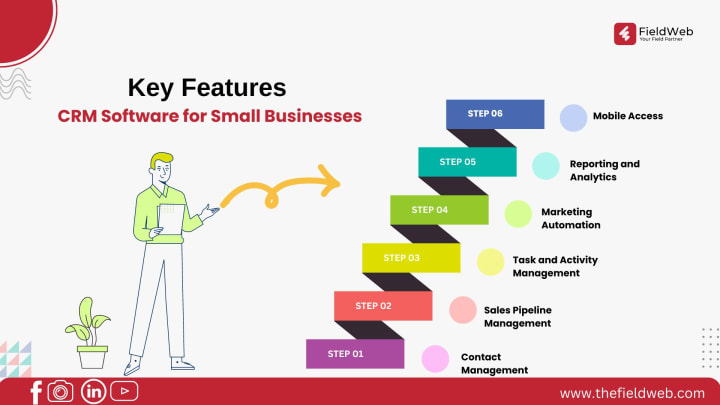
1. Contact Management
The core of any CRM system is its contact management feature. This allows businesses to store and organize customer data, including contact information, communication history, preferences, and notes. A CRM with powerful contact management helps businesses stay on top of their customer interactions.
2. Sales Pipeline Management
CRM software enables small businesses to visualize their sales pipeline and track every lead’s journey. This helps in identifying where prospects are getting stuck in the sales funnel, allowing for more targeted follow-ups.
3. Task and Activity Management
A good CRM system helps small businesses stay organized by assigning tasks to team members, setting deadlines, and tracking progress. This ensures that important activities like follow-ups and deal closures happen on time.
4. Marketing Automation
CRM systems often include marketing automation tools that allow businesses to send targeted email campaigns, manage social media interactions, and track campaign performance. For small businesses, this feature can save time and improve the effectiveness of marketing efforts.
5. Reporting and Analytics
Data is a valuable asset for any small business. CRM software provides reporting and analytics tools to track key metrics like lead conversion rates, customer acquisition costs, and sales growth. These insights are critical for making strategic business decisions.
6. Mobile Access
For small businesses with remote teams or on-the-go sales staff, a CRM that offers mobile access is essential. This feature allows team members to access customer information, update records, and manage tasks from anywhere, ensuring that no opportunity is missed.
How CRM Software Benefits Small Businesses
1. Better Organization and Productivity
CRM software helps small businesses stay organized by automating repetitive tasks, assigning activities, and tracking progress. This leads to improved productivity, as employees can focus on more high-value tasks like closing deals and building relationships.
2. Enhanced Customer Retention
By tracking customer interactions and setting follow-up reminders, CRM software helps small businesses maintain consistent and meaningful communication with customers. This results in higher customer satisfaction and improved retention rates.
3. Improved Sales Performance
A CRM system allows businesses to streamline their sales processes, track leads through the sales pipeline, and close deals faster. By automating tasks like follow-ups and providing insights into lead behavior, CRM software helps small businesses convert more leads into customers.
4. Scalability
As small businesses grow, their customer base and sales pipeline also expand. CRM software is scalable, allowing businesses to add more users, track more customers, and manage additional leads without losing efficiency.
5. Time Savings
Manual processes like data entry, lead tracking, and task management can consume valuable time. CRM software automates these tasks, freeing up time for employees to focus on activities that drive business growth.
Top CRM Software Solutions for Small Businesses
There are many CRM software options available, but here are a few popular choices that are well-suited for small businesses:
FieldWeb
FieldWeb is a CRM solution specifically designed for small businesses managing field service teams. It offers robust features such as real-time tracking, automated dispatching, and customer data management. FieldWeb’s easy-to-use interface and mobile access make it ideal for businesses looking to manage their customer interactions efficiently on the go.
Zoho CRM
Zoho CRM is known for its affordability and range of features tailored for small businesses. It offers everything from contact management to marketing automation, making it a great all-in-one solution.
HubSpot CRM
HubSpot CRM is a free option that offers powerful tools for managing contacts, sales pipelines, and marketing campaigns. It’s easy to use and scales well with growing businesses.
Salesforce Essentials
Salesforce is a leader in CRM software, and its Essentials version is designed specifically for small businesses. It offers robust features for sales, customer service, and marketing at an affordable price.
Pipedrive
Pipedrive focuses on sales pipeline management, making it ideal for small businesses that want to improve their sales processes. It’s known for its intuitive interface and ease of use.
Conclusion
CRM software is a powerful tool for small businesses looking to improve their organization, boost sales, and deliver exceptional customer service. By automating key tasks, providing valuable insights, and organizing customer data, a good CRM system can help small businesses grow and thrive in today’s competitive market.
Whether you’re just starting out or looking to take your small business to the next level, investing in CRM software is a smart move that will pay off in increased efficiency and better customer relationships.
About the Creator
Regulatory Throughput as a Determinant of Aircraft Operational Availability
Aircraft operational availability is commonly attributed to fleet size, technological reliability, and market demand. This perspective underestimates the structural influence of regulatory compliance on aviation systems. This paper examines how regulatory throughput defined as the speed and capacity at which compliance processes are executed functions as a primary determinant of aircraft availability. By analyzing maintenance workflows, parts certification, and operational approvals, the study argues that aviation availability is governed more by regulatory process alignment than by technical capability or demand intensity.
By Beckett Dowhan6 days ago in Journal
TUS NUA - ch 49
TUS NUA – ch 49 New Beginnings – Mia and Midnight (*)(*)(*) As Mia spoke on the phone to Ali’s sister, Ellen, Finola slipped quietly away and walked to the stream behind Tus Nua. Carefully, she put a block on her family so no one could know what she was about to do.
By Margaret Brennan4 days ago in Fiction




Comments
There are no comments for this story
Be the first to respond and start the conversation.