
Building a Robust Test Automation Framework with WebdriverIO: Best Practices
you’ll have practical insights to enhance your WebdriverIO automation strategy, ensuring a smoother and more efficient testing process.


Efficient test automation is crucial for reliable software testing, and WebdriverIO provides a robust framework to achieve this. This blog will highlight best practices that enhance the performance and maintainability of your automation efforts. We’ll cover key topics such as setting up your test environment, adopting the Page Object Model (POM) for better test organization, and leveraging WebdriverIO commands effectively.
Additionally, we’ll explore strategies for parallel test execution to reduce runtime, best practices for locating elements to avoid flakiness, and optimizing test reliability with custom waits. We’ll also address common pitfalls, cross-browser testing integration with platforms like BrowserStack, and maintaining test stability with retry mechanisms.
By the end of this blog, you’ll have practical insights to enhance your WebdriverIO automation strategy, ensuring a smoother and more efficient testing process.
Setting Up Your Test Environment Efficiently
To harness the full potential of WDIO, you need a solid test environment setup. Here’s a step-by-step guide for setting it up.
For setting up WebdriverIO you can refer our WebdriverIO Setup
Integrating the Page Object Model (POM) for Better Test Organization
The Page Object Model (POM) is a design approach that improves test automation by organizing page elements and their Methods in separate files, away from test files. This makes your tests more manageable, especially when working with applications that have multiple pages or complex workflows.
🎯Benefits of POM in Large-Scale Projects
- Centralized Maintenance
UI changes are only updated in the relevant page object file, reducing effort.
- Code Reusability
Page methods (like login or search) can be reused across multiple test cases.
- Improved Readability
Test scripts become concise, focusing only on business logic and assertions.
- Better Scalability
Adding new pages or features becomes easier by extending existing page objects.
- Reduced Flakiness
Encapsulating waits or interactions inside page objects makes tests more stable and reliable.
Example: Refactoring Tests Using POM
- Without POM (Direct Test Logic in Tests)

- With POM (Refactored Approach)
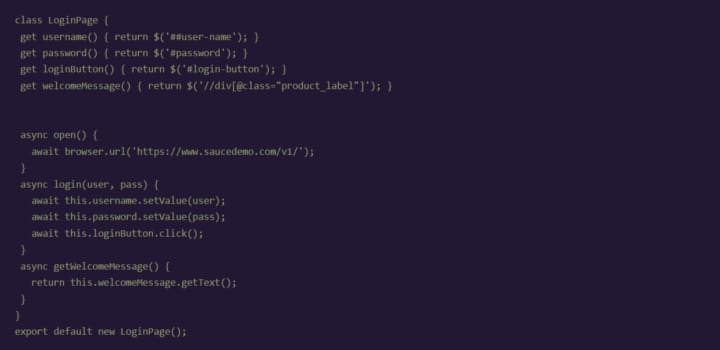
Login Page Object (login.page.js):
- Refactored Test Script (login.test.js)

🎯Benefits of Refactoring with POM
- Centralised Maintenance: Any change to the login form only requires updates in login.page.js.
- Clean Test Scripts: Tests now focus on validation rather than page interactions.
- Scalability: Adding new tests becomes easier by reusing the Login Page methods.
Efficient Use of WebDriverIO Commands
Let’s explore some best practices for using WebDriverIO commands to enhance test efficiency and reliability.
1. When to Avoid Protocol Methods in WebDriverIO
Protocol methods (e.g., browser.elementClick(), browser.executeScript()) communicate directly with the WebDriver, bypassing WDIO’s built-in error handling, retries, and implicit waits. Using these methods can lead to flaky tests, especially if elements aren’t available due to dynamic content or latency issues.
When to Avoid:
UI is not fully loaded: Use WDIO commands like element.click() which automatically retry until the element is ready.
Inconsistent behaviour: Use methods like .waitForDisplayed() to ensure stability before performing actions.

2. Use of .waitFor and Dynamic Waits over Static Timeouts
Static waits (browser.pause()) halt execution for a fixed duration, slowing tests unnecessarily. Dynamic waits, such as .waitForDisplayed(), only pause until an element is ready, improving both stability and speed.
Using browser.pause() introduces a fixed wait time (e.g., pause(5000)), which slows down tests unnecessarily and makes them fragile. Even if an element becomes available earlier, the test will still wait for the full duration, increasing execution time.
Better Alternative: Use dynamic waits such as .waitForDisplayed() to pause only as long as needed.
Example:

3. Configuring WDIO for Parallel Execution
Running tests in parallel shortens test execution time, especially for large suites. Configure parallel execution in the wdio.conf.js file using the maxInstances setting.
Parallel execution enables WebDriverIO to run multiple test cases or browser instances simultaneously. Instead of running tests sequentially (one after another), it divides the workload across available instances (browsers or devices), significantly reducing overall test time.
For example:
If you have 10 test files and set maxInstances: 5, WDIO will launch 5 tests at once, then start the next 5 when the first batch completes.
In cloud platforms like BrowserStack, parallel execution spreads tests across multiple devices or browsers, ensuring faster coverage and scalability.
Click on this link to read more about it: https://jignect.tech/building-a-robust-test-automation-framework-with-webdriverio-best-practices/
About the Creator
Jignect Technologies
At JigNect Technologies, we believe that software testing is an art, a science, and a passion. Our team of experts combines years of experience, cutting-edge technology.
Keep reading
More stories from Jignect Technologies and writers in Journal and other communities.
Mastering Network Interception in Cypress: A Detailed Guide
In today’s highly competitive landscape of software testing, efficient handling of network requests is the key to ensuring seamless functionality of web applications. The modern end-to-end testing framework Cypress provides strong features for intercepting and testing network requests, so it’s a game-changer for test automation.
By Jignect Technologiesabout a year ago in Journal
Dayna Frazer’s Impact on Creative Production and Storytelling
Creative production is no longer just about making things look good. Today, it’s about meaning, emotion, and connection. One creative producer who understands this deeply is Dayna Frazer. Through her thoughtful approach to visuals and storytelling, she has influenced how modern creators think about production, narrative, and purpose.
By Alexanderaarya5 days ago in Journal



Comments
There are no comments for this story
Be the first to respond and start the conversation.