
Android vs iOS Mobile Testing: Which Is More Complex in 2025?
An In-Depth Comparison of Mobile Testing Challenges Across Platforms


Swiping through apps has become second nature, yet what often goes unnoticed is the rigorous testing that ensures these apps run without a hitch. Developers and testers are locked in an ongoing race to perfect performance, user experience, and security across platforms.
When comparing Android vs iOS mobile testing in 2025,
The question isn’t just which is better-it’s which is more complex, and why.While both ecosystems aim to offer a seamless user experience, their underlying differences create vastly different landscapes for QA teams. From fragmentation issues on Android to App Store review constraints on iOS, the process behind the scenes can be anything but simple.
Let’s Explore the most pressing reasons Android or iOS mobile testing might edge out the other in complexity.
Platform Fragmentation and Device Diversity
Android’s Device Explosion vs iOS’s Controlled Ecosystem
One of the primary challenges developers face when testing mobile applications lies in device fragmentation. This is especially stark on Android.
- Android supports thousands of unique device models from dozens of manufacturers.
- iOS, on the other hand, operates within a limited set of Apple devices with standardized hardware.
Testing across Android devices requires checking for compatibility with different:
- Screen sizes and resolutions
- Hardware configurations (RAM, chipsets, sensors)
- Android OS versions
With Apple, testers can often focus on the latest 3-4 iOS versions and a handful of device models. This drastically reduces complexity and testing time.
Why Android Testing is Tougher Here:
Because developers need to run tests across a vast number of device combinations, it increases not only the testing load but also the likelihood of missed bugs.
OS Updates and Backward Compatibility
iOS’s Swift Adoption vs Android’s Delayed Rollouts
Apple controls the release of iOS updates, and most users install them promptly. Android users, however, depend on manufacturers and carriers, leading to inconsistent and often delayed updates.
- iOS: 90% of users typically update within a few months
- Android: Many users stay stuck on older versions for years
This results in Android developers having to support a larger variety of OS versions-each with different behaviors and APIs.
Impact on Testing:
- Regression testing becomes crucial on Android to ensure features don't break on older versions.
- iOS offers a relatively clean slate for each app update cycle.
UI and UX Consistency
Fragmented UIs on Android vs Uniform Design on iOS
Even the visual layer causes headaches. Android offers developers significant flexibility with the UI. However, that also means inconsistent implementations across devices.
- Different display sizes and OEM customizations may alter the layout.
- Font rendering, animations, and even gesture behaviors vary.
iOS, with its tight control and design guidelines, offers more predictable UI rendering. Most iOS apps look and feel similar across devices, making the UI testing process simpler.
Key UI Testing Considerations on Android:
- UI automation tests may pass on Pixel devices but fail on Samsung due to UI overlays.
- Varying DPI (dots per inch) impacts how assets render, particularly in older phones.
Testing Tools and Framework Availability
More Open Tools for Android, Yet More Stable Ones for iOS
Android offers an open environment for testing with tools like:
- Espresso
- UI Automator
- Appium (cross-platform)
- Testevolve
Advantages:
- Deep access to the device
- Ability to automate nearly everything
However, openness brings unpredictability. Manufacturer-specific customizations can sometimes hinder test automation.
iOS, while more restrictive in terms of access, offers:
- XCUITest: highly integrated and reliable for native apps
- More predictable test results due to uniform system behavior
Summary Table: Testing Tool Comparison
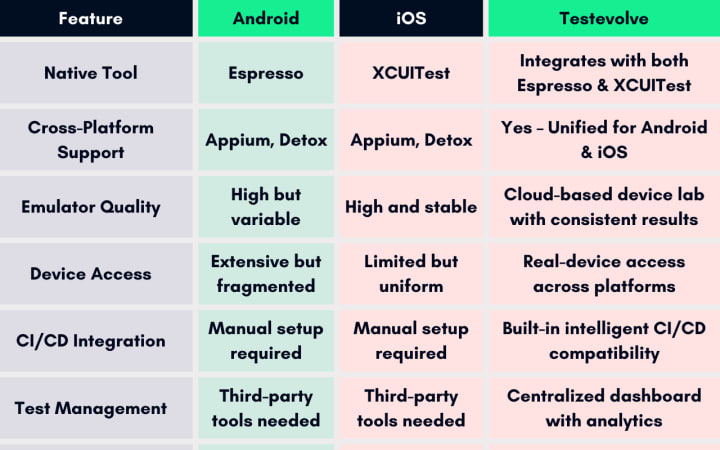
Would you like this table exported as an image or PDF for your documentation?
App Deployment and Review Process
iOS’s Stringent Review vs Android’s Speedy Publishing
When it comes to pushing an app live, the complexity often flips.
- Android (via Google Play Store): Generally takes hours to approve a new app or update.
- iOS (via Apple App Store): Can take days, especially with stringent guidelines.
This means that catching and fixing bugs post-release is easier and faster on Android. But for iOS, a failed review can delay deployment significantly.
Considerations for QA Teams:
- iOS demands perfection before release, requiring more rigorous pre-deployment testing.
- Android allows quicker iteration, but also more post-deployment fixes.
Bullet Points: Android vs iOS Release Cycles
Android:
- Faster time to market
- Easier rollbacks
- Beta releases via Google Play Console
iOS:
- Slower approval process
- Higher risk of app rejection
- Limited beta testing via TestFlight
Security Testing Differences
Closed vs Open Systems
Security is another layer where testing diverges.
- iOS enforces strong sandboxing and app permissions, making it harder to test certain edge cases.
- Android provides more freedom, but that also means QA must test for a broader range of vulnerabilities.
For instance, testing how your app handles background data collection or inter-app communication can be more extensive on Android due to the OS’s openness.
Which Is More Complex in 2025?
In 2025, Android mobile testing continues to be the more complex landscape overall, thanks to its:
- Fragmented ecosystem
- Delayed OS updates
- Varied hardware and UI inconsistencies
That said, iOS mobile testing demands meticulous pre-release checks due to strict review guidelines and security policies. For teams seeking consistency and predictability, iOS might be easier. But if you're optimizing for scale and flexibility, Android's complexity is worth navigating.
In a Nutshell
Testing mobile apps has never been more intricate. The race between Android and iOS development has yielded two ecosystems with contrasting complexities. QA teams must evaluate where their challenges lie- be it fragmentation, security, UI differences, or release hurdles.
To streamline Android & iOS Mobile Testing, you can choose Testevolve for seamless testing. Their advanced cloud testing infrastructure and intelligent test management help unify efforts across platforms. You can explore more based on your project requirements on the Testevolve official website.
Read Our Recent Trending Post : Top 7 Key Benefits of Visual Regression Testing for Modern Web Apps
About the Creator
Leeanna marshall
Hello, I'm Leeanna Marshall, an ardent enthusiast of all things automation and a passionate blogger. visit my blog
Keep reading
More stories from Leeanna marshall and writers in Journal and other communities.
Top 7 Key Benefits of Visual Regression Testing for Modern Web Apps
Developing web applications is a rewarding yet challenging pursuit. Every update, design tweak, or new feature release carries the risk of unintentionally affecting the visual integrity of your app. That's where Visual Regression Testing steps in - ensuring that your carefully crafted user experience remains unbroken across updates. Without reliable visual checks, the cost of unnoticed UI bugs can be catastrophic to user trust and brand reputation.
By Leeanna marshall11 months ago in Journal
Author’s Advice
If you would’ve asked me 20 years ago did I know I’d become a writer and an author, I would’ve said “nope, ain’t happening”. As fate would have it I did become an author and I can honestly say I’m loving it so far. It really does feel good to be a writer. I’ve learned a lot on this journey and I feel like with even me being as new to this world as I am, there’s some wisdom I need to share with every other aspiring author.
By Joe Patterson5 days ago in Journal
Sometimes It's Like That and That'sThe Way It Is
It was the late 1960s, and ten-year-old Gloria Coleman was standing with her grandmother on the side of the highway waiting for the bus. As the Greyhound pulled up, it seemed monstrous and intimidating. Grandma Elizabeth grabbed Gloria's hand, holding it tightly as they boarded.
By Cheryl E Preston3 days ago in Fiction




Comments
There are no comments for this story
Be the first to respond and start the conversation.