
Amazon Seller Account
How To Create Amazon Seller Account


Create Amazon Account is Very Simple
As you know that Amazon is the best online showcase in the e-commerce market for sell your products and services. There are lots of customers and their business running all over India and your products live 24 hours a day where available users can find and purchase as per their interest. So this is a big opportunity for business owners to grow their business online with the help of Amazon.
Process — If you want to sell your products on amazon. then you have to go through certain.
Register now
Watch This video and follow it step by step to Create Amazon Seller Account Free.
Create an Amazon Merchant Account Process - In the process of creating an account on Amazon. You need to follow certain terms and conditions and you need to submit certain documents during the process. In India the documents you need 1. PAN number, 2. GST number, 3. Official name, 4. Indian Banking details, 5. Email id, Phone number, 7. Digital signature.
Now start registering your merchant account with or without registering your online store on Amazon by following the steps below provided.
In the diagram below, you need to fill in the details as stated
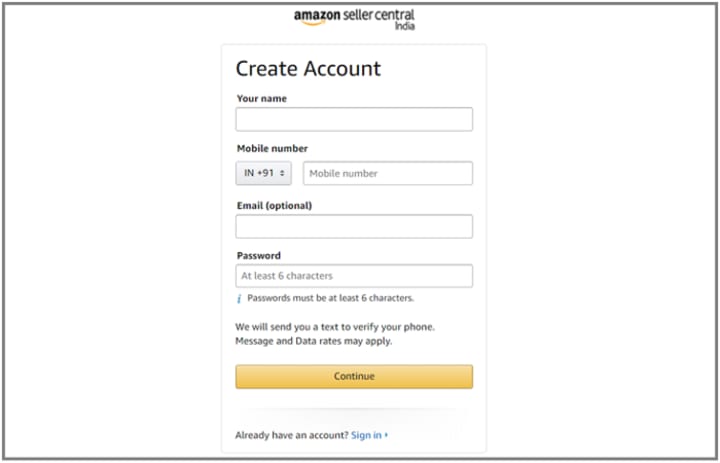
After filling in your name and mobile number, email address, and password, you'll need to click on the Continue button There is one very important point you need to keep in mind when creating your merchant account. If you already receive amazon. with a personal email id, you're sure you should create a merchant account from a different email address. Otherwise, you may not be able to create your merchant account. It means you need to provide a different email address and phone number.
2. In the wizard given below
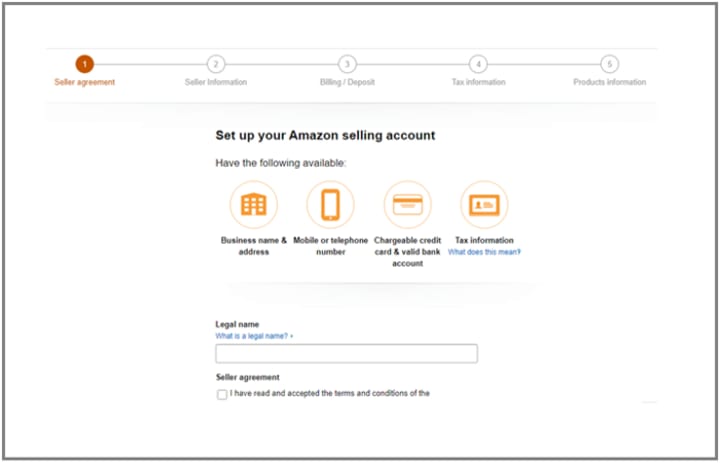
You need to provide the legal name of your online business store through which you are going to sell your products. As per the best suggestion you need to fill in the legal name which is core related to your products and services. It gives you the benefits at the time customer identify your products by searching your store name. And then click on the agreement check box and click continue
3. In the given below wizard

Now think about your business and your products and services, because this business name is displayed on Amazon and everyone can see it. It should be unique and easy to associate with your products and services. Example - If you are going to work with men's and women's clothing, then you have to name your store Trendy Wear Online Store. Another column can be selected for you. If you want to complete it or you can leave it. After that, you need to fill in the mobile number to confirm and click on the button as indicated by "Send me now" in yellow.
4. In the wizard given below

After confirmation, Amazon will ask you for a payment method, so you will need to dial those internationally recognized credit cards and bank details. Here you need to select the "Amazon Fulfillment" checkbox. This is the most important part of Amazon, with this feature of FBA (Amazon Fulfillment); simply store your products in Amazon fulfillment centers according to your location. It means that the Amazon FBA center is close to you, and they select products, pack your products and ship your products to customers. Knowing that the fulfillment of the Amazon feature can help you measure your business and reach more customers.

You need to provide tax information regarding your business on Amazon.

This is the last step, how to create an Amazon seller account free in India. Or you can say your seller account registration on Amazon. Here you just need to provide about your products as per mentioned in the above screen.
Like what kinds are products you want to sell on Amazon. You just need to click Yes or No.
In the second option, you make sure that you are a manufacturer and brand the products you want to sell here.
In the last point, you need to justify that how many different products do you want to sell?
WRITTEN BY
SELLER SUPPORT (ATES)
This is Amazon Trained E-commerce Specialist (ATES) for Amazon Seller Support in terms of Create an Amazon seller account in India with Free Registration.
Get Free Consultation With Our Experts:
What is The
Documents Required
PAN Card
Address Proof
Canceled Cheque
Valid Mobile Number
E-Mail ID
Trade Mark/ Brand Authorization (Optional)
Additional Documents may require according to Product category.
For More Details Contact Or Visit Us:
Contact No: +918209644311
Toll Free No: 1800 890 1413
Contact Person: Arvind Ajmera
Our Official Website: https://www.arvian.in/
For GST: Click Here
For Whatsapp: Just Click
About the Creator
Arvian Business Solutions PVT LTD
Arvian Business Solutions provides fully serviced individual & executive offices, team spaces, and virtual office solutions. You’ll find everything you need to stay connected and focused on your business.
Keep reading
More stories from Arvian Business Solutions PVT LTD and writers in Journal and other communities.
15 Up-and-Coming Trends About GST Return Filing
1. What is the New GST Return System? In the 31st GST Council Meet, it was decided that a New Return System under GST would be introduced for taxpayers. This return system will contain simplified return forms, for ease of filing across taxpayers registered under GST. Under this New Return System, there will be one main return GST RET-1 and 2 annexures GST ANX-1 and GST ANX-2. This return will need to be filed on a monthly basis, except for small taxpayers who can opt to file the same quarterly. Small taxpayers are taxpayers with a turnover of Rs 5 crore in the preceding financial year.
By Arvian Business Solutions PVT LTD5 years ago in Journal
The goals I did not achieve
Every writing goal I made for the year is a wash. It has been this way for a while, but I think it's important to be open about my failures and the reality of how life can get in the way. This is especially true considering the several times I have posted on Vocal about my writing goals, how I was changing my approach, and where I was hoping to be for the upcoming year. I will probably do that again in a couple months, but for now, it is time to acknowledge where I am today.
By Kay Husnick19 days ago in Journal
📢 Raise Your Voice Thread: 01/08/2026
Our “Raise Your Voice Threads” are hosted most alternating Thursdays at 12PM ET to offer creators more avenues to uncover exceptional stories on Vocal. As we are continuously searching for fresh creators and inspiring stories, this thread provides an opportunity to exchange and discuss the stories that have moved and motivated us on Vocal.
By Raise Your Voice by Vocal7 days ago in Resources


Comments
There are no comments for this story
Be the first to respond and start the conversation.