
Advanced CSV Contact Export: Generate vCard (VCF) Files with Field Mapping
Migrates CSV to VCF Format
Contact information is very important for communication and working together in today's digital age. Having your contacts in a format that everyone can use, like vCard (VCF), might make things easier when you are maintaining client information, synchronizing contacts between devices, or getting ready to move data. One of the most typical problems customers have is converting CSV files to VCF files, especially when it comes to making sure that the fields are mapped correctly so that no data is lost or missing.
In this blog post, we will show you how to do an advanced CSV contact export with correct field mapping to make VCF (vCard) files. We will also talk about why this method is important for people who want to import their contacts into Android phones, iPhones, Outlook, iCloud, or cloud-based services without making mistakes.
Why Convert CSV to VCF (vCard)?
CSV (Comma Separated Values) is a simple and common method to save contact information that has been exported from Excel, Google Contacts, CRMs, or other address book systems. But a lot of email clients and mobile phones need contacts to be in VCF (vCard) format to be imported. Most devices and apps can read the VCF file format, which holds information like name, phone number, email, address, company, and even profile images.
Key Benefits of Converting CSV to VCF-
- Works with Android and iPhone phones, as well as cloud services like Google Contacts and iCloud.
- You can import it into Outlook, Thunderbird, and other desktop email programs.
- Keeps contact information neat and consistent
- Easier to sync data between platforms
- Reduces errors during migration and backup
When Do You Need CSV to VCF Conversion with Field Mapping?
This method is especially useful in the following situations-
- You are moving thousands of contacts from a CRM to either Google Contacts or Outlook.
- You want to bring a contact list from Excel or CSV into your Android or iPhone.
- You want to combine previous address books that are in different formats.
- Before you deliver out a lot of emails for marketing, you need to standardize your data.
- You are performing a data backup in a universal contact format
The Critical Role of Field Mapping in CSV to VCF Conversion
Field mapping links each contact information in your CSV file to the right field in the VCF file that you get. If your CSV has a column for "First Name," for instance, you need to make sure that this value travels to the right field in the vCard format. When you import the data into your device or app, it can show up under the wrong label or not at all if this mapping is inaccurate or not done.
If you fail to organize the fields correctly, converting a CSV file could make the contact information confused or missing. If you have to deal with a list of business contacts or key client data, this can cause big problems. This is why it is essential to have a program that can do advanced field mapping.
Limitations of Manual CSV to VCF Conversion
Many people look for free or manual ways to convert CSV files to VCF files, but most of these techniques have big problems-
- Takes a long time and is hard to understand
- There is no way to map fields correctly.
- There is a good probability that data will be lost or mismatched.
- Not suitable for large-scale contact lists
- Often refuses to allow you have more than one contact in a file
This is why it is essential to use a tool that is made just for the purpose and has field mapping functions.
Features to Look for in a Professional CSV to VCF Converter
Choose a tool that gives you full control over your contact data and gives you trustworthy results.
- Support for batch conversion of many contacts
- Field mapping interface for accurate data alignment
- Works with different versions of vCard (v2.1, v3.0, v4.0)
- Support for custom fields like job title, company, etc.
- Interface that is easy to utilize
- You can save multiple contacts in one or more VCF files.
Professional Solution- WholeClear CSV to VCF Converter
The WholeClear CSV to VCF Converter is a professional software that makes it easy to convert CSV files to VCF files with extensive field mapping. It is built for those who seek a smooth, accurate, and fast conversion experience.
This tool is perfect for anyone who work in IT, business, or who have to move contacts around a lot. It can convert many files at once, keeps all the information in your CSV file, and enables you easily match each CSV column to the right vCard field.
Key Features of WholeClear CSV to VCF Converter
- Accurate Field Mapping- Quickly match CSV fields to VCF fields like Name, Email, Phone, etc.
- Multiple vCard Versions- Works with v2.1, v3.0, and v4.0 formats thus it works with a lot of different devices.
- Bulk Conversion- Convert hundreds or thousands of contacts in one go.
- Custom Field Support- This includes the job title, department, website, company, and more.
- Easy-to-Use Interface- No technical skills required to operate the tool
- Compatible with All Platforms- VCF files work with Android, iOS, Outlook, iCloud, Google Contacts, etc.
- Save Options- You can make one VCF file for all of your contacts or one for each contact.
How to Convert CSV to VCF Using CSV to VCF Converter
Here’s how you can convert your contact list in minutes-
Step-by-Step Working-
- On your Windows computer, install the WholeClear CSV to VCF Converter.
- To enter your CSV file with contact information, select the Browse option.
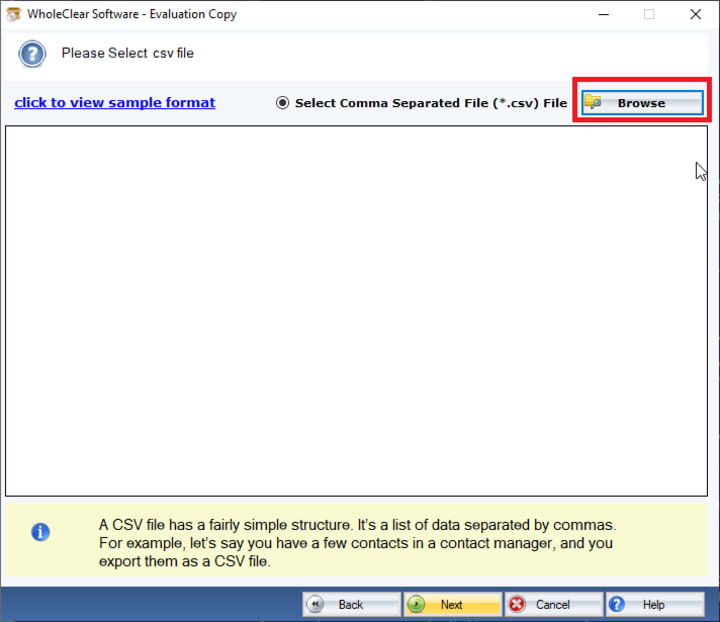
- You will be able to see a preview of all the contact fields in the software. You can now map each CSV column to the appropriate vCard field.
- Select the vCard format you want- v2.1 for Android, v3.0 for iCloud, or v4.0 for the most recent apps.
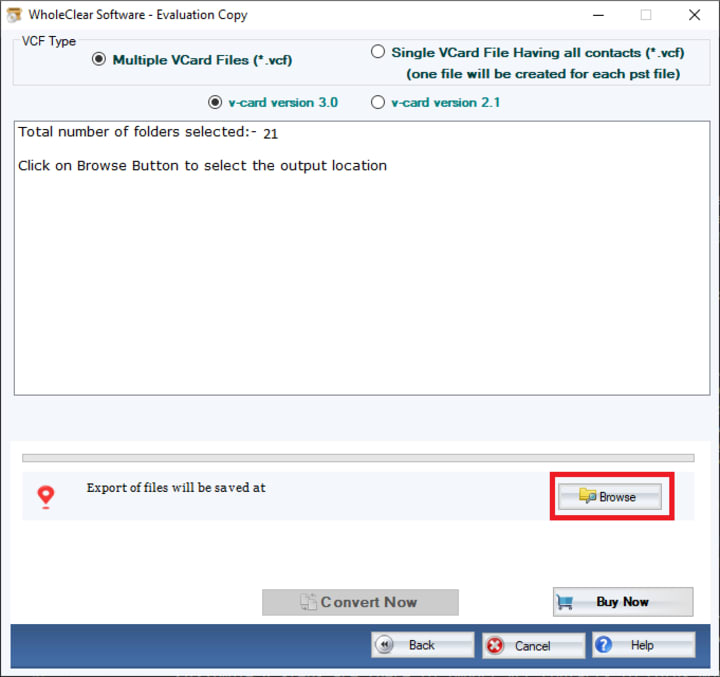
- Select the folder where you want to save the converted VCF files.
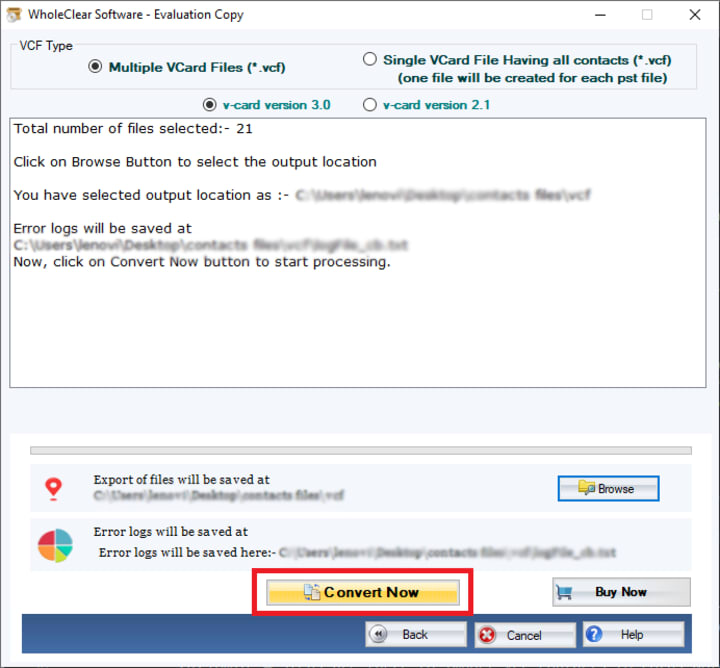
- Press the Convert Now button. The tool will look at your data and make VCF files with all the fields correctly mapped.
Final Thoughts
When moving contacts, it is essential to be accurate. If you fails to map the fields correctly when you manually convert CSV files, you could lose data, have formatting problems, or have imports fail. An comprehensive CSV to VCF conversion with field mapping makes sure that your contact information is saved accurately and can be imported into any platform.
You can automate the whole process and yet have complete control over your data with a professional solution like WholeClear CSV to VCF Converter. This software makes it easy and error-free to export contacts from CSV to vCard format. It has a user-friendly interface, field mapping features, and excellent compatibility.
Make sure your contact information is correctly written and organized with the right solution, whether you are switching phones, backing up client databases, or getting ready for email marketing campaigns.
About the Creator
Keep reading
More stories from Alla crook and writers in Journal and other communities.
How to Convert CSV to iPhone-Compatible VCF Format – Step-by-Step Tutorial
If you have a CSV (Comma-Separated Values) file with a list of contacts and want to move them to your iPhone, you should know that the iPhone cannot directly import contacts from CSV files. iPhones, on the other hand, need contacts in VCF (vCard) format. You need to convert your CSV file into a VCF file in order to obtain your CSV contacts onto your iPhone.
By Alla crook8 months ago in Journal
Author’s Advice
If you would’ve asked me 20 years ago did I know I’d become a writer and an author, I would’ve said “nope, ain’t happening”. As fate would have it I did become an author and I can honestly say I’m loving it so far. It really does feel good to be a writer. I’ve learned a lot on this journey and I feel like with even me being as new to this world as I am, there’s some wisdom I need to share with every other aspiring author.
By Joe Patterson3 days ago in Journal
Expanding Women’s Healthcare Access
Access to quality healthcare remains one of the most important issues facing women around the world. Despite advances in medical science and technology, many women still encounter barriers when trying to receive basic preventive care, reproductive health services, or maternal support. These barriers can include financial limitations, geographic distance from healthcare providers, cultural misunderstandings, and gaps in communication between patients and clinicians.
By Shamim Patel MD 3 days ago in Journal




Comments
There are no comments for this story
Be the first to respond and start the conversation.