
3 Useful, Powerful, And Free Online Editing Tools For A Writer
Writing without revising is the literary equivalent of waltzing gaily out of the house in your underwear. - Patricia Fuller


Every writer, regardless of being a beginner or pro, pushes themselves above and beyond for editing. When we time-travel and think about our forefathers who lived before the technological era, we can imagine their struggle in the editing process. In contrast to those days, today, we have plentiful resources to edit our creative works and make them look less clumsy when submitted to an editorial team. Technology has blessed us with editing tools to reduce the burden of the painstaking editing process.
There are a lot of online editing tools for writers. The vast the technology is, it gets strenuous to find the right tool which ticks our requirement boxes. Be it academic essays, fiction, articles, book, or poem: these 3 editing tools would be helpful to do 3 level editing. Your third draft would turn out into a perfectly baked cake. For sure, you won’t miss it the third time.
Hemingway App

Feed-in your first draft into the Hemingway App. This app doesn’t have advance level editing features. It checks the basics of your draft. With practice and the Hemingway App pointing your mistakes, you will limit the adverbs, passive voice and will watch the sentence length. The primary reason I use Hemingway App to edit my first draft is to see fewer red flags. It is a way to trick my mind that editing is easy. Step-by-step editing is painless and less stressful. Hemingway App is the best first step to climb the stairs of editing. You will feel happy once you complete your Level 1 editing with Hemingway App. Never expect a final draft from this tool.
Grammarly
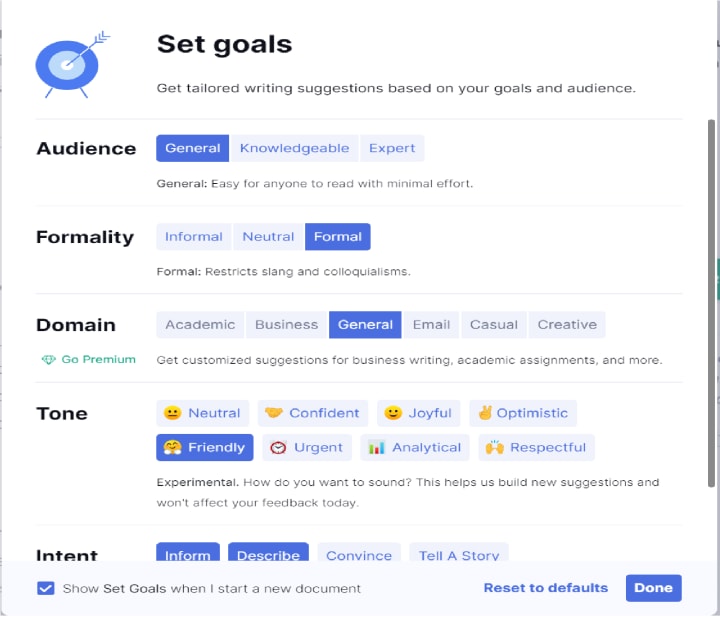

Editing helps in learning the aspects of good writing. Grammarly extends a helping hand in editing your draft. Even though it is a paid tool, Grammarly offers free features as well. You can add Grammarly to your chrome browser. The best aspect Grammarly offers is setting the goals. It allows you to select the type of audience, writing formality, domain, tone, and intent. We can adjust the goals according to what content we write. As a summary, it checks the correctness, clarity, engagement, and delivery according to the goals set.
I work with my second draft using Grammarly and feel that my work is 50% polished using the Grammarly editing tool.
ProWritingAid
Creativity without a proper framework spoils the quality of writing. Many of us have that creative nerve but lack the knowledge of framework in our creative writing. There are many courses for teaching the technicalities of creative writing, but don’t worry if you can’t afford one. ProWritingAid is by far the best and advanced editing tool. I learned a lot about how to write and things where I went gravely wrong. ProWritingAid is an ocean in the editing world.
ProWritingAid editing tool helps you to avoid sticky sentences, cliches. It checks the glue index, informs if our writing has slow paces. This tool stops us when we write emotional tells and channelizes us to express the emotions in our writing. It also offers a detailed summary report of your document with breakdowns and a comparison of your work to the set standards. This tool has premium version if you can afford. I haven't tried it yet.
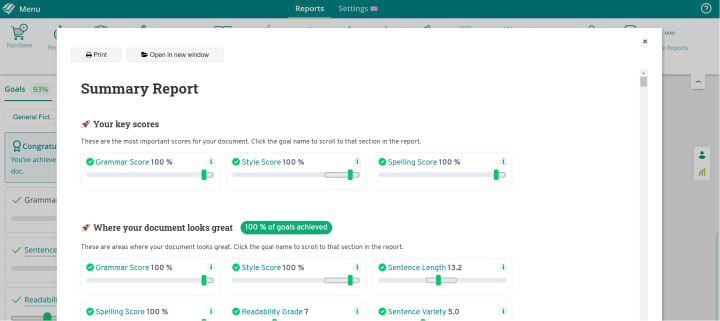
I’m still exploring this vast, powerful editing tool on various fronts. Your writing style will upgrade drastically, and the results will reflect in your work. If you like your work to look professional, ProWritingAid is the best editing tool. I do my third and final round of editing with this tool. When I achieve a 100% goal in ProWritingAid, I feel 100% confident to submit my work.
About the Creator
Anitha Sankaran
I'm a freelance writer and a former IT professional. I write poetry, articles about personal development, short stories and flash fictions.
Keep reading
More stories from Anitha Sankaran and writers in Journal and other communities.
How To Give A Feedback With Compassionate Directness
Giving a compliment to someone is painless and trouble-free. But offering feedback is bothersome. Think about the last feedback you gave or received. It sounds like a life of toil when it comes to giving feedback.
By Anitha Sankaran6 years ago in Journal
How Language Shapes the Way We Think
Language influences thinking in ways that feel ordinary until we pause and look closer. The words available to us guide how we describe events, recall memories, and even plan our day. Researchers in psychology and linguistics have spent decades studying this connection. Their findings show that language does not trap the mind, yet it does steer attention and shape habits of thought.
By Molly Gibson4 days ago in Journal



Comments
There are no comments for this story
Be the first to respond and start the conversation.