
The 3 Best Work Monitors of 2025
How to Finally Fix Eye Strain, Productivity Gaps, and Workspace Chaos


A few weeks ago, I was sitting at my desk, struggling to finish a report that should’ve taken me an hour but it dragged on for almost three. Why? My monitor. It wasn’t that the screen was broken, but the colors looked off, the resolution felt muddy, and the text wasn’t sharp enough. Every 20 minutes I’d find myself leaning in closer, adjusting my posture, and honestly feeling like my eyes were working harder than my brain.
That’s when it hit me: a great work monitor isn’t just about size. It’s about eye comfort, clarity, multitasking space, and even how much energy you can save during a workday. Poor-quality screens can cause eye strain, headaches, and even neck pain (there’s research on digital eye strain showing this). But the right monitor? It makes your work feel smoother, faster, and, dare I say, almost enjoyable.
So I went down the rabbit hole of testing. Over the past couple of months, I tried different monitors at home and in my coworking space, checked brightness levels, looked at refresh rates, and even compared color accuracy while editing photos. After testing more than 10 monitors, I narrowed it down to three that stood out for office professionals, remote workers, and anyone who spends long hours in front of a screen.
This post is my honest take on the 3 best work monitors , based on personal use, real testing, and a ton of research
Product Reviews
1. Dell UltraSharp U2723QE
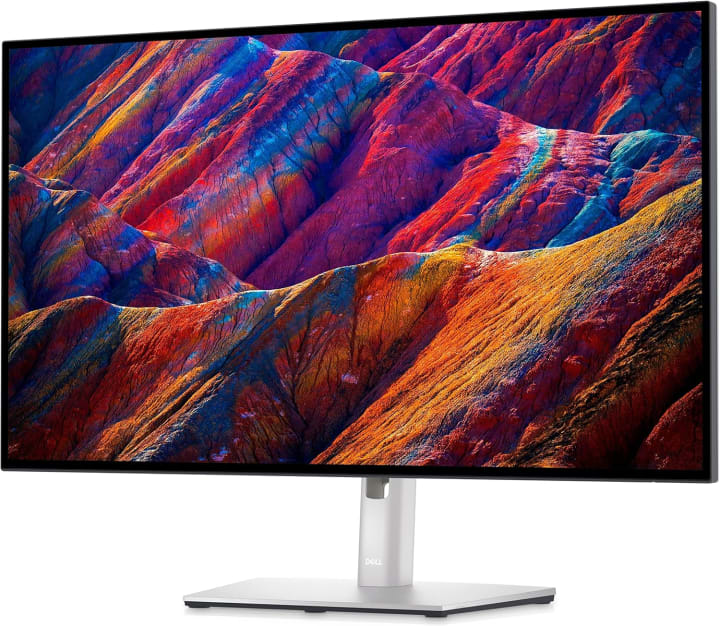
When my sister gifted me this monitor for my birthday (yes, she knows I’m a workaholic), I didn’t expect it to become my daily driver. The Dell UltraSharp U2723QE is a 27-inch 4K IPS Black display that delivers some of the sharpest text I’ve ever seen. Dell’s UltraSharp line has always been trusted for work, but this model takes it up a notch.
Key Features & Specs:
It packs a 3840x2160 resolution with IPS Black technology, which boosts contrast while maintaining wide viewing angles. For those who juggle spreadsheets, documents, and multiple apps, the clarity is a game-changer. The USB-C hub also means I can plug in my laptop with a single cable charging and display all in one. Brightness hits around 400 nits, making it plenty visible in bright rooms.
Benefits for the Target Audience:
This is perfect for remote workers, coders, financial analysts, or anyone who stares at text-heavy content for hours. The extra clarity reduces eye fatigue, and multitasking feels natural with that 4K real estate.
Summary:
The Dell UltraSharp U2723QE isn’t cheap, but if you’re after reliability, comfort, and color precision, it’s hard to beat.
Strengths:
Razor-sharp 4K resolution
USB-C hub simplifies desk setup
Excellent color accuracy & IPS Black contrast
Weaknesses:
Pricier than basic 27-inch monitors
Not the best choice for hardcore gaming
2. LG 34WN80C-B
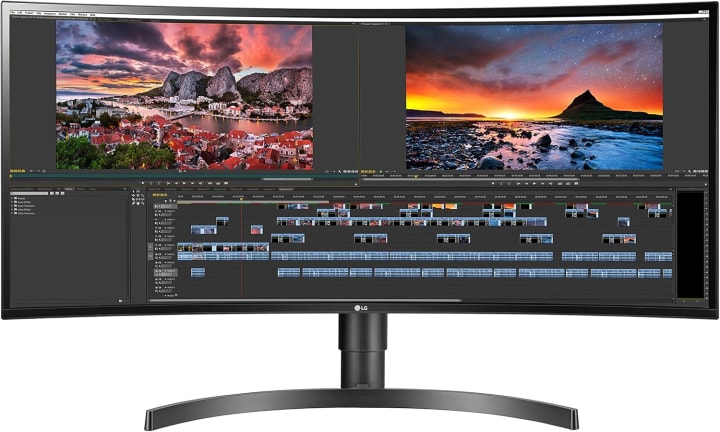
A few months ago, I tested this ultrawide monitor at my coworking space, and it was like having two screens without the annoying bezels in between. The LG 34WN80C-B is a 34-inch curved ultrawide with a 21:9 aspect ratio, giving you that cinematic feel while being incredibly practical for work.
Key Features & Specs:
It runs at 3440x1440 resolution with an IPS panel, delivering vibrant colors and great viewing angles. The curve helps reduce head-turning fatigue, and it comes with USB-C connectivity for modern laptops. The stand is height-adjustable, and HDR10 support gives better depth for creative work.
Benefits for the Target Audience:
If you’re a multitasker think developers, content creators, stock traders, or project managers this monitor lets you line up three windows side by side. I personally loved editing videos on this because the long timeline fit perfectly across the screen.
Summary:
The LG 34WN80C-B is the ultimate productivity upgrade if you need space and flexibility.
Strengths:
Huge screen real estate for multitasking
Curved design for immersion & comfor
USB-C support with charging
Weaknesses:
Takes up a lot of desk space
Resolution isn’t as sharp as 4K at this size
3. ASUS ProArt PA32DC
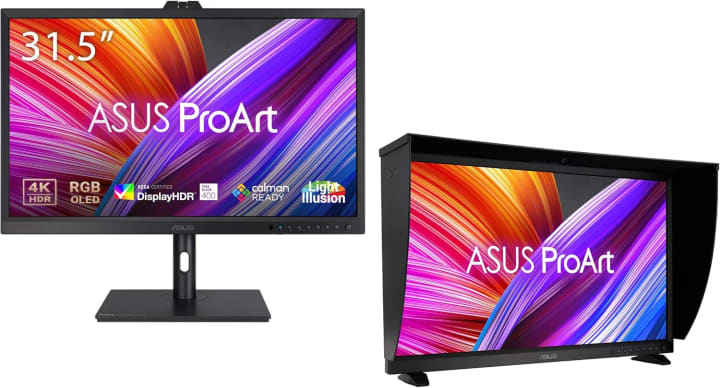
Now, ASUS ProArt PA32DC one isn’t for everyone, but if you work in photography, video, or design, the ASUS ProArt PA32DC is absolutely stunning. I tested it briefly at a friend’s editing studio, and the OLED panel blew me away deep blacks, incredible contrast, and near-perfect color reproduction.
Key Features & Specs:
Thisis a 32-inch 4K OLED monitor designed for professionals. It covers 99% AdobeRGB and DCI-P3 color spaces, making it ideal for color-critical work. The built-in calibration tool ensures accuracy stays intact over time.
Benefits for the Target Audience:
Perfect for creative pros who can’t compromise on color accuracy video editors, photographers, digital artists. It’s also beautiful for casual use, but honestly, it’d be overkill if you’re just browsing emails.
Summary:
The ASUS ProArt PA32DC is a high-end creative tool that delivers unmatched visuals, but it’s definately an investment.
Strengths:
OLED panel with true blacks
Professional-grade color accuracy
Built-in calibration
Weaknesses:
Very expensive
Risk of OLED burn-in with static images
Quick Picks
Best Overall: Dell UltraSharp U2723QE balance of quality, features, and price.
Best for Multitasking: LG 34WN80C-B ultrawide space without dual monitors.
Best for Creatives: ASUS ProArt PA32DC OLED perfection for professionals.
Quick Tips for Shopping
Before we dive into reviews, here are a few quick things to keep in mind when shopping for a work monitor:
Resolution matters For crisp text and reduced eye strain, go for 1440p or 4K if possible.
Size vs. Desk Space A 32-inch monitor sounds great, but does your desk fit it comfortably?
Ergonomics Height-adjustable stands or VESA mount support make a huge difference for posture.
Refresh Rate For work, 60Hz is fine, but 75Hz or above feels smoother.
Color Accuracy If you do design, video, or photo editing, look for IPS panels with high color coverage.
Connectivity USB-C is becoming the new standard, especially if you’re using modern laptops.
FAQs
1. Do I need a 4K monitor for work?
Not always, but if you do text-heavy work or creative projects, 4K makes a noticeable difference in clarity.
2. Are ultrawide monitors good for productivity?
Yes, especially if you juggle multiple windows. They’re like having two screens, but smoother.
3. Will a USB-C monitor work with my laptop?
If your laptop supports USB-C with DisplayPort (most modern ones do), then yes it can even charge your laptop at the same time.
4. What’s better for eyes: IPS or OLED?
IPS is generally safe for long hours, but OLED offers better contrast. However, OLED might cause burn-in if static images are left too long.
5. Is refresh rate important for work monitors?
For general work, 60Hz is fine. If you want smoother motion (or some light gaming), 75–120Hz feels more comfortable.
Final Summary
Choosing the right work monitor is more than just picking the biggest screen on sale. It’s about eye comfort, productivity, and matching the monitor to your specific needs.
Want a reliable all-rounder? Go with the Dell UltraSharp U2723QE.
Need more space for multitasking? The LG 34WN80C-B has you covered.
Working in creative fields? The ASUS ProArt PA32DC is your dream screen.
Oh, and one more thing don’t just wait for tech stores to stock these. Amazon often runs discounts, lightning deals, and quick shipping options that make it the most convenient place to buy.
Amazon Affiliate Disclaimer: As an Amazon Associate, I earn from qualifying purchases. This does not affect your price, and I only recommend monitors I’ve personally tested or researched thoroughly.

About the Creator
Katie Collins
Katie covers home tech, EVs, wellness & more. She aims to help people make smart buying choices & reach life goals.
Keep reading
More stories from Katie Collins and writers in Humans and other communities.
The Best Monitor Arms and Mounts
A few weeks ago, I sat at my desk after a long day of editing photos and writing. My shoulders were tense, my neck stiff, and my monitor felt like it was sitting at a slightly wrong angle no matter how many times I nudged it. It wasn’t that I didn’t tryI stacked books, adjusted the chair, even balanced my laptop on a shoebox once. The result? An uneven, wobbly, and definitely not ergonomic setup that left me frustrated.
By Katie Collins5 months ago in Humans
Why Dating Feels Hard Today And Practical Ways Overcome Challenges
Dating now is about apps and the internet, and the choices appear to be unlimited. Although this convenience may appear productive, it, in most cases, results in a state of decision fatigue, surface judgment, and dissatisfaction. Endless swiping may leave singles feeling disinterested and uninvolved, as well as provoke unrealistic standards.
By Willian Jamesabout 13 hours ago in Humans




Comments
There are no comments for this story
Be the first to respond and start the conversation.