
How Your To-Do List Kills Your Productivity
What I am doing instead to get more done and reduce my mental load


Is your to-do list making you more productive, or just busier?
When they have a big project or a busy day with lots of tasks many people first make a to-do list. A shopping list helps you to remember what to get from the store. So a to-do list will make sure you do not forget any tasks.
But are you trying to remember the tasks or get them done?
Why do people make to-do lists?
To-do lists are simple, quick, and easy to write.
When you are busy and stressed a to-do list can give you a sense of control. You have every task written down, you won't forget any of them and you can tick them off one by one. This also gives you a sense of accountability at the end of the day you can see how many tasks you completed.
If a general sense of control and accountability is all you want then to-do lists are great.
The real problem comes when to-do lists must do more than this. Lists are good for shopping or attendance registers. In these instances, they are just lists of information. All things on them are equal, these items are needed or these are the people allowed into the function.
Tasks are not all equal, they take different amounts of time energy, or resources to complete.
What do to-do lists actually do?
The first and most insidious problem is the flip side of their benefits.
At first, writing down all your tasks makes you feel in control. As that list grows it becomes overwhelming. When paired with the accountability the to-do list provides we become preoccupied with ticking off tasks. Cal Newport, in his book Deep Work, notes that to-do lists can create a false sense of productivity. We check off minor tasks while avoiding more challenging work that requires deep focus.
If you try to tick off as many tasks as possible, the more challenging and high-priority tasks are not getting done.
Nir Eyal author of Indestractible has talked about the time when he had moved on to another task without ticking off the last one. He stopped what he was doing to go back to the list and tick it off. He realized in the moment how bizarre it was to be more focused on ticking the completed task than completing the next one.
Ticking boxes on this list is not important, we want to get stuff done.
Having all incomplete tasks written down in a list is also not good for our mental load if we keep re-reading it.
Our brains like to cling to unfinished tasks or open loops as they are often called. Steven Pressfield in The War of Art notes that open loops create "mental clutter". This reduces our capacity for creativity and productivity.
Every open loop in our brain reduces our available working memory as our brain constantly tries to remind us of these tasks. The idea of open loops affecting the brain is not a new idea, in fact, we have known about it for almost 100 years at least. Psychologist Bluma Zeigarnik noted in the 1920s that our minds cling to unfinished tasks making it harder to focus on other tasks.
This compounds with the feeling of being overwhelmed by a large to-do list.
So how can we better plan what we need to get done and ensure we do not forget anything?
A better way to plan your day
A better way to plan your time is with a time-blocked schedule.
Time-blocking involves assigning specific blocks of time to different tasks. This helps maintain focus and prevent distractions. Cal Newport, in Deep Work, advocates for time-blocking as a method to dedicate uninterrupted time to high-value tasks. This leads to higher quality work and better productivity.
Time-blocking makes you prioritize.
You must decide in advance which tasks will occupy your time slots. This makes sure that important tasks receive the attention they deserve. In The 7 Habits of Highly Effective People, Stephen Covey discusses the concept of "putting first things first,". A calendar view helps with this. If task A needs 5 hours to complete but is due tomorrow, and task B needs only 3 hours but is not due for 3 weeks task A should be scheduled first.
Anyone who works in education will be familiar with this style. It is how we create timetables for teachers and students. It can also be a powerful tool for anyone who wants to plan out their day.
Let's look at an example.

This is a plan for a typical school day for me in term time. The main day part of the routine such as when I am teaching is planned for me so I copy that from my school timetable. I color these red as during this time I am completely unavailable for meetings.
I have 1 hour of "free" time on that day which I have assigned to planning next week's GCSE Computer Science lessons in this case. This is colored blue as meetings can be placed here if necessary. This is the only slot of the week that is like this, any non-urgent meetings are always done on Friday.
My 2 creative slots are also planned out specifically. In the morning I am working on a specific piece. A larger piece might be written over many days or moved to a weekend when I have larger blocks of time to write. Every weekday morning has at least 1 hour that I can dedicate to writing. Across the 5 weekdays, I have 7 hours of dedicated writing time at the time I usually feel the most creative.
The evening hour is for planning topics for the coming week and writing a potential headline for each. I have another hour on Tuesday where I will either finish this work if needed or get a head start on research.
What about working from home?
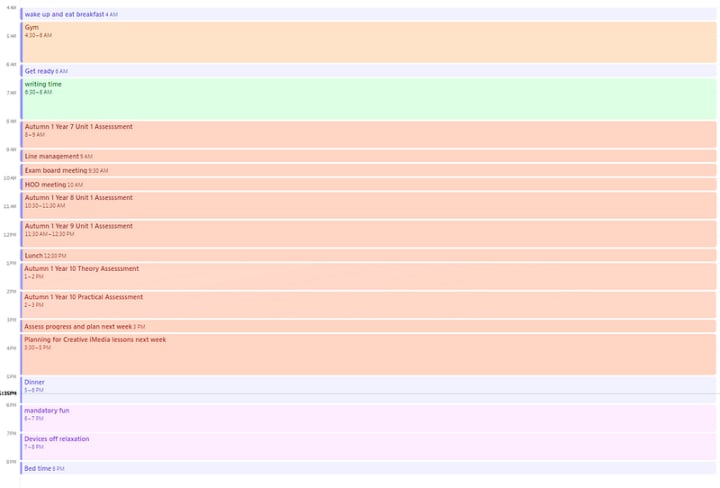
My Fridays are different because I work from home. This is usually the day I do most of my meetings. I try to block the meetings together so that I get bigger chunks of focused planning time. Any tasks that need a similar mental state should be grouped where possible to reduce lag when switching between them.
The goal this day was to create Autumn 1 assessments for years 7–10. This is a big piece of work and it spreads many topics from Staying Safe Online in Year 7 to Python Programming and Computer Systems in Year 10.
This is a lot of information to keep in my working memory at any given time. By assigning each assessment to its own hour I can just focus on one topic at a time. I even broke the Year 10 assessment into 2 parts so that I could focus on the Python Programming and Computer Systems topics separately.
I also have planned some time for relaxation, getting ready, eating, commuting, and a buffer to account for delays leaving school. In Atomic Habits James Clear emphasizes the importance of rest and recovery as part of an effective productivity system.
You may not like the idea of your day being this strictly organized, but if you try it as an experiment for a few weeks I am confident you will see the benefits.
A better way to organize your thoughts and remember information
The other reason people use to-do lists is as a memory tool.
When you get a new task you can just add it to the to-do list. This means you can return to focusing on your current task for now and come back to it later. This aspect actually can be useful, but there is a better way to do it.
Cal Newport regularly talks about his working memory.txt file. The basic idea behind this is to have some place to offload thoughts a text file, a notion page, or whatever works for you. Anything that comes to mind that needs to be remembered but is not directly related to the task at hand is added to this document. You can then forget it until the end of the day.
At the end of the day, you set aside a small amount of time to go through this document. Any tasks can be added to an open time block, ideas can go to a designated idea area, and information for specific projects can be added to their area. This should not be a lengthy process, anything there that requires more than a few minutes should be added to a future time slot.
Instead of scattering notes across various apps, sticky notes, or notebooks, this central file consolidates everything into a single, easily accessible location. This centralized approach simplifies the process of reviewing and organizing tasks, making it easier to stay on top of what needs to be done.
This also means that while working on specific tasks you are clearing mental space for more critical and creative thinking.
Much like reducing task switching with the time-blocked schedule, the goal is allowing you to focus on one thing at a time.
Using both of these methods together will help you to get more done each day. You will get more done because you can focus on one task at a time and minimize the impact of distractions.
If you want to learn more about getting things done the books that have helped me the most in this area are:
Deep Work - Cal Newport (Cal also has a podcast Deep Questions with over 300 episodes)
Atomic Habits - James Clear
I have mentioned them both in the article but they have so much more to offer if you are looking to get more done without burning out.
About the Creator
Michael Naylor
I am a Computer Science teacher in the UK with a variety of interests from education, making learning more accessible and self improvement to tech, gaming, and programming.
Reader insights
Nice work
Very well written. Keep up the good work!
Top insights
Compelling and original writing
Creative use of language & vocab
Easy to read and follow
Well-structured & engaging content
Masterful proofreading
Zero grammar & spelling mistakes
On-point and relevant
Writing reflected the title & theme
Keep reading
More stories from Michael Naylor and writers in Humans and other communities.
Reed Blankenship: The Quiet Journey From Underdog to NFL Starter
Some football careers begin with national attention and five-star rankings. Others begin quietly, far away from the spotlight. The story of Reed Blankenship belongs to the second path. He was not the most famous recruit. He did not enter college with headlines or huge expectations. Instead, his journey was built on patience, discipline, and years of steady work that few people noticed. Today, fans who watch Reed Blankenship on an NFL field see confidence, intelligence, and determination in every play. But those moments are the result of a long road filled with doubts, small opportunities, and relentless effort. His rise shows that success in football is not always about early hype. Sometimes it comes from persistence, preparation, and the courage to keep chasing a dream.
By Muqadas khan6 days ago in Humans




Comments (1)
I really love your content and how it's crafted , I love it and happily subscribed , you can check out my content and subscribe to me also , thanks for this beautiful one