
What Is and How to Use a Video Downloader
-Best tools for video content creators


While services like Netflix, HBO Max, Disney+, Crunchyroll, Hulu, and Apple TV+, etc. have huge libraries of shows and movies, they don't always provide easy and unlimited ways for users to seamlessly view such content offline. If you are going to travel or be out of a place with good connectivity, having something ready to watch offline could be a good choice. That's where video downloaders come into play, making seamless, uninterrupted and unlimited offline viewing possible. This article will discuss some of the best video downloaders that actually give a better download experience from various platforms for offline viewing. Just keep reading.
Part 1: What Are Video Downloader Tools?
Most video streaming services offer in-app downloads, but most come with significant restrictions. Storage capacity limits, download count caps, and incompatible devices are common complaints. What's more, your downloads will expire within a few days (usually 30 days if you have not begun to watch) or a few hours (basically 48 hours if you start watching the video). If your subscription is expired, the video downloaded will be unavailable until you activate the account again.
It is under this circumstance that many video downloaders enter the market. They aim to fix these gaps and meet people's demands. There are many kinds of video downloaders on the market, like YouTube video downloaders, TikTok video downloaders, Facebook video downloaders, etc., that enable the download of videos from multiple platforms without bothering about the incompatibility of devices, storage limits, loss of any content, etc. With their download feature, customized formats, and support for more platforms, video downloaders grant full control over how and where you would enjoy your media.

Part 2: Popular Video Downloader Tools
Having understood the demand for video downloaders, let's look at some options available today. Here are some top picks.
1. Online video downloaders
Online video downloaders are ideal for those on the go who would not want to go through the hassle of downloading software. The best point is that you can directly download videos from your browser. You just copy the URL of the video, and voila, you are all set to go. Here are 3 good examples.
Example One: Y2Mate (free with ads)
Y2Mate is basically a YouTube video downloader. It facilitates the smooth downloading and conversion of videos from YouTube, Facebook, and Dailymotion into MP4, M4V, and MP3 formats in HD quality. This fast-downloading portal has no registration hassles. For quick use, just put "pp" behind "YouTube" in the link, and within a second, the video will be downloaded. Y2Mate is compatible with any browser, so it is friendly and easy to handle when downloading videos for offline viewing or conversion. However, as Y2Mate is an ad-supported website, you may need to stand with ad disturbance.

Example Two: SaveTheVideo (free with ads)
SaveTheVideo is a free online service that allows you to download videos from Vimeo, Dailymotion, TikTok, Facebook, Twitter, and Instagram. It allows you to save content in MP3, MP4, AAC, and WEBM formats. With it, you can even cut or merge videos and also download subtitles. Also, it works on all types of devices, including Windows, macOS, iOS, Android (app is available), and Linux. So, it's more flexible and can be used anywhere to download videos from any place if you are an Android user. Similarly, as with many free tools, SaveTheVideo may display ads during use. Meanwhile, it has certain limitations in regards of download quality and download speed.

Example Three: AceThinker (free version)
AceThinker also has the capability to seamlessly download videos online from a number of social platforms like, but not limited to, Facebook, Instagram, Vimeo, TikTok, and Dailymotion. This utility tool will enable capturing any video in no time by merely pasting the URL of the video without even installing software or creating a user account. AceThinker allows downloading in many formats and resolutions that guarantee high-quality downloads suitable for offline viewing. However, it does not support batch downloading.

2. Software video downloaders
Though free online video downloaders can make downloading easy, they normally come with many restrictions in functionality and speed, not to mention the relatively poor resolution. Furthermore, users may suffer from ad problems or problems when downloading certain types of protected content. To get rid of these tricky things, advanced software downloaders emerged. These video downloaders require people to first install the app to a device and then use it.
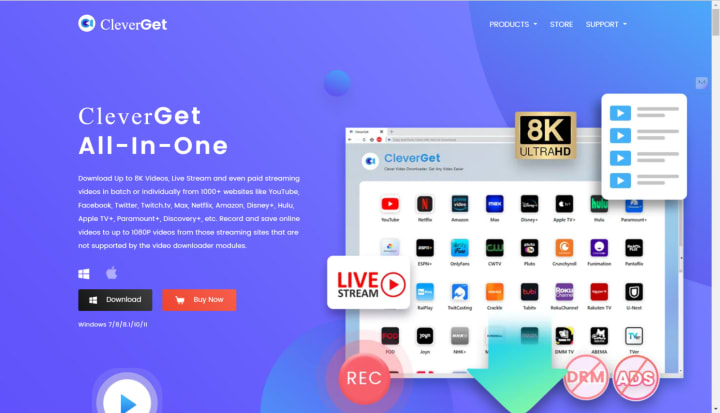
While online tools provide convenience and instant access, software tools can offer greater control and performance. Nowadays, there are many popular software downloaders available on the market. If you search on Google, you can easily find the names of CleverGet, Movpilot, and StreamFab. These tools are all charged but with almost no restrictions compared to online tools. Here, I will introduce CleverGet as an example.
Now, CleverGet features an all-around video downloader that easily copes with more than a thousand streaming services for download, including YouTube, Netflix, and Disney+. It allows resolution up to 8K and supports bulk video downloads and streams, including paid content. What's more, there's an embedded browser in the software for ease of use, which enables you to perform a search and download right from platforms without leaving the program. In the next part, we will show you how to use it to download shows.
Part 3: How to Use a Video Downloader to Download Shows
While we have pointed out the broader abilities of CleverGet, let's now narrow it down to actually how you can operate it to download videos. Here's how you can clearly use CleverGet to download videos from, let's pick Max as an example, HBO Max in a step-by-step guide.
Step 1: Download and install CleverGet Max Downloader.
Launch the software after installation.
Step 2: Copy and Paste Video URL
Head to Max, copy the URL of the target video and then paste it into CleverGet's search bar. The software will automatically parse this link.
Step 3: Select One Video from the List
After parsing, you can see a list of different downloadable resources of various sizes, resolutions, etc. Choose one you like.
Step 4: Download the Video
Tap the "Download" button to start downloading for offline playback.
Part 4: Conclusion
Nowadays, streaming services have dramatically changed the way we watch our favorite movies and shows. They improve the quality and convenience in terms of viewing. Just like all goods emerged to meet people's demands, online video downloaders and software video downloaders came into being just to satisfy people's demand to download videos from any platform without extra limitations.
Despite the excellent performance of online video downloaders like Y2Mate, SaveTheVideo, and AceThinker, they still have some limits like download speed, download platforms, output quality, output forms, etc. In this case, software video downloaders like CleverGet and StreamFab enter the market. Although you are required to install the app before downloading videos, they are capable of downloading videos from many more websites with higher output qualities, higher downloading speed, and more output forms. If you are a YouTube creator who needs to handle advanced functions of the video, then software video downloaders like CleverGet may be more suitable for you.
About the Creator
Lumi
I am rooted, but I flow.
Meet the Director Nominated for Two Oscars for Two Different Films
In the highly competitive world of filmmaking, earning a nomination for the Academy Awards is considered one of the greatest recognitions of artistic achievement. For one director, however, the honor arrived twice in a single year — for two completely different films. The unusual milestone has drawn attention across the global film industry and highlighted the creative range of a filmmaker whose work continues to push boundaries. The nominations, announced by the Academy of Motion Picture Arts and Sciences, place the director in a rare category of artists who have managed to captivate audiences and critics simultaneously with multiple projects released within the same awards cycle. While it is common for filmmakers to spend several years developing a single project, this director oversaw two distinct productions, each with its own cast, theme, and visual language. Both films went on to gain widespread critical praise, eventually earning nominations at the prestigious Academy Awards. Industry observers say the achievement reflects not only technical skill but also a remarkable ability to navigate vastly different storytelling approaches. Two Films, Two Worlds The first nominated film is a sweeping historical drama that explores the complexities of identity, power, and personal sacrifice. Set against the backdrop of a turbulent political era, the film combines intimate character studies with large-scale cinematic spectacle. Critics praised the director’s ability to balance emotional storytelling with historical authenticity. Carefully constructed scenes, detailed production design, and powerful performances helped the film resonate with audiences around the world. The second nominated film stands in stark contrast. Rather than historical drama, it is a contemporary character-driven story focused on personal relationships and moral ambiguity. The narrative unfolds in a quieter setting, relying heavily on dialogue and subtle performances. Despite its smaller scale, the film has been described as equally powerful. Reviewers noted the director’s talent for extracting complex emotions from everyday situations, turning ordinary moments into compelling cinematic experiences. Together, the two films demonstrate a rare versatility that has impressed both critics and members of the film academy. A Career Built on Risk The director’s path to recognition was not immediate. Early in their career, they worked on independent productions that struggled to secure wide distribution. Many of those early films were praised in small film festivals but received limited commercial success. Those projects, however, helped shape a distinctive creative voice. Rather than following conventional industry formulas, the filmmaker developed a reputation for taking risks with narrative structure and visual style. Over time, those risks began attracting international attention. Film critics often compare the director’s approach to that of celebrated auteurs such as Christopher Nolan and Alejandro G. Iñárritu, both known for blending ambitious storytelling with strong artistic identity. Although the comparison is flattering, the director’s work remains distinctly their own. The Challenge of Creating Two Films Producing two award-caliber films within the same period is an enormous logistical challenge. Each production requires months — sometimes years — of planning, financing, casting, and post-production work. Film industry insiders say the director’s ability to manage both projects simultaneously speaks to an exceptional level of organization and creative discipline. Crew members involved in the productions describe a collaborative environment where ideas were encouraged and experimentation was welcomed. “Every scene felt carefully planned but also open to discovery,” one cinematographer who worked on the projects said in an interview. “The director had a clear vision, but they also trusted the creative team.” Recognition from the Film Community Since the nominations were announced, the director has received congratulations from filmmakers and actors around the world. Social media has been filled with tributes from colleagues who admire the achievement. Some analysts say the nominations reflect a broader shift within the film industry toward recognizing bold storytelling and diverse perspectives. In recent years, the Academy Awards has expanded its membership and voting body, bringing in a more international and diverse group of filmmakers. That change has allowed a wider range of films to gain recognition. For this director, the moment represents both validation and new expectations. Looking Ahead While awards season attention often focuses on trophies and ceremonies, many filmmakers emphasize that recognition is only part of the creative journey. The director has already hinted at several upcoming projects, including a potential collaboration with major international studios and a smaller experimental film expected to return to their independent roots. Whether or not the Oscar nominations lead to a win, the dual recognition has firmly established the filmmaker as one of the most exciting voices in modern cinema. For audiences, the achievement offers a reminder that great storytelling can take many forms — from sweeping historical epics to intimate human dramas. And for the director behind both films, the moment marks not an end point, but the beginning of an even more ambitious chapter in a rapidly evolving career.
By Fiaz Ahmed about 20 hours ago in Geeks


Comments (1)
Personally, I think it's a little sad that some people give up on finding their lost money, passwords, or cryptocurrency when there is so much support available. when a wide range of professionals are willing to assist you in obtaining what is rightfully yours. I've spoken with friends who are going through comparable circumstances but are too proud or shy to ask for assistance. I've always believed that you should receive assistance if everyone is receiving it. Although I prefer to remain anonymous, I feel compelled to relay this crucial information: hackers are there for a purpose. to assist you when officials or the police are unable to. So far, I have tried Synack Hackers, and I have to say, they have not let me down. This hacker saved me the $240,000 USDT that I would have otherwise lost. I was sadly let down by the police department, which is why I decided to look for hackers. So, beloved, get assistance. If you're interested in working with my hackers, here is their email: (synackhack{@}tech{-}center{.}com)