

Max users who sign up for the Max ad-supported plan can save at least $6 per month and $50 per year in comparison to ad-free consumers. Since the content is the same for both plans, subscribing to the ad-supported one is a good choice for people trying to cut costs on streaming services.
Of course, advertisements themselves are annoying, and a lot of Max users wish they could disable them while still enjoying the low price of the ad tier. Therefore, this article will introduce three feasible methods of getting rid of ads on Max for your reference.
Option 1: Change your subscription plan
"Can I fast forward or skip ads? No, fast forward and skip aren't available when an ad is playing." - It is the answer from the Max official site. You can switch your ad-supported plan to the Ad-Free or Ultimate Ad-Free plan to turn off the ads. And their price is $15.99/month and $19.99/month respectively. This is probably the most effective way to remove the ads on Max completely. In case you don't know, Hulu and Amazon Prime also provide Max content. It is available to add Max channels to your existing Prime or Hulu account, and the Max content is ad-free.
Is there a way to get ad-free Max without paying extra money? Yes, some AT&T wireless plans include an ad-free Max subscription, and you can check them out.
Option 2: HBO Max ad blocker
Here is a Google Chrome extension named HBO Max skipper that can skip ads, intros, recaps on HBO Max/Max in the USA automatically.
- Open HBO Max skipper on Google Chrome
- Click “Add to Chrome”

- Then “Add extension”
- Find the puzzle icon in the top right corner
- Pin it
If the HBO Max skipper can't work on your end, you can also check this post on the uBlockOrigin community on Reddit.
FYI these two methods may not work for you. Please choose the method that suits you according to your circumstances.
Option 3: Get rid of ads by downloading Max videos
The ads that show in the middle of successive episodes are annoying if you want to stream them back-to-back. To watch the series all at once without interruption, downloading them is a great alternative. Besides, you can view your preferred series or movies without lag when there’s no internet connection. Here comes the question, how to download ad-free HBO Max and Max videos? SameMovie HBOMax Video Downloader is an outstanding app for downloading HBO Max and Max content without ads. It is also an ideal option if you want to watch HBO Max/Max TV shows or movies while traveling. SameMovie is capable of downloading high-quality videos in MP4/MKV format with multilingual subtitles and audio tracks kept. Videos downloaded by this tool will be preserved locally in your local drive, and it’s also available to transfer the video files to as many as devices you want. Most importantly, you'll not be bothered by ads even if you transfer videos to other devices.
To get a tutorial on downloading Max videos, please click https://bit.ly/3rAINUf.
Tutorial: How to Download Max Videos with SameMovie
Here is a step-by-step guide on how to download Max videos. Before we begin, please download SameMovie HBOMax Video Downloader.
STEP 1 Sign in to Max Account
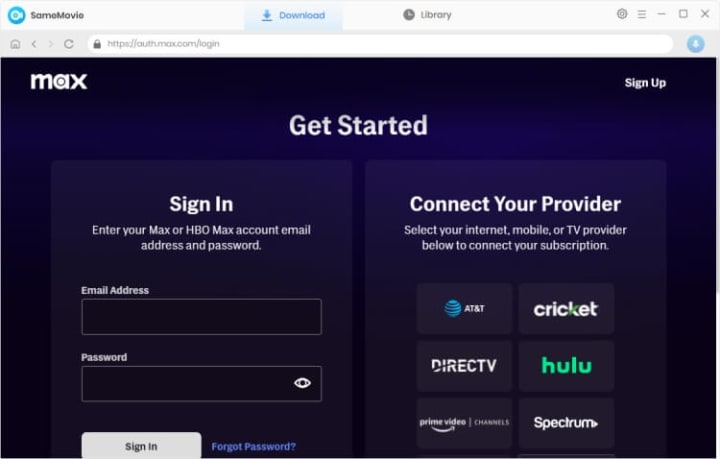
SameMovie HBOMax Video Downloader is compatible with both Windows PC and Mac computers. Download and install it on your device. Click “SIGN IN” in the right corner, and a login window will pop up. Please log into your Max account with your information.
STEP 2 Search for Videos
To find videos you want to download, simply type the keywords in the search box, and then press "Enter". And you can pick the video you want to download from the results.

STEP 3 Download Max Video
Simply tap the "Download" button, and the download process will start. When the downloads are complete, you can find the video files by clicking the "Library" tab or the output path you choose in Step 2.

To know how it works, please click https://bit.ly/3rAINUf.
About the Creator
Louise Walker
Trying to find useful video downloaders.
Keep reading
More stories from Louise Walker and writers in Geeks and other communities.
Watch and Download The Shawshank Redemption
The Shawshank Redemption has become a classic and the highest-rated film of all time on IMDb. It is also one of the must-watch films in the 1990s, holding the same honors as films like The Truman Show, Pulp Fiction and Forrest Gump. After receiving numerous nominations—including seven Academy Award nominations and a theatrical re-release, the movie's box office earnings rose to $73.3 million. The movie was chosen for preservation in the National Film Registry by the US Library of Congress in 2015 because it was "culturally, historically, or aesthetically significant."
By Louise Walker3 years ago in Geeks
A Knight of the Seven Kingdoms Series Review (Season 1)
As one of the biggest properties in fantasy, A Song of Ice and Fire remains immensely popular with audiences. After reaching far into the past with House of the Dragon, a second spin-off was on the cards. A Knight of the Seven Kingdoms serves up a bite-sized slice of action and drama, but it still claims a spot among the best small-screen titles.
By Robert Cain15 days ago in Geeks
The Worst Friends in Pop Culture
Friendship is one of the most celebrated themes in storytelling. From animated sitcoms to epic fantasy sagas, audiences are constantly reminded that loyalty, trust, and emotional support are the glue that holds relationships together. The best fictional friendships inspire us because they show characters standing by each other through chaos, heartbreak, and adventure.
By Jenna Deedy2 days ago in Geeks



Comments
There are no comments for this story
Be the first to respond and start the conversation.