
PS5 Randomly Turning Off? 8 Common Causes & Easy Fixes
Is your PS5 randomly turning off? Discover common causes like overheating, power issues, and software glitches, along with easy fixes to get your PlayStation 5 running smoothly again.
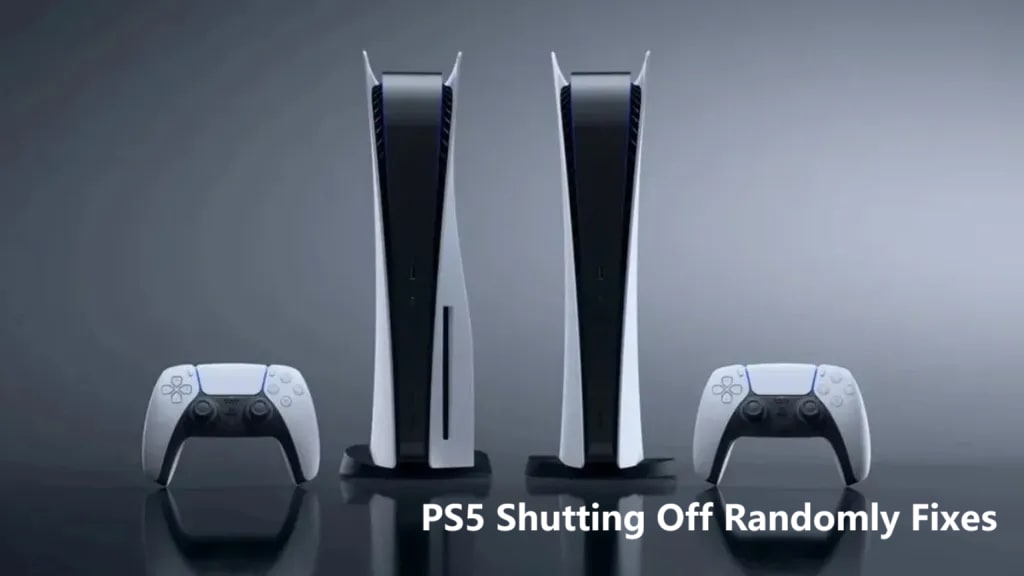
If your PS5 randomly turning off, you're not alone. This issue can be frustrating, especially if it happens during an intense gaming session. Fortunately, there are several reasons why this could be happening, and most of them are easy to fix. In this guide, we’ll cover the most common causes and provide step-by-step solutions to get your PS5 back up and running smoothly.
1. Overheating: Why It Happens & How to Fix It
Why it happens:
PS5 consoles are powerful machines, but they can overheat if not properly ventilated. The PS5 is designed to shut down automatically when it gets too hot to prevent internal damage.
How to fix it:
Ensure proper airflow: Make sure your PS5 is in an open area with plenty of ventilation. Don’t place it inside a closed cabinet or too close to walls.
Clean the vents: Dust and dirt can block the airflow, making the console overheat faster. Use a microfiber cloth or compressed air to clean the vents regularly.
Cooling stands: Consider using a cooling stand or external fan to help regulate the temperature during long gaming sessions.
2. Power Supply Issues: A Common Reason
Why it happens:
A faulty power cord, unstable power outlet, or power surges can cause your PS5 to turn off randomly. See quick PS5 shutting off randomly fix:
How to fix it:
Check the power cord: Inspect the power cable for signs of wear or damage. Try using a different power cord if possible.
Try a different outlet: Plug your PS5 into a different outlet, preferably one that’s not shared with other high-power devices.
Use a surge protector: Protect your PS5 from power surges by using a surge protector or a high-quality power strip.
3. Software Glitches or Corrupted Data
Why it happens:
Sometimes, system bugs or corrupted data can cause your PS5 to shut off without warning. This is more likely if your console hasn’t been updated in a while.
How to fix it:
Update your system software: Ensure your PS5 has the latest updates installed. Go to Settings > System > System Software to check for available updates.
Clear the cache: Go to Settings > Storage and clear the system cache to remove any temporary files that may be causing issues.
Reinstall system software: If the problem persists, try reinstalling the system software by initializing the PS5 from the settings menu. Remember to back up your data first!
4. Power Settings: Rest Mode and Auto Shutdown
Why it happens:
PS5's power-saving settings, like Rest Mode or Auto Shutdown, could be causing your PS5 randomly turning off.
How to fix it:
Disable Rest Mode: Go to Settings > Power Saving > Set Time Until PS5 Enters Rest Mode and set it to “Never” if you don’t want your PS5 to turn off automatically.
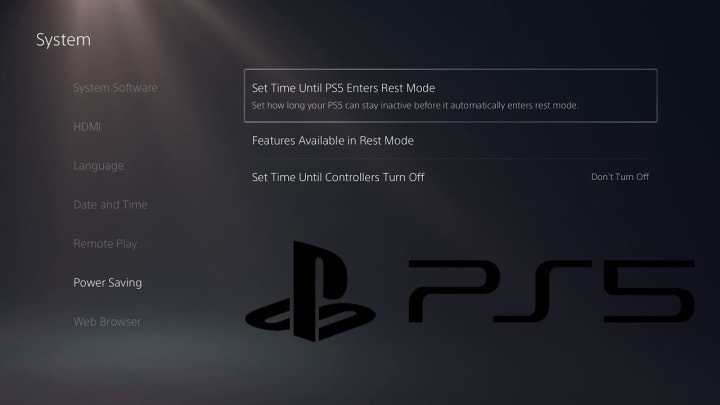
Adjust Auto Shutdown Settings: You can change the settings for automatic shutdowns under Settings > Power Saving to prevent your PS5 from turning off unexpectedly during gameplay.
5. HDMI-CEC Settings: TV-Related Shutdowns
Why it happens:
HDMI-CEC (Consumer Electronics Control) allows your TV to send commands to your PS5. Sometimes, this can cause the PS5 to turn off if the TV sends the wrong signal.
How to fix it:
Disable HDMI-CEC: Go to Settings > System > HDMI and turn off HDMI-CEC. You should also check your TV’s settings to ensure HDMI-CEC is disabled there too.
6. Faulty Hardware: When to Seek Professional Help
Why it happens:
Internal hardware issues, such as a faulty power supply, damaged power button, or malfunctioning fan, can cause your PS5 to turn off unexpectedly.
How to fix it:
Check the internal components: Inspect the power button and any visible wiring for damage. If you notice anything unusual, it might be time to contact PlayStation support.
Professional repair: If none of the above steps work, you may need to have your PS5 repaired. Contact PlayStation support or visit a certified repair center.
7. External Devices: Peripherals Drawing Too Much Power
Why it happens:
External devices such as USB peripherals, controllers, or external hard drives can sometimes draw too much power from the PS5, causing it to shut off.
How to fix it:
Unplug external devices: Disconnect any USB devices or external storage drives from your PS5. Check if the issue persists.
Try devices one at a time: Plug devices back in one by one to identify the one causing the shutdown.
8. Update Your PS5 to the Latest Version
Why it happens:
An outdated or incomplete system update can cause random shutdowns or instability in the PS5's performance.
How to fix it:
Install the latest updates: Check for any pending software updates by going to Settings > System > System Software and make sure your console is fully updated.
Conclusion
If your PS5 randomly turning off, you can try the easy fixes above to get it working properly again. Start with checking the basics—like ensuring proper ventilation and checking power connections—and work your way through the more technical fixes, like updating software or disabling power-saving features. In most cases, these simple solutions will get your PS5 running smoothly again.
If you’re still having trouble, don’t hesitate to reach out to PlayStation support for further assistance. With these troubleshooting tips, you’ll be back to gaming in no time!
Shop for PS5 Accessories at Great Prices
Looking for cooling stands, controllers, or other PS5 accessories to prevent shutdowns and improve your gaming setup? Visit bestnextgen.com, where you can easily compare Amazon prices Europe. Save time and money while finding the perfect gear for your PS5 today!
About the Creator
Keep reading
More stories from Morris Joy and writers in Gamers and other communities.
How to Fix Roblox Error Code 262: 7 Methods
Roblox Error Code 262 can be a frustrating roadblock, especially when you’re in the middle of a game. This error usually points to issues with connecting to Roblox servers, but there are several steps you can take to resolve it. Below, we’ll explore 7 practical solutions that go beyond the basics, offering a comprehensive approach to getting you back into the game.
By Morris Joy2 years ago in Gamers
15 New Xbox Game Pass Games Arriving in March and Beyond
Xbox Game Pass continues its impressive momentum in 2026, delivering a steady stream of new games for subscribers. Over the past few weeks, the service has been dropping exciting titles one after another, and March is shaping up to be another busy month.
By Info Post Gate5 days ago in Gamers


Comments
There are no comments for this story
Be the first to respond and start the conversation.