

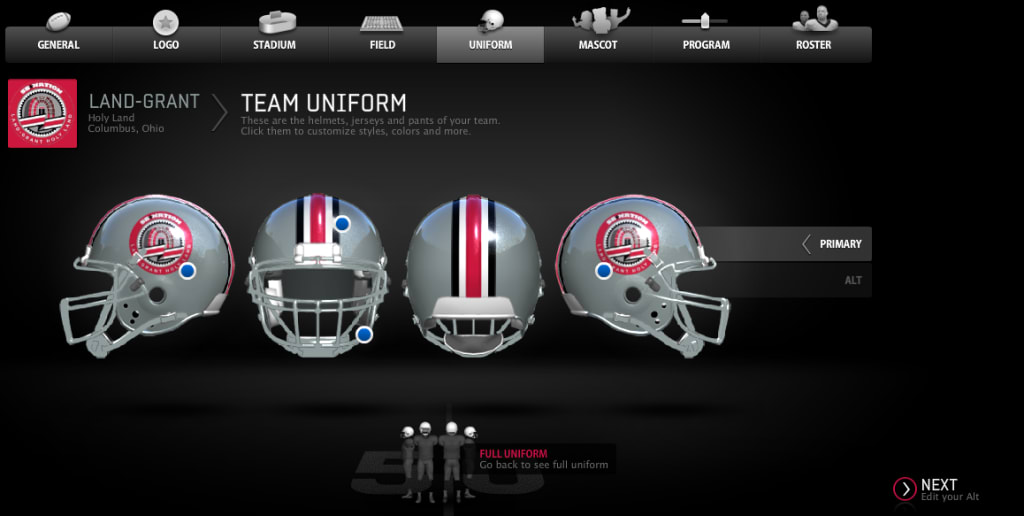
Madden 25 introduces an innovative Team Builder feature, offering players unparalleled control over crafting and customizing their own football teams. This feature, reminiscent of the popular College Football 25, lets users dive deep into team creation—from logos to stadiums, uniforms, and player rosters. Let’s explore how you can make the most of this exciting addition.
Getting Started with Team Builder
The first step in Madden 25’s Team Builder is setting up the foundation for your dream team. Players can upload personal logos, choose team colors, and even design the home field environment. Whether you aim to replicate a real-life team or create something entirely original, the customization options are nearly endless. For example, in one instance, the user created the Noblesville Blue Hawks, a team with vibrant blue hues and sleek wing designs, taking inspiration from teams like Oregon.
Customizing Uniforms and Stadiums
Customization goes far beyond logos and team colors. Madden 25 allows users to create up to five unique uniforms. You have the freedom to design home, away, and special edition uniforms. The user’s Blue Hawks sported eye-catching chrome-striped helmets and classic, streamlined jerseys for away games. Attention to detail can make your team stand out both on the field and in the crowd.
When it comes to stadiums, there are multiple stadium options, but one of the highlights is the Deluxe Stadium, with its futuristic aesthetics. This choice includes the ability to modify field logos and even change the turf color, providing a truly personalized experience.
Building the Roster
Once the look of your team is finalized, it's time to build a roster. Madden 25 allows you to tailor your team to fit a specific playing style. Whether you want a balanced, run-heavy, or pass-focused squad, you have full control over your roster. Players can also edit every athlete’s name, number, appearance, and attributes to align with their vision. Want a team full of defensive juggernauts or fast, elusive playmakers? Madden 25’s Team Builder can make that happen. Players can even use Madden 25 coins to make transactions and enhance their rosters further.
Saving and Sharing Your Team
As you build your team, it’s crucial to save your progress frequently to avoid losing any hard work. Once satisfied, submit the final product to Madden 25’s download center, where it can be shared with others. The user who created the Noblesville Blue Hawks, for instance, successfully imported the team into the game, making it available for others to download and use.
Taking Your Team into Franchise Mode
Once your team is uploaded, it’s time to jump into Franchise Mode. To integrate the custom team into Madden 25’s franchise, users must start an online play mode and replace an existing team, such as the Indianapolis Colts, with their creation. Here, you can choose to either keep the existing Colts roster or apply your Team Builder customizations to craft a fully unique experience.
Experiencing Your Creation in Action
As soon as your custom team hits the field, you’ll immediately notice how your designs come to life. The Blue Hawks’ futuristic stadium, combined with their distinctive uniforms, created a dynamic and immersive gaming experience. It’s these small touches that truly elevate the Madden 25 experience, adding a personal connection to the gameplay.
Conclusion
In summary, Madden 25’s Team Builder offers a comprehensive, engaging way to create and manage custom football teams. Whether you're designing eye-popping uniforms or assembling a star-studded roster, the tool provides everything you need to bring your dream team to life. With your custom creation, dive into Franchise Mode and lead your team to victory. Madden 25 is the perfect platform to unleash your inner coach, designer, and strategist, allowing you to take full control of your team's journey to victory.
About the Creator
Master the Meta: How to Increase Legendarity Fast in Rush Royale 2026
The landscape of Rush Royale shifted dramatically with the introduction of the Legendarity system. For veteran players, the old days of simply stacking critical damage percentage are over. In 2026, your prowess is no longer measured solely by how many common units you have painstakingly leveled up to 15.
By Richard Bailey3 days ago in Gamers



Comments
There are no comments for this story
Be the first to respond and start the conversation.