
Building Your Ideal Gaming Setup
Creating Your Perfect Gaming Space for the Best Playtime

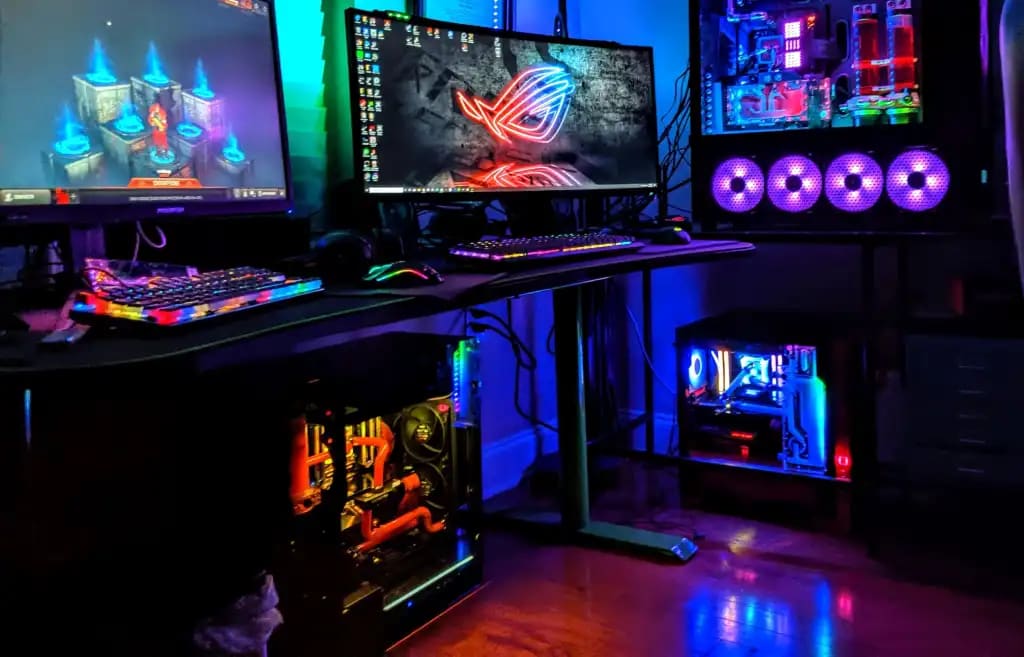
In the dynamic realm of gaming, cultivating the perfect gaming setup is not just a luxury but a necessity for an immersive and gratifying experience. Regardless of your gaming expertise, achieving an exceptional gaming encounter is within reach with the right combination of hardware, accessories, and ambiance. This article delves into the crucial components that contribute to constructing the ultimate gaming setup, ensuring that every level of gamer can enjoy their virtual escapades to the fullest.
1. Powerful Gaming Rig:
An effective gaming PC or console is the foundation of any gaming system. Invest in state-of-the-art hardware that can easily run the newest, highly graphic games. A seamless gaming experience requires a top-tier graphics card, a high-performance processor, and lots of RAM.
• Desktop PC: Consider a gaming desktop featuring components like the NVIDIA GeForce RTX 3080 or AMD Radeon RX 6800 XT, an Intel Core i9 or AMD Ryzen 9 processor, and at least 16GB of RAM.
• Gaming Laptop: ASUS ROG Zephyrus G14 with AMD Ryzen 9 5900HS and NVIDIA GeForce RTX 3060.
2. Quality Gaming Monitor:
Select a gaming monitor that works well with your robust setup. High refresh rates, quick response times, and adaptive sync technologies like FreeSync or G-Sync are desirable attributes to look for. Crisp and vivid visuals on a larger screen with a high resolution can further improve the visual experience.
• High-End: ASUS ROG Swift PG279Q 27" 1440p 165Hz IPS.
• Budget-Friendly: AOC CQ32G1 32" 1440p 144Hz VA.
3. Ergonomic Gaming Chair:
For extended gaming sessions, comfort is crucial. Purchase an ergonomic gaming chair to support your neck and back properly. During prolonged play, adjustable armrests, lumbar support, and a reclining feature can greatly improve your comfort and lower your chance of pain or damage.
• High-End: Secretlab Omega Series or Herman Miller Embody.
• Budget-Friendly: Homall Gaming Chair.
4. Customizable Lighting and Ambiance:
Customize the lighting to create a gaming environment. Your gaming area can become more lively and immersive with the addition of RGB lighting strips or smart lighting solutions. In order to lessen eye strain and improve the overall appearance, think about adding ambient lighting underneath your desk or behind your display.
• Smart Lighting: Philips Hue Play Light Bars or LIFX Z LED Strip.
• Ambient Lighting: Nanoleaf Light Panels.
5. High-Quality Audio Setup:
An immersive gaming environment requires a top-notch audio setup. To create a more realistic audio experience, get a surround sound system and a decent set of gaming speakers or headphones. A good microphone is also important to think about because it's important to communicate clearly with teammates.
• Headphones: Sennheiser HD 660 S or SteelSeries Arctis Pro Wireless.
• Speakers: Audioengine A5+ Wireless or Logitech G560 LIGHTSYNC.
6. Customizable Peripherals:
Select gaming accessories based on your preferences and style of play. You can get a competitive advantage by using mechanical keyboards, controllers that can be customized, and gaming mice with DPI adjustments. A big mouse pad for accurate movements and a gaming mouse with additional buttons for easy access to in-game commands should also be taken into consideration.
• Mechanical Keyboard: Corsair K95 RGB Platinum XT.
• Gaming Mouse: Logitech G Pro X Superlight.
• Controller: Xbox Elite Wireless Controller Series 2 or DualSense Wireless Controller for PlayStation.
7. Dual Monitor Setup (Optional):
An enlarged field of view in some games or multitasking can benefit from a twin monitor arrangement. This gives you more screen space that you may use for streaming, keeping an eye on conversations, or running multiple apps at once.
• High-End: Dell Alienware AW3420DW (ultrawide) paired with Dell S2719DGF.
• Budget-Friendly: AOC CQ32G1 (32") paired with ASUS VG245H (24").
8. Cable Management:
Organize your gaming area by allocating time for cable management. To keep cables neat and avoid tangling, use Velcro ties, organizers, and clips. This enhances the appearance of your setup and facilitates cleaning and upkeep.
• Cable Organizers: IKEA Signum Cable Management.
• Cable Clips: Blue Key World Cable Clips.
9. Regular Maintenance:
Sustaining your gaming system is essential for maximum longevity and efficiency. To avoid overheating, keep your peripherals and hardware clean, update your drivers frequently, and make sure your gaming area has adequate ventilation.
• Compressed Air: Dust-Off Compressed Gas Duster.
• Cleaning Supplies: Microfiber cloths, electronic wipes.
Building the ideal gaming setup is a fusion of art and technology, where every component plays a pivotal role in crafting an immersive and pleasurable gaming experience. Whether you're a casual gamer or a seasoned veteran, the pursuit of perfection in your gaming sanctuary is an ongoing journey. By incorporating the right hardware, peripherals, and ambiance, you can create a haven where your virtual adventures come to life, transcending the boundaries between reality and the digital realms you explore.
About the Creator
Dimension Drigger Tech
Every gadget has a story, and I'm here to tell it. Join me for engaging content – articles, videos, and social updates – where technology meets storytelling.
Keep reading
More stories from writers in Gamers and other communities.
🅼🅸🅳🅽🅸🅶🅷🆃 🆂🅽🅰🅲🅺🆂
"It's 10 in Tuscon! We all know what that means... It's Time for Midnight Snacks with your man, Gerald Gee! Ready to spend the night together? Me too! I'm full of snacks and can't wait to regurgitate them all back into your hungry ears. Crack a brew! Pop some corn! Anything to get ready for one hell of a show where the talk maybe cheap but the words cut deep...
By Lamar Wigginsa day ago in Fiction




Comments
There are no comments for this story
Be the first to respond and start the conversation.