
Best Affordable Studio Monitors in 2026 (Top Contenders)
Discover the best affordable studio monitors for home recording. Our guide covers top budget picks with great sound, easy setup, and excellent value.

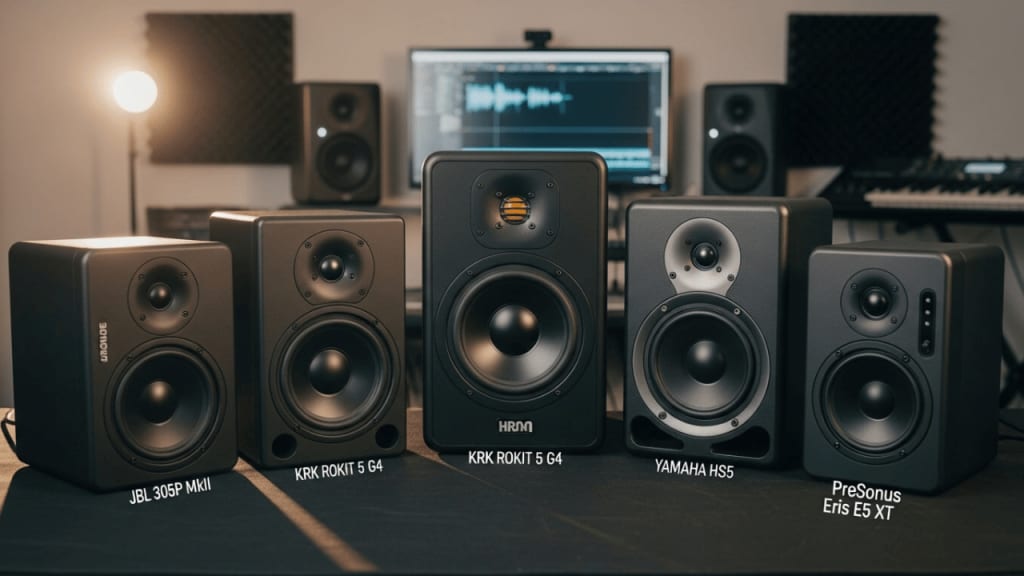
🎧 Best Affordable Studio Monitors
If you're searching for the best affordable studio monitors, you're in the right place. Whether you're a beginner producer, podcaster, or just love making music at home, good monitors help you hear your sound. And guess what? You don’t need to spend a fortune to get great quality.
In this guide, we’ll explore the top budget-friendly studio monitors that offer amazing sound without breaking the bank. We’ll also explain what makes a monitor great, how to choose one, and answer common questions at the end.
🎵 Why Studio Monitors Matter
Studio monitors are special speakers made for music production. Unlike regular speakers, they don’t boost bass or hide flaws. Instead, they give you a “flat” sound—what you hear is what you get. This helps you mix and edit your music better.
Even though headphones are useful, monitors give you a more natural feel of how your track sounds in a room. That’s why they’re a must-have for any home studio.
🛠️ How to Choose the Best Affordable Studio Monitors
Choosing the right monitor depends on your needs. Here are a few tips to help:
🎯 Consider Your Space
- Small room? Go for 3.5" or 5" monitors.
- Bigger room? You might need 6" or 8" monitors for better bass.
🔌 Check the Inputs
Make sure the monitor has the right connections for your gear—RCA, TRS, or XLR.
🔊 Look for Flat Response
A good monitor should not color the sound. You want it to be honest, so you can mix properly.
💡 Think About Your Goals
Are you mixing music, recording podcasts, or just jamming? Your use case affects your choice.
The Top 5 Best Affordable Studio Monitors That You Can Buy Today
- Adam Audio T5V – Best Overall
- Kali Audio LP-6 V2 – Best for Mixing
- JBL 305P MkII – Best for Clarity
- PreSonus Eris 3.5 – Best for Beginners
- Mackie CR3.5 – Best Under $100
1. Adam Audio T5V – Best Overall
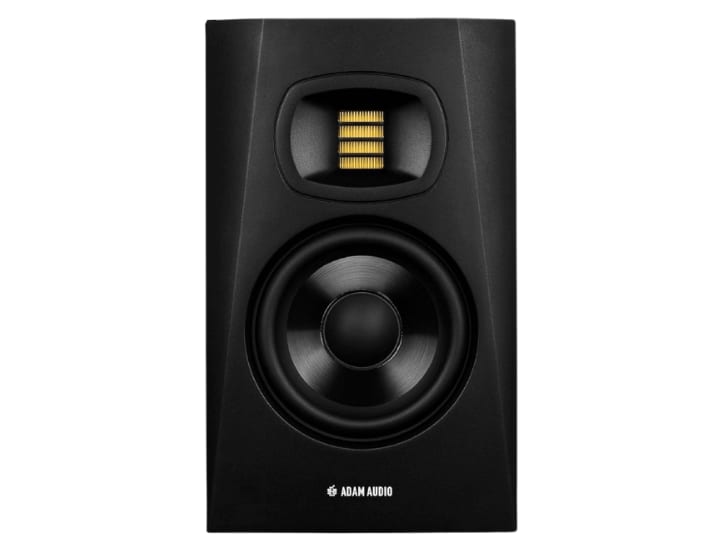
If you're building a home studio and want professional sound without spending a fortune, the ADAM Audio T5V Studio Monitor might be your perfect match. Designed for recording, mixing, and mastering, this compact powerhouse delivers studio-quality sound at a price that’s surprisingly friendly.
But what makes the T5V stand out in a crowded market of budget monitors? Let’s break it down.
🔍 What Makes the ADAM Audio T5V So Special?
The T5V isn’t just another affordable speaker—it’s a serious tool trusted by audio engineers and creators worldwide. Here’s why:
- U-ART Tweeter Technology: This unique ribbon tweeter delivers sparkling highs up to 25 kHz. It’s based on the same tech found in ADAM’s high-end models, giving you crisp detail without harshness.
- 5-Inch Polypropylene Woofer: Don’t let the size fool you. The woofer reaches down to 45 Hz, offering tight, punchy bass that’s rare in monitors this compact.
- Built-In Class D Amplifiers: Each monitor has its own amp—50W for the woofer and 20W for the tweeter—ensuring clean power and efficient performance.
- Rear Bass Reflex Port: This design helps with low-end extension while keeping the footprint small. You can place it near walls without muddying the sound.
- DSP-Controlled EQ Filters: Adjust high and low frequencies to suit your room. Whether your space is treated or not, you’ll get balanced sound.
🧠 Designed for Small Studios, Big Ideas
Whether you're mixing vocals, tracking guitar, or editing a podcast, the T5V adapts to your workflow. Its wide sweet spot means you don’t have to sit perfectly centered to hear your mix accurately. That’s a game-changer for creators working in tight or asymmetrical rooms.
And if you need more bass? The T5V pairs beautifully with the ADAM Audio T10S subwoofer, giving you a full-range setup without sacrificing clarity.
📦 What’s in the Box?
When you order a single T5V monitor, here’s what you get:
- One ADAM Audio T5V Studio Monitor
- Power cable
- User manual
Note: Audio cables are not included; ensure you have the correct connectors (RCA, XLR, or TRS) for your setup.
🛠️ Setup Tips for Best Results
To get the most out of your T5V:
- Place monitors at ear level, forming an equilateral triangle with your listening position.
- Avoid corners—they can boost bass too much.
- Use acoustic treatment if possible, or adjust the built-in EQ to compensate.
💬 Final Thought
The ADAM Audio T5V Studio Monitor proves that you don’t need deep pockets to get deep sound. With its advanced tweeter, powerful woofer, and smart design, it’s a top contender for anyone seeking the best affordable studio monitors. Whether you're a beginner or a seasoned producer, the T5V helps you hear your music the way it’s meant to be heard—honestly, clearly, and beautifully.
2. Kali Audio LP-6 V2 – Best for Mixing
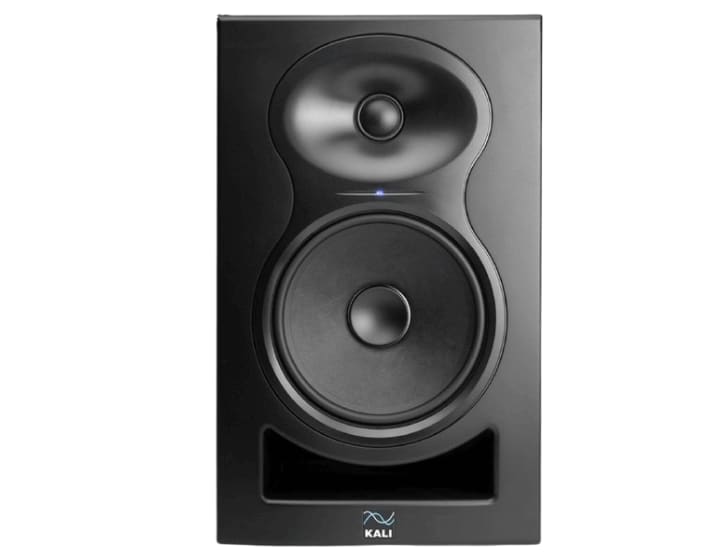
The second contender in our lineup of best affordable studio monitors is the KALI AUDIO LP-6 V2 6.5" Project Lone Pine Powered Studio Monitor. If you’re someone who values accuracy and wants to hear every detail in your mix, this monitor might just be your new best friend.
Let’s be real—mixing music isn’t just about making things sound good. It’s about making them sound right. And the LP-6 V2 is built to help you do just that.
🔊 Why the LP-6 V2 Deserves Your Attention
Kali Audio’s Lone Pine series has earned a reputation for delivering professional-grade sound at a price that’s accessible to independent creators. The LP-6 V2 takes that promise even further with upgraded features and a brutally honest sound profile.
Here’s what makes it shine:
- 6.5" Woofer + 1" Soft-Dome Tweeter: This combo delivers deep, controlled bass and smooth highs—perfect for mixing across genres.
- 3D Imaging Waveguide: Want to hear your mix in three dimensions? This waveguide creates a wide, tall, and deep stereo image, helping you place instruments and vocals with precision.
- Low-Noise Bi-Amped Design: Each driver has its amplifier, reducing distortion and improving clarity. You’ll hear every nuance, even at high volumes.
- Boundary EQ Settings: Got a tricky room? No problem. The LP-6 V2 includes smart EQ presets to help you tune your monitors to your space.
- Multiple Input Options: With TRS, RCA, and XLR inputs, it fits into almost any setup, whether you're using an audio interface, mixer, or straight from your computer.
📈 Performance That Punches Above Its Price
With 80 watts of power and a maximum SPL of 115dB, the LP-6 V2 is loud enough for most home studios. But more importantly, it’s clean. You won’t get muddy bass or hyped highs—just a flat, accurate response that lets you mix with confidence.
And if you’re wondering whether it’s good for mastering? Absolutely. Many engineers use it for both mixing and mastering because of its honest sound reproduction.
🧰 Who Is It For?
This monitor is ideal for:
- 🎼 Music producers who want accurate mixes
- 🎙️ Podcasters and voice-over artists need clear vocal playback
- 🎮 Game sound designers working with spatial audio
- 🎧 Anyone upgrading from consumer speakers or entry-level monitors
Whether you're working in a treated studio or a bedroom setup, the LP-6 V2 adapts beautifully.
🛠️ Setup Tips for Maximum Impact
To get the best results from your LP-6 V2:
- Place them at ear level, forming a triangle with your listening position.
- Use the boundary EQ to adjust for wall reflections or desk placement
- Pair with a subwoofer if you need extended low-end for genres like EDM or hip-hop.
💬 Final Thought
The KALI AUDIO LP-6 V2 isn’t just a budget-friendly studio monitor—it’s a precision tool for creators who care about their sound. With its advanced waveguide, powerful output, and room-friendly EQ settings, it gives you the confidence to mix faster and better. If you’re looking for one of the best affordable studio monitors that doesn’t compromise on quality, the LP-6 V2 is a serious contender.
3. JBL 305P MkII – Best for Clarity
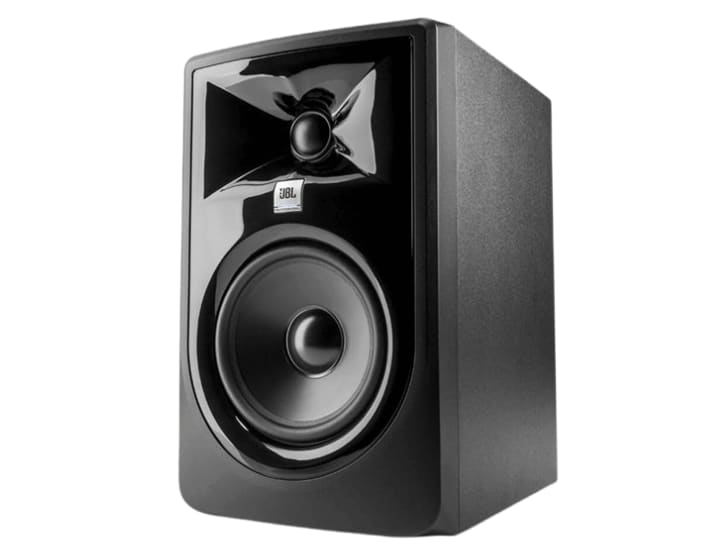
The third contender in our roundup of best affordable studio monitors is the JBL Professional 305P MkII—a 5-inch, 2-way powered monitor that’s earned its place in countless home studios. If you’re looking for a speaker that delivers precise imaging, dynamic range, and room-friendly performance, this one deserves your attention.
Whether you're mixing vocals, producing beats, or editing audio for video, the 305P MkII helps you hear your work with clarity and confidence.
🎯 Why Choose the JBL 305P MkII?
JBL has a long-standing reputation in professional audio, and the 305P MkII brings that legacy to your desktop. Here’s what makes it stand out:
- Patented Image Control Waveguide: This tech, borrowed from JBL’s flagship M2 monitors, gives you a wide sweet spot and stunning detail. You’ll hear every nuance—even if you’re not sitting dead center.
- Next-Gen Transducers: Refined drivers offer improved transient response and linearity, meaning your mixes sound tight and accurate.
- Dual Class-D Amplifiers (82W Total): These amps deliver clean power and high output, making the monitor suitable for both quiet editing and loud playback.
- Slip Stream™ Bass Port: Designed for superior low-end performance, this port keeps your bass tight and punchy—even at high volumes.
- Flexible Connectivity: With balanced XLR and TRS inputs, plus a sensitivity switch, it fits seamlessly into any studio setup.
- Boundary EQ & HF Trim Switches: Tweak your sound to match your room’s acoustics. Whether your space is treated or not, you’ll get balanced playback.
🧠 Who Is the JBL 305P MkII For?
This monitor is ideal for:
- 🎶 Bedroom producers and indie musicians
- 🎙️ Podcasters and voice editors
- 🎥 Content creators working with video soundtracks
- 🎧 Audiophiles seeking hi-fi desktop audio
Its compact size makes it perfect for nearfield listening, and its sound quality punches far above its price.
🛠️ Setup Tips for Optimal Sound
To get the most out of your 305P MkII:
- Place monitors at ear level, angled toward your listening position.
- Use the boundary EQ if placing near walls or corners.
- Pair with a subwoofer like the JBL LSR310S for full-range monitoring.
💬 Final Thought
The JBL Professional 305P MkII is more than just a budget-friendly studio monitor—it’s a precision tool that brings professional-grade sound to your desktop. With its advanced waveguide, powerful output, and room-tuning features, it’s a top choice for creators who want accuracy without complexity.
If you’re serious about your sound but working with a modest budget, the 305P MkII is a smart investment. It’s proof that great mixes don’t require great expense—just great monitors.
4. PreSonus Eris 3.5 – Best for Beginners
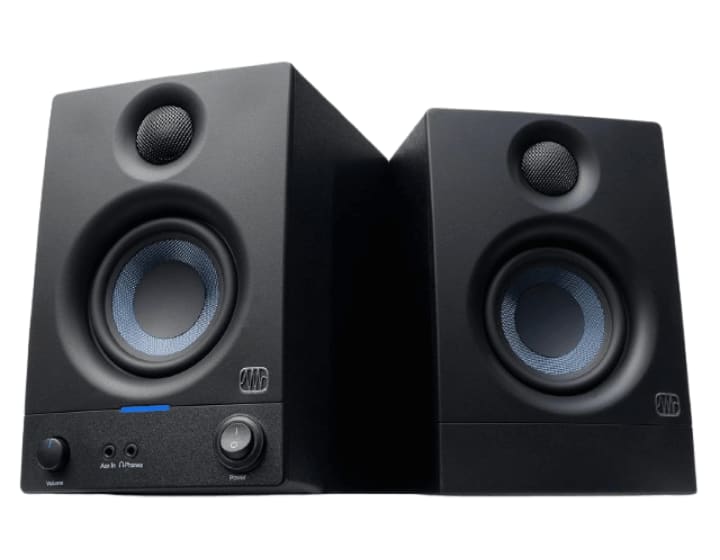
The fourth contender in our guide to the best affordable studio monitors is the PreSonus Eris 3.5, a compact yet powerful pair of speakers designed for nearfield music production, desktop setups, and hi-fi audio listening. If you’re just starting your creative journey or need a reliable monitor for a small space, this one checks all the boxes.
Let’s explore why the Eris 3.5 is a favorite among bedroom producers, gamers, and multimedia creators.
🎧 Why the PreSonus Eris 3.5 Stands Out
Don’t let its size fool you—the Eris 3.5 delivers studio-quality sound in a sleek, space-saving design. Here’s what makes it a standout:
- 3.5-Inch Woven Composite Woofer: Tight, punchy bass that feels bigger than the speaker’s footprint. The woven design helps reduce distortion and keeps the low end clean.
- 1-Inch Silk-Dome Tweeter: Smooth, natural highs with a wide dispersion pattern. You’ll enjoy a broad sweet spot, even if you’re not sitting perfectly centered.
- 50 Watts of Class AB Amplification: With 25 watts per side, these monitors pack enough punch for small rooms without sacrificing clarity.
- Acoustic Tuning Controls: High- and low-frequency knobs let you adjust the sound to match your room’s acoustics. Great for untreated spaces.
- Versatile Connectivity: Rear-panel TRS and RCA inputs plus a front-panel aux input and headphone jack make it easy to connect to any device—from audio interfaces to laptops and mobile phones.
- Front-Panel Volume Control: Convenient access to adjust speaker and headphone levels without reaching behind your desk.
🧠 Who Should Use the Eris 3.5?
This monitor is ideal for:
- 🎼 Beginner producers building their first studio
- 🎮 Gamers and streamers wanting better sound
- 🎙️ Podcasters and voice-over artists
- 🎥 Video editors working in tight spaces
- 🎧 Audiophiles seeking compact hi-fi audio
Its small footprint and flexible inputs make it perfect for desks, dorms, and home studios.
🛠️ Setup Tips for Better Sound
To get the best performance from your Eris 3.5 monitors:
- Place them at ear level, angled slightly inward.
- Use the acoustic tuning knobs to adjust for room reflections.
- Avoid placing them directly against walls to prevent bass buildup.
- Consider pairing with the Eris Sub8 BT if you need more low-end punch.
💬 Final Thought
The PreSonus Eris 3.5 Studio Monitors prove that great sound doesn’t have to come with a hefty price tag. With their clear audio, smart design, and versatile connectivity, they’re a top pick for anyone starting or working in a small space. If you’re looking for one of the best affordable studio monitors that delivers more than expected, the Eris 3.5 is a smart, stylish, and sonically solid choice.
5. Mackie CR3.5 – Best Under $100
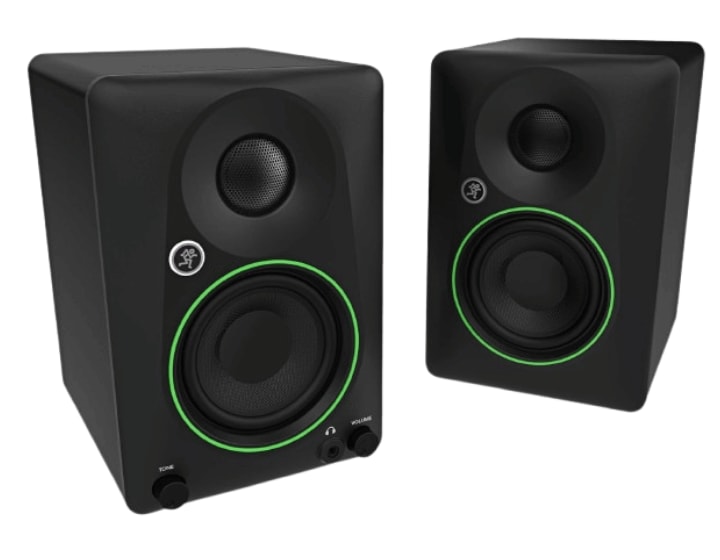
The fifth contender in our lineup of best affordable studio monitors is the Mackie CR3.5 3.5-inch Powered Studio Monitors. If you're looking for a budget-friendly speaker that can handle everything from music production to casual listening, this little powerhouse might be exactly what your setup needs.
Whether you're mixing tracks, gaming, podcasting, or just vibing to your favorite playlist, the CR3.5 adapts to your lifestyle—and your desk space.
🎧 Why the Mackie CR3.5 Is a Smart Choice
Mackie’s CR Series is known for blending professional-grade sound with everyday usability. The CR3.5 takes that philosophy and packs it into a compact, stylish design that fits almost anywhere.
Here’s what makes it stand out:
- 3.5" Polypropylene-Coated Woofer: Delivers tight, punchy bass that’s perfect for small rooms and desktop setups.
- 0.75" Silk-Dome Tweeter: Smooth, detailed highs that make vocals and instruments shine.
- 50W Total Power (25W per speaker): Enough volume to fill your space without distortion or fatigue.
- Tone Control Knob: Shape your sound on the fly—go from flat studio response to bass-boosted party mode with a twist.
- Location Switch: Flip between desktop and bookshelf modes to optimize sound based on where you place the monitors.
- Multiple Inputs: TRS, RCA, and 3.5mm inputs let you connect to audio interfaces, mixers, computers, or even your phone.
- Front-Panel Headphone Output: Instantly switch to private listening with a simple plug-in—no menu diving required.
🧠 Who Should Use the CR3.5?
This monitor is ideal for:
- 🎼 Beginner producers and hobbyists
- 🎮 Gamers who want immersive sound
- 🎙️ Podcasters and streamers
- 🎧 Music lovers seeking hi-fi desktop audio
- 🏠 Anyone with limited space but big sound goals
Its compact size and flexible features make it perfect for multi-use environments—your studio, your office, your living room.
🛠️ Setup Tips for Better Sound
To get the most out of your Mackie CR3.5:
- Use desktop mode for close-up listening and bookshelf mode for wider placement.
- Adjust the tone knob to match your activity—flat for mixing, boosted for fun.
- Keep them at ear level and angled toward your listening position.
- Avoid placing them directly against walls to prevent bass buildup.
💬 Final Thought
The Mackie CR3.5 Studio Monitors prove that great sound doesn’t have to come in a big box—or with a big price tag. With their versatile tone control, smart input options, and compact design, they’re perfect for creators who want flexibility without sacrificing clarity.
If you're building a studio on a budget or just want better sound at your desk, the CR3.5 is one of the best affordable studio monitors to consider. It’s not just a speaker—it’s your all-in-one audio companion.
🧪 Testing and Reviews Matter
All the monitors listed here have been tested by audio engineers and reviewed by trusted sources like MusicRadar, Higher Hz, and Music Critic. They’ve been used in real studios and homes, so you can trust their performance.
✅ Conclusion
Finding the best affordable studio monitors doesn’t have to be hard. With options like the Adam Audio T5V, JBL 305P MkII, and PreSonus Eris 3.5, you can get great sound without spending too much. Just think about your space, your goals, and your budget.
Good monitors help you make better music. And now, you know which ones to choose.
❓ FAQ
Q: Can I use regular speakers instead of studio monitors? A: You can, but they won’t give you accurate sound. Studio monitors are better for mixing.
Q: Do I need an audio interface? A: Yes, if your monitors use XLR or TRS cables. It helps improve sound quality, too.
Q: What size monitor should I get? A: For small rooms, 3.5" or 5" is enough. Bigger rooms may need 6" or 8".
Q: Are studio monitors good for gaming or movies? A: Yes! They offer clear sound, but they’re designed for music production
Q: Can I mix music with headphones only? A: You can start with headphones, but monitors give a better sense of space and balance.
About the Creator
Perfect Tech Views
Welcome to Perfect Tech Views—your go-to source for clear, unbiased, and insightful tech knowledge. Whether you're a pro, a beginner, or just exploring gadgets, we've got you covered with expert guidance!
Keep reading
More stories from Perfect Tech Views and writers in Gamers and other communities.
Best Affordable Monitor for Photo Editing in 2026 (Expert Choice)
🖥️ Best Affordable Monitor for Photo Editing If you're editing photos, the best affordable monitor for photo editing is more than just a screen. It helps you see colors clearly, spot tiny details, and make your pictures look amazing. Even if you're on a budget, you can still find great monitors that do the job well.
By Perfect Tech Views4 months ago in Gamers
Diablo IV Season 11 Class Rankings: The Definitive Guide to Picking Your Hero and Avoiding Early-Game Burnout
With the arrival of Season 11, Diablo IV now boasts seven distinct classes: Sorcerer, Necromancer, Rogue, Barbarian, Druid, Spiritborn, and Paladin. Given the steep price of entry—often around $70—choosing the wrong starter can lead to immediate burnout. This review, based on clearing Pit Tier 55 and reaching Torment IV with every class, aims to help you spend your time and money wisely.
By hasan zidan4 days ago in Gamers




Comments