
Assassin’s Creed Shadows Photo Mode Guide – How to Capture Cinematic Shots in Feudal Japan
Master every feature of photo mode in Assassin’s Creed Shadows to capture stunning, cinematic shots across feudal Japan.

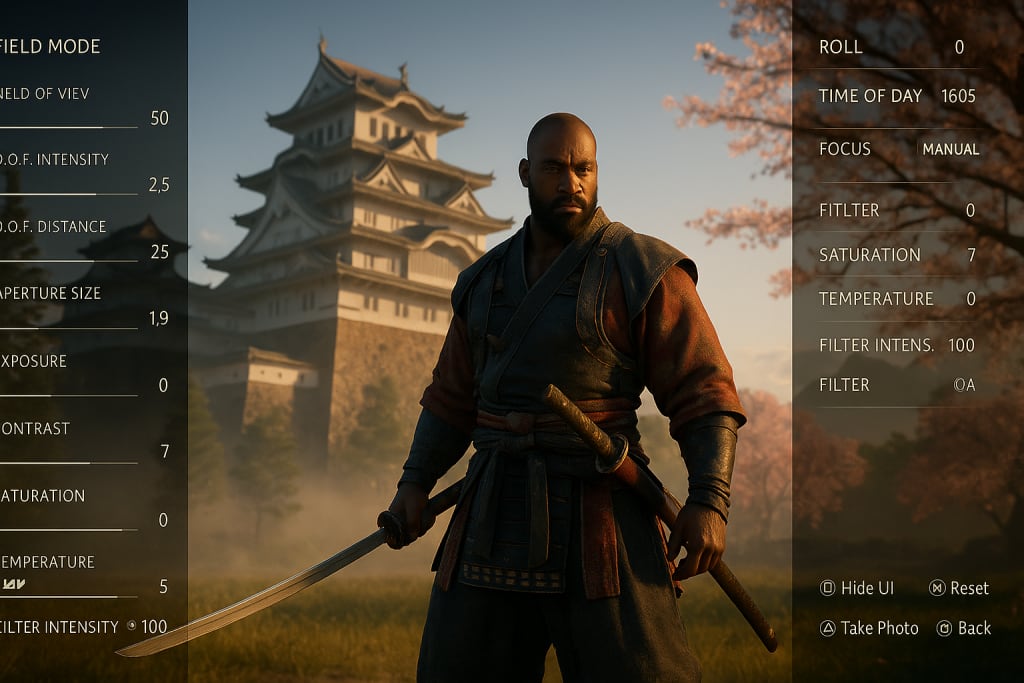
Assassin’s Creed Shadows transports players to a breathtaking rendition of feudal Japan, filled with misty forests, bustling castle towns, and serene shrines nestled deep within the mountains. For players who love capturing moments, Ubisoft’s latest photo mode is more than just a screenshot tool—it’s a full-fledged creative suite.
Whether you’re chasing that perfect sunset behind Himeji Castle or freezing a bloody duel mid-slash, this guide will walk you through everything you need to know to master photo mode in Assassin’s Creed Shadows.
How to Access Photo Mode in Assassin’s Creed Shadows
Let’s start with the basics. Accessing photo mode is simple. At any time during gameplay (except during cutscenes or quick-time events), press the right analog stick (R3) and left analog stick (L3) simultaneously on your controller. For PC players, the default shortcut is F3, but you can remap it in the settings if needed.
Once activated, the screen will freeze and transition to photo mode, allowing full control of the camera, filters, and visual settings. From here, you’re free to explore the frame, reposition the camera, and fine-tune your shot.
Camera Controls and Movement – Mastering the Basics
The first thing you’ll notice is how much freedom Ubisoft gives you. The camera is fully detached, allowing for both wide cinematic views and tight close-ups. Use the following controls to move the camera:
- Left stick / WASD – Move the camera
- Right stick / Mouse drag – Pan and tilt
- Triggers / Scroll wheel – Zoom in and out
- L1/R1 or Q/E – Tilt the camera roll for dynamic angles
Adjusting the field of view (FOV) is crucial. A narrow FOV can create intense, portrait-style compositions, while a wide FOV is perfect for showcasing landscapes or architecture. Keep in mind that FOV can drastically affect how distant or grand your subject appears—so experiment liberally.
Depth of Field – Controlling Focus for Cinematic Impact
One of the most powerful tools in photo mode is depth of field (DOF). It lets you blur parts of the image while keeping a subject in sharp focus, much like a professional camera lens. When used correctly, it adds depth, drama, and realism.
To use DOF effectively:
- Adjust the focus distance so your subject is crisp and detailed.
- Increase the aperture size to create more background blur.
- Use manual focus if the auto-focus doesn’t lock where you want.
If you’re photographing Naoe in the middle of a stealth takedown, a shallow DOF can isolate her from the background, giving your shot a dramatic, cinematic quality that draws attention to her blade mid-swing.
Lighting and Time of Day – Painting with Natural Elements
Lighting can make or break a photo. Assassin’s Creed Shadows lets you manipulate the time of day and weather in photo mode, giving you complete control over how light interacts with your scene.
Want golden-hour warmth during a standoff in a bamboo grove? Slide the time forward to early evening. Want fog rolling in over a moonlit battlefield? Toggle the weather to misty night.
Here’s how to use lighting to your advantage:
- Backlighting: Position your subject between the camera and the sun to create silhouettes.
- Side lighting: Emphasizes facial features and texture, great for character portraits.
- Top-down lighting: Adds harsh shadows, creating a more menacing or gritty vibe.
Use these tools to tell a story. Lighting is mood, and mood is everything in visual storytelling.
Framing and Composition – Rule of Thirds, Leading Lines, and Layering
Once the technical setup is complete, it’s time to compose your shot. Composition is the difference between a simple screenshot and a visually striking image. Use these principles:
- Rule of Thirds: Divide the screen into a 3x3 grid and position key elements along the lines or intersections.
- Leading Lines: Use environmental features like roads, bridges, or architecture to draw the viewer’s eye toward your subject.
- Foreground, Midground, Background: Include multiple layers in your shot to give it depth and realism.
Imagine Yasuke walking through a market street, with flags fluttering in the foreground, him towering in the midground, and a pagoda rising in the hazy distance. That’s a layered shot that feels alive.
Using Filters and Color Grading
Assassin’s Creed Shadows includes a wide selection of filters and custom color grading tools. Don’t rely on them to save a bad shot—but when used purposefully, they elevate your work.
Here’s how to approach filters:
- Monochrome filters emphasize emotion and shape.
- Warm filters add nostalgia or peacefulness.
- Cool filters suggest danger, stealth, or melancholy.
Color grading sliders allow for fine-tuned control over contrast, exposure, vibrance, and temperature. Subtle adjustments often look better than extreme ones. Try tweaking contrast and saturation slightly to give your shots a punch without overexposing the details.
Action Shots – Freezing Combat in Motion
Capturing a fight is tricky. You have to pause at just the right frame when the motion is most dynamic. Look for moments of tension—just before a blade strikes, or when a body is twisting mid-air. Assassin’s Creed Shadows often features animations with dramatic posture and momentum, so take advantage of those poses.
Use a low shutter angle and strong DOF to highlight motion. A tilted camera angle, known as the Dutch tilt, can increase visual tension and drama.
Tip: Naoe’s quick, ninja-like takedowns often look better in tight frames, while Yasuke’s brute-force swings work best from wide or low-angle shots that emphasize power.
Environmental Storytelling – Shots That Say More
Not every photo needs a subject in the frame. Sometimes, the most impactful images are quiet. A broken katana buried in the mud. A blood trail leading out of frame. A shrine left in decay, bathed in the soft glow of the setting sun.
These shots allow the world itself to speak. Assassin’s Creed Shadows is rich with detail, and many players miss it in the heat of gameplay. Use photo mode to slow down and explore what these environments say about history, culture, and conflict.
Best Locations for Photos in Assassin’s Creed Shadows
While the entire map is stunning, a few key locations stand out for photography:
- Himeji Castle: Ideal for sunrise or foggy twilight shots.
- Kyoto Streets: Use lantern light to capture dramatic night scenes.
- Bamboo Forests: Excellent for action shots and dynamic lighting.
- Mountain Temples: Provide peaceful, spiritual ambiance—perfect for calm portraits or wide landscapes.
Explore on foot and take your time. Sometimes the best scenes are tucked away in quiet corners.
Turning Moments into Art
Assassin’s Creed Shadows isn’t just about combat and stealth—it’s about immersion. Photo mode allows you to engage with the world on a different level. It turns the player into a silent observer, a documentarian of a fading era. Every shot you take becomes a postcard from the past, a frozen piece of a world shaped by blade, honor, and blood.
So experiment. Zoom in. Pan out. Tilt, filter, and tweak. Then do it again. You’re not just taking pictures. You’re telling stories—one frame at a time.
About the Creator
Richard Bailey
I am currently working on expanding my writing topics and exploring different areas and topics of writing. I have a personal history with a very severe form of treatment-resistant major depressive disorder.
Keep reading
More stories from Richard Bailey and writers in Gamers and other communities.
20 Inspiring D&D Map Ideas You Can Steal for Your Campaign
Why Great Maps Matter in D&D Maps are more than lines on parchment. In Dungeons & Dragons, a map can tell a story before a single word is spoken. It can evoke danger, history, wonder—or fear. A good map doesn’t just set the scene; it shapes the entire session.
By Richard Bailey7 months ago in Gamers
U4gm MLB The Show 26: A Complete Evolution of Baseball Gaming
MLB The Show 26 takes baseball simulation to an entirely new level. This year’s edition isn’t just a simple update — it represents a full evolution of the franchise, combining realism, strategy, and fun in one polished package. From career journeys to competitive online play, every mode has been refined, making the game more immersive and rewarding than ever before.
By Billo Nali6 days ago in Gamers


Comments
There are no comments for this story
Be the first to respond and start the conversation.