
Top CI/CD Tools Every QA Automation Engineer Should Know
CI/CD Tools: Test Automation


In DevOps, CI/CD practices are crucial for smoothly building, testing, and deploying code. This automated approach has clear benefits compared to older methods, which often involve manual testing and deployment, causing delays and more errors. CI/CD helps DevOps teams by automating repetitive tasks, consistently checking code, and quickly deploying updates. This approach encourages teamwork among developers, testers, and operations staff, speeds up the release process, and ensures software quality as it changes.
By incorporating CI / CD processes into their workflow systems can speed up the feedback loop. Enable developers and testers to resolve issues as they arise better code quality and consistency, in software releases has improved significantly The integration of CI / CD, with DevOps practices has revolutionized team collaboration methods leading to more effective software development pipelines.
What Are CI/CD Tools?
CI/CD tools are software solutions designed to facilitate continuous integration, delivery, and deployment processes within DevOps workflows. They help automate tasks like building, testing, and deploying code, ensuring that applications remain in a stable, deployable state across environments. CI/CD tools offer a wide range of features, from integrating with version control systems (like Git) to automating tests and managing deployments.
These tools often connect seamlessly with other DevOps software, including monitoring solutions, code repositories, and collaboration platforms. By adopting CI/CD tools, teams can reduce human error, increase code consistency, and streamline collaboration, making it possible to release software quickly and reliably.
Benefits of using CI CD tools
Implementing CI/CD tools in DevOps workflows provides several significant benefits that can drive project success and boost productivity:
- Faster Time to Market: By automating the build, test, and deployment processes, CI/CD tools enable teams to release new features and fixes more quickly and frequently.
- Improved Quality: CI/CD tools enforce automated testing, which helps catch bugs and issues early in the development cycle for more stable releases.
- Reduced Manual Errors: Automation minimizes the risk of human error during repetitive tasks such as code integration, testing, and deployment to bring consistency and reliability to the development process.
- Early Bug Detection: Continuous integration allows for early detection of integration issues and bugs as the code is integrated and tested frequently.
- Efficient Use of Resources: Automation reduces the need for manual intervention in the build and deployment process, allowing developers to focus more on coding and problem-solving rather than repetitive tasks.
- Consistent Deployment Environments: CD tools ensure that code is deployed in a consistent manner across different environments (development, staging, production) reducing the chances of environment-specific issues.
- Faster Feedback Loop: Developers receive rapid feedback on their code changes through automated testing and deployment accelerating the development process.
- Scalability: CI/CD pipelines can be scaled to handle larger projects and more complex workflows. This adaptability supports growth and evolving requirements.
- Improved Security: Automated security checks and vulnerability scans can be integrated into the CI/CD pipeline, ensuring that security best practices are followed.
- Reduced Deployment Risks: By deploying small, incremental changes frequently, CD tools help mitigate the risks associated with large-scale deployments and make it easier to rollback changes if needed.
- Better Monitoring and Reporting: CI/CD tools usually include monitoring and reporting features that give information about the build and deployment steps, helping teams find and fix problems early. Similar to a Test Management Tool that works well with Azure DevOps and Jenkins.
Understanding the Key Stages of a CI/CD Pipeline
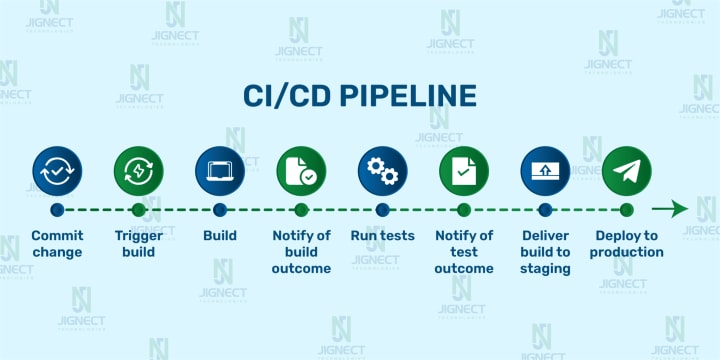
A CI/CD pipeline helps take your code from development to production in an organized and automated way. The process usually starts with writing the code and ends with deploying it live. Pipelines can be triggered automatically when code changes, scheduled to run at specific times, started manually, or triggered after another pipeline.
Here are the four key stages of a CI/CD pipeline:
How to choose the right CI CD Tool?
- Project Size and Complexity
- Integration with Version Control Systems (VCS)
- Team Expertise and Resources
- Cloud vs On-Premises
- Pipeline Complexity
- Cost Considerations
- Security and Compliance
- Scalability Needs
Top 7 CI/CD Tools: Features and Benefits Uncovered
Exploring Other CI/CD Tools in the Market
Common characteristics of CI/CD tools
Most CI/CD tools share certain characteristics that make them suitable for automating DevOps workflows. Let’s examine some of the key features that are often found in CI/CD tools:
Pipeline Automation: CI/CD tools automate stages of the pipeline, from code integration to deployment, allowing for smooth, continuous workflows.
Version Control Integration: Most CI/CD tools are compatible with popular version control systems, like Git, making it easier to manage code versions and track changes.
Automated Testing: An integral feature, automated testing runs unit, integration, and end-to-end tests, verifying code stability before deployment.
Deployment Management: These tools facilitate seamless deployment to production and staging environments, often with rollback options in case of failures.
Container Support: Many CI/CD tools offer integration with containerization platforms like Docker and Kubernetes, providing flexible, consistent deployment environments.
Extensibility: CI/CD tools often support plugins or extensions, enabling teams to add functionality tailored to their workflow.
These characteristics are crucial in making CI/CD tools efficient, reliable, and adaptable to various project needs.
Trends in CI/CD Tools
CI/CD tools are evolving, with new trends and advancements shaping how DevOps teams approach software development and deployment. Here are some of the latest trends in CI/CD tools:
AI-Driven Automation: Artificial intelligence is making CI/CD smarter by helping to detect and prioritize issues automatically, reducing the burden on human teams.
Serverless CI/CD: Serverless architectures offer on-demand resources, reducing costs and scaling according to need, a major trend in modern CI/CD implementations.
Enhanced Security Features: With an increased focus on DevSecOps, CI/CD tools are incorporating security scans and compliance checks directly within the pipeline.
Hybrid CI/CD Pipelines: Many organizations are adopting hybrid pipelines that leverage both cloud and on-premises resources, offering flexibility and security in deployments.
Multi-Cloud Compatibility: CI/CD tools are evolving to support multi-cloud environments, allowing deployments across different cloud providers seamlessly.
These trends highlight how CI/CD tools are continually advancing to meet the demands of modern DevOps workflows, improving speed, security, and reliability.
Best Practices to Optimize the CI/CD Process
Making your CI/CD process more efficient can save time, reduce errors, and improve the quality of your software. Here are some practical tips to optimize your pipeline:
Centralize Your Code
Keep all your code, configuration files, and documentation in one version control system. This makes it easier to track changes, collaborate, and manage everything in one place.
Automate as Much as Possible
Automate tasks like building, testing, deploying, and monitoring. Automation reduces mistakes, saves time, and ensures consistency in your process.
Standardize the Build Process
Use the same build process locally and in your CI/CD pipeline. This avoids surprises by ensuring builds work the same way everywhere.
Run Tasks in Parallel
Speed things up by running tests and other tasks at the same time. Just make sure tasks don’t depend on each other to avoid conflicts.
Use Build Artifacts
Save build outputs (like binaries or packaged apps) in a central place. This makes it easy to deploy them to different environments or roll back to previous versions when needed.
Test Thoroughly
Include different types of tests in your pipeline, such as unit, integration, and end-to-end tests. This helps catch issues before your code goes live.
Manage Configurations Carefully
Use tools like Infrastructure as Code (IaC) to handle environment configurations. Automating this ensures consistency and reduces errors across environments.
Monitor and Improve
Keep an eye on your pipeline’s performance. Use metrics and team feedback to find and fix bottlenecks. Continuously fine-tune the process to make it better.
Promote Team Collaboration
Encourage open communication between developers, testers, and operations teams. A collaborative environment helps everyone work together towards delivering great software.
Make Security a Priority
Include security checks in your pipeline, such as code scans, dependency checks, and security testing. Catching vulnerabilities early reduces risks down the line.
Conclusion
CI/CD tools have become indispensable in DevOps, streamlining the complex processes of integration, testing, and deployment. With numerous options available, the key to finding the right CI/CD tool lies in understanding your project’s specific needs and carefully evaluating features, integrations, and scalability. As technology advances, CI/CD tools are likely to offer even more sophisticated features, such as AI-driven insights, serverless infrastructure, and enhanced security.
Embracing the right CI/CD tool will help your team work more efficiently, collaborate effectively, and deliver high-quality software to users. In a world where speed and quality are critical to success, CI/CD tools are indeed the backbone of a productive DevOps environment.
Witness how our meticulous approach and cutting-edge solutions elevated quality and performance to new heights. Begin your journey into the world of software testing excellence. To know more refer to Tools & Technologies & QA Services.
About the Creator
Jignect Technologies
At JigNect Technologies, we believe that software testing is an art, a science, and a passion. Our team of experts combines years of experience, cutting-edge technology.
Keep reading
More stories from Jignect Technologies and writers in FYI and other communities.
Top Reasons Why You Need Automated Accessibility Testing
What is Accessibility Testing? Accessibility testing refers to the process of meticulously evaluating and assessing a software product or application to ensure compliance with government accessibility laws and that it provides equal access to all users, including those with impairments, without barriers impeding their experiences.
By Jignect Technologiesabout a year ago in FYI
A Failed Artist, A Disillusioned Poet, An Underpaid Game Show Host
I took my son and niece to Gori, a small town in Georgia where Joseph Stalin was born. They talked me into visiting the Stalin's Museum, the largest in the post-Soviet space. I had resisted going there because I just can't stand the monster and know enough about him, or so I thought.
By Lana V Lynx20 days ago in FYI
Autonomy Is The Real Privilege
Good morning, freedom-seekers! Today we’re gonna be looking at autonomy. A strange word, I know; one many would probably look at blankly and run away from on sight. We’re gonna figure out what it actually means, consider how it’s achieved, and decipher just how deeply most of us are tangled up in dependence without realising it.
By That ‘Freedom’ Guy6 days ago in Humans



Comments
There are no comments for this story
Be the first to respond and start the conversation.