
Surface Laptop Physical Damage
Understanding the Risks and the Path to Restoration
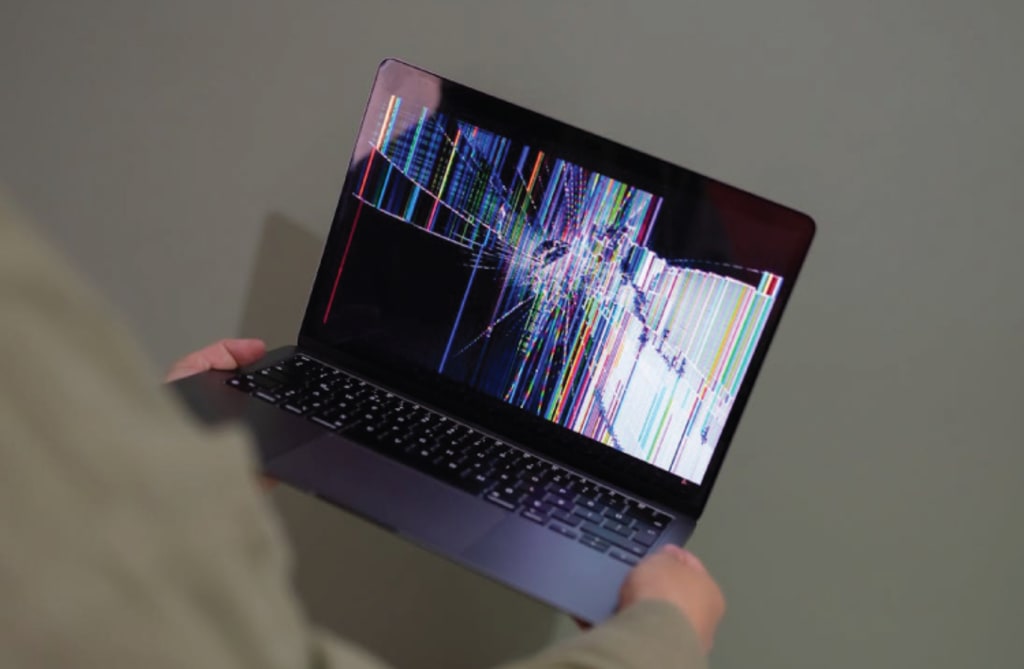
Physical damage to laptops, particularly premium devices like Microsoft’s Surface series, represents more than a hardware failure—it introduces operational, financial, and logistical complications that can ripple across an individual’s workflow or an entire business. As sleek and performance-oriented as Surface Laptops are, their compact design and integrated components make them both technologically impressive and mechanically sensitive.
While digital threats often dominate the conversation—malware, data breaches, and software corruption—physical damage remains one of the most unpredictable and impactful forms of disruption. A cracked display, a bent frame, liquid intrusion, or a non-functional touchpad can render even the most powerful device practically unusable. In professional environments, such setbacks can result in costly downtime, missed deadlines, and avoidable stress.
Understanding the nature of physical damage, its impact on Surface devices, and the process of quality repair is essential for users who depend on their laptops for continuity and productivity.
________________________________________
Types of Physical Damage Common in Surface Laptops
Unlike traditional laptops with replaceable components, Surface devices are built with a high level of hardware integration. This design, while enabling slim profiles and portability, also increases vulnerability in certain scenarios. Here are some of the most frequently encountered forms of physical damage:
• Screen Cracks and Display Damage: Often the result of drops, pressure from heavy objects, or sharp impacts. The high-resolution PixelSense display, though visually stunning, is sensitive to shock.
• Chassis Bends and Frame Deformation: The aluminum body is sturdy, but not immune to structural distortion when the device is stored improperly or subjected to uneven force.
• Keyboard and Touchpad Issues: Liquid spills, accidental detachment, or key damage due to rough use can render input systems ineffective, especially in models with integrated keyboards.
• Port and Connector Damage: USB ports, charging jacks, and Surface Connect ports can become misaligned or break entirely when subjected to abrupt pull forces or poor cable handling.
• Hinge Malfunctions: While less common, issues with the hinge mechanism—especially in Surface Laptop Studio or Book models—can severely limit functionality.
• Thermal and Cooling Component Impacts: In rare cases, physical shock may disturb internal fans or heat dissipation systems, leading to overheating or system throttling.
________________________________________
Why Physical Damage Demands Specialized Repair
Surface Laptops are not conventional devices. The internal architecture is optimized for minimal thickness, which means components are densely packed and often layered in non-modular arrangements. In practice, this means two things:
1. Physical repairs require precise dismantling methods. Most Surface models are not designed for easy user-serviceable disassembly. Attempting self-repair or working with general repair shops that lack brand-specific knowledge often leads to further damage.
2. Replacement parts and calibration tools are specialized. A cracked Surface screen is not interchangeable with off-the-shelf touchscreens. Similarly, internal flex cables, thermal plates, or connectors are model-specific and demand OEM-grade replacements.
The intricacy of the Surface Laptop’s construction calls for a technician not only skilled in hardware restoration but also equipped with the right tools and schematics. It’s this combination that separates surface-level fixes from meaningful, long-term recovery.
________________________________________
Impacts of Delayed or Improper Repair
Delays in addressing physical damage often lead to secondary complications:
• Cracked screens may spread into broader display malfunctions, leading to digitizer failure or dead pixels.
• Liquid exposure that is initially superficial can cause corrosion on internal circuits if not promptly addressed with proper cleaning and board-level treatment.
• Broken ports, if forced, may lead to motherboard damage, increasing the complexity and cost of repair.
Improper repair attempts are just as hazardous. Misaligned displays, unsealed adhesives, or non-OEM part installations often result in poor device integrity, screen flicker, heat retention issues, or permanent damage.
These risks emphasize the importance of professional intervention for Surface Laptop physical damage cases. It’s not simply a matter of restoration—it’s about preventing escalation.
________________________________________
The Role of F2 Technology in Surface Laptop Damage Repair
With extensive experience in advanced laptop hardware services, F2 Technology offers dedicated solutions for Surface Laptop physical damage scenarios. Their approach combines precision diagnostics, access to genuine parts, and in-depth understanding of Microsoft’s design standards.
Key aspects of their service include:
• Component-Level Expertise: Whether the damage is external (like a shattered screen) or internal (such as a dislodged SSD connector), the repair process starts with non-invasive diagnostics to avoid unnecessary tampering.
• OEM-Compatible Replacements: F2 Technology ensures that all replacement components—screens, hinges, flex cables—are fully compatible with the device model and meet original specifications for performance and fit.
• Cleanroom-Grade Handling: Devices affected by dust, spills, or residue are handled in controlled environments to prevent further contamination during repair.
• System Integrity Restoration: Post-repair, the device undergoes system tests for battery performance, display calibration, port functionality, and thermal behavior—ensuring not only that the damage is fixed but that overall functionality is intact.
Their services are not limited to fixing what is broken; they focus on restoring the Surface Laptop to its designed state of performance and resilience.
________________________________________
The Broader Context: Laptops in the Age of Mobility
As work becomes increasingly remote and hybrid, devices travel more than ever—between offices, homes, flights, coffee shops, and coworking spaces. This mobility, while offering flexibility, also increases exposure to environmental and accidental risks.
Surface Laptops, with their elegant form and high-performance capability, are a popular choice among business professionals, designers, educators, and content creators. Their compact build, however, requires users to treat them with a level of physical caution not typically associated with rugged computing.
Organizations, too, are recognizing the cost implications of hardware downtime. Investing in reliable repair partners like F2 Technology can drastically reduce turnaround time, extend device life cycles, and maintain operational continuity in the face of unexpected physical damage.
________________________________________
Prevention and Proactive Measures
While physical accidents aren’t always avoidable, users can reduce their risk through preventive measures:
• Use of Hard Cases and Sleeves: Particularly important during travel or when storing devices in shared spaces.
• Mindful Charging Practices: Avoid stretching cables or using ports under tension.
• Spill-Free Workspaces: Keep liquids at a safe distance or use keyboard covers in high-risk environments.
• Professional Maintenance Cycles: Periodic hardware inspection can identify wear and tear before it becomes critical.
However, even with the best practices, accidents can and do happen. Having a trusted repair option on hand provides the confidence to move forward without excessive disruption.
________________________________________
Conclusion: Professional Repair as Part of the Resilience Model
Physical damage to a Surface Laptop doesn’t have to result in permanent setback. What begins as an unfortunate incident can be resolved efficiently—provided the right technical care is applied. Surface devices demand more than quick fixes; they require deliberate, informed repair strategies that respect the engineering behind them.
F2 Technology’s approach to Surface Laptop physical damage repair is built on that understanding. By combining professionalism, precision, and customer education, they transform a potentially stressful situation into a manageable service experience.
In the larger view, setbacks—be they technological or otherwise—are inevitable. But how one navigates them determines the outcome. With the right support and informed response, recovery is not just possible—it’s expected.
Check further : https://f2.technology/surface-laptop-physical-damage-repair-services/
About the Creator
Keep reading
More stories from F2 Technology and writers in FYI and other communities.
The Silent Upgrade
In the bustling world of data centers and digital finance, conversations usually revolve around cloud computing, cybersecurity, AI analytics, or the latest software upgrades. But very few ever talk about the invisible backbone behind it all — server firmware.
By F2 Technology7 months ago in FYI



Comments
There are no comments for this story
Be the first to respond and start the conversation.