
How to Diagnose and Fix a Faulty TV Power Supply Board: A Step-by-Step Guide
TV Power Supply Board

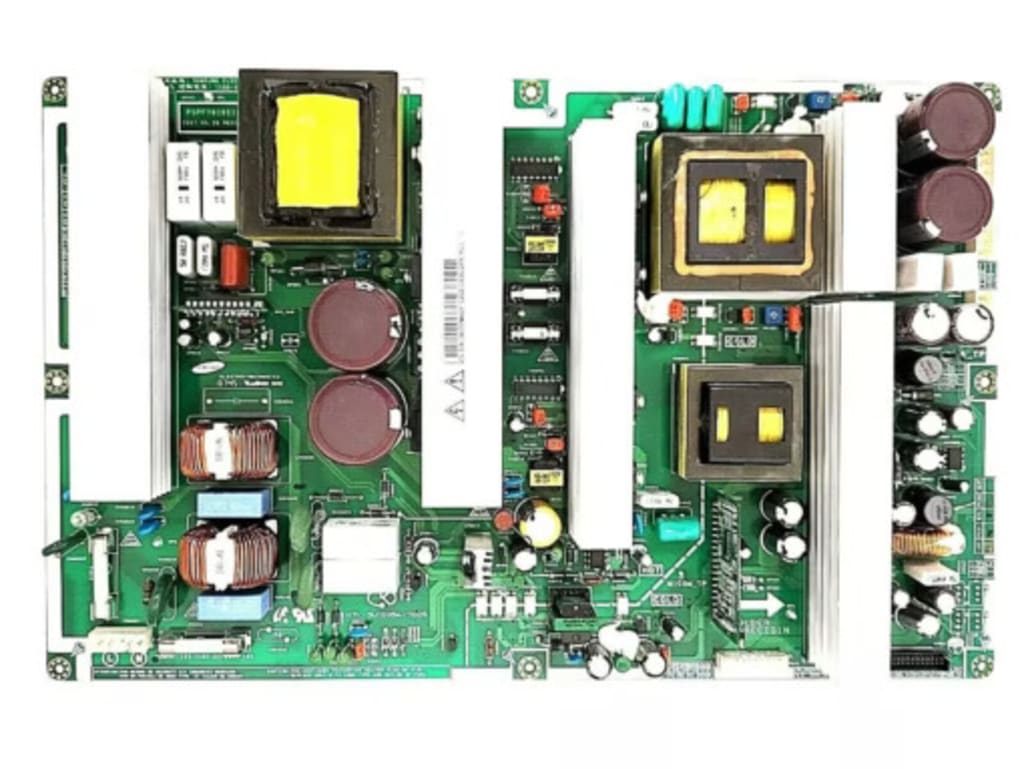
TVs are central to entertainment in most households, but when they stop working, it can be a frustrating experience. One of the common culprits behind a malfunctioning TV is a faulty power supply board. In this step-by-step guide, we’ll walk you through how to diagnose and fix a TV power supply board, highlight how to replace TV power boards, and give you tips on where to buy TV power supply boards online. Whether you're a DIYer or looking for cost-effective solutions, this guide can help you restore your TV’s functionality.
What is a TV Power Supply Board?
A TV power supply board is responsible for converting electrical power from your outlet to the required voltage and current for the TV’s internal components. It plays a vital role in ensuring your TV functions correctly by delivering the necessary power to circuits, screens, and audio systems.
Without a functional power supply board, your TV may fail to turn on, flicker, or show erratic performance. If you’re experiencing such issues, the power supply board might be the problem.
Common Signs of a Faulty TV Power Supply Board
If your TV is showing any of the following symptoms, it's likely that the power supply board is malfunctioning:
1. TV Won’t Turn On
If your TV doesn’t respond when you press the power button, it could indicate a faulty TV power supply board. The power board may not be delivering the correct voltage to turn the TV on.
2. Flickering or Distorted Picture
If your TV’s picture flickers or distorts, it may be due to an unstable power supply. This issue is commonly associated with a failing power supply board, which cannot provide consistent voltage to your TV.
3. Burning Smell or Visible Damage
A burning smell or visible signs of damage, such as charred areas or leaking components, are red flags that your power supply board has malfunctioned and needs to be replaced.
Diagnosing a Faulty TV Power Supply Board
Now that you understand the symptoms of a faulty power supply board, it’s time to diagnose the problem. Here’s how to check if your TV power supply board is the culprit.
1. Unplug the TV
Before you begin, make sure your TV is unplugged from the electrical outlet. This is essential to avoid electrical shock while working with the internal components.
2. Remove the Back Panel
Use a screwdriver to carefully remove the back panel of the TV. Some models may require additional steps, so refer to your user manual if needed. Be cautious when removing the panel, as it may be attached to cables or fasteners that should be gently detached.
3. Inspect the Power Supply Board
Once the back panel is removed, locate the TV power supply board. It will typically be a large board with capacitors, transformers, and other components. Look for visible signs of damage such as burnt components, corrosion, or damaged capacitors. If you notice any of these signs, the power supply board is most likely the problem.
4. Test with a Multimeter
Using a multimeter, you can check for continuity and voltage on the power supply board. Measure the output voltage from the power supply board to ensure it is within the acceptable range. If the voltages are incorrect or the board doesn’t show continuity, it will need to be replaced.
5. Check the Fuses
Some power supply boards have fuses that protect the circuit from electrical surges. If a fuse has blown, it could be a sign that the board has suffered an electrical fault. Replacing the fuse may resolve the issue, but if the fuse blows again, the power supply board itself is the likely culprit.
Replacing a Faulty TV Power Supply Board
If you’ve confirmed that the TV power supply board is faulty, the next step is to replace it. Replacing a power supply board can be a cost-effective solution compared to purchasing a new TV.
1. Buy a Replacement Power Supply Board
The first thing you need to do is buy a replacement power supply board. When shopping online, it’s essential to ensure that the board you’re purchasing is compatible with your TV model. TV Parts Canada offers a wide selection of TV parts, including power supply boards for various brands and models. Make sure to check the specifications carefully before placing your order to avoid compatibility issues.
2. Install the New Power Supply Board
Once you have the replacement TV power supply board, follow these steps to install it:
Disconnect All Cables: Unplug all cables from the TV, including power cords and signal cables.
Remove the Old Board: Unscrew the faulty power supply board from the TV and carefully disconnect any wires connected to it.
Install the New Board: Align the replacement board in the same position as the old one and reconnect the cables. Secure the new board with screws.
Test the TV: Plug in your TV and turn it on to check if the issue is resolved. If everything works correctly, the new board should fix the problem.
Where to Buy TV Power Supply Boards Online
If you’re looking for TV power supply boards in Canada, TV Parts Canada is an excellent place to shop. They offer a range of replacement parts, including TV power supply boards and other essential components. When buying online, here are a few tips:
- Check Compatibility: Ensure the replacement board matches the exact model and brand of your TV.
- Customer Reviews: Read reviews from other customers to verify the quality of the parts and the reliability of the seller.
- Warranty and Return Policy: Look for a warranty or return policy to ensure you can exchange the board if it’s defective or doesn’t work as expected.
Additional Tips for Maintaining Your TV
To prolong the life of your TV and prevent issues with the power supply board, consider the following maintenance tips:
1. Use a Surge Protector
Power surges can damage internal components, including the power supply board. Using a surge protector for your TV can help safeguard it from electrical spikes.
2. Clean the TV Regularly
Dust and dirt can accumulate inside your TV, causing it to overheat and damaging sensitive components. Periodically clean the vents and internal components with compressed air to ensure proper ventilation and cooling.
3. Avoid Overloading Circuits
Ensure that the circuit your TV is connected to can handle the electrical load. Overloading circuits can cause power issues and stress the power supply board.
4. Turn Off the TV When Not in Use
Leaving your TV on for extended periods can put unnecessary strain on the power supply board. Turn off the TV when it’s not in use to extend its lifespan.
Ready to Fix Your TV Power Supply Board?
Fixing a faulty TV power supply board doesn’t have to be a daunting task. With the right tools and knowledge, you can diagnose the issue and replace the power supply board yourself, saving money on repairs. If you’re not comfortable with the DIY approach, consider consulting a professional technician.
When it's time to replace the TV power supply board, be sure to purchase high-quality replacement parts from trusted sources like TV Parts Canada. By following the steps outlined in this guide, you’ll have a better understanding of how to keep your TV running smoothly for years to come.
Ready to get started? Browse through our selection of TV power supply boards and other TV parts today at TV Parts Canada, and restore your TV’s performance. Whether you're a DIYer or need professional help, we’ve got the right parts and support for you!
About the Creator
TV Parts Canada
TVpartsCanada.net offers a vast inventory of TV repair parts, including power supply boards, motherboards, TV lamps, and backlights. We support DIY enthusiasts and repair shops with reliable parts and expert support.
Keep reading
More stories from TV Parts Canada and writers in FYI and other communities.
How to Buy Bluetooth Modules for TVs Online: A Step-by-Step Guide
Are you looking to upgrade your TV's functionality with Bluetooth connectivity? Bluetooth modules are an excellent choice for connecting your TV to wireless speakers, headphones, or other Bluetooth-enabled devices. Whether you want to replace an old Bluetooth module or enhance an older TV's capabilities, purchasing Bluetooth modules for TVs online is an easy and convenient option. This step-by-step guide will walk you through how to buy Bluetooth modules for TVs, focusing on key considerations like compatibility, product quality, and how to find the best deals.
By TV Parts Canada11 months ago in FYI
A Failed Artist, A Disillusioned Poet, An Underpaid Game Show Host
I took my son and niece to Gori, a small town in Georgia where Joseph Stalin was born. They talked me into visiting the Stalin's Museum, the largest in the post-Soviet space. I had resisted going there because I just can't stand the monster and know enough about him, or so I thought.
By Lana V Lynx17 days ago in FYI
Autonomy Is The Real Privilege
Good morning, freedom-seekers! Today we’re gonna be looking at autonomy. A strange word, I know; one many would probably look at blankly and run away from on sight. We’re gonna figure out what it actually means, consider how it’s achieved, and decipher just how deeply most of us are tangled up in dependence without realising it.
By That ‘Freedom’ Guy3 days ago in Humans



Comments (1)
Great guide! Fantastic work!