
How Advanced WordPress Design Practices Elevate Accessibility and User Experience
Advanced WordPress UX and Accessibility Strategies for Modern Websites

Accessibility can no longer be a compliance box in the modern digital environment because it has become a brand differentiator. With the digital ecosystems of organizations developing, WordPress accessibility has been recognized as a primary source of user retention, inclusivity, and conversion rates. An easy-to-use interface makes sure that all visitors, regardless of his or her devices, capabilities, and limitations, will find the interface equally convenient to use.
For business leaders, the decision to invest in WordPress website accessibility is not just an ethical decision. It's a growth strategy and also helps boost UX and increase the visibility of SEO. Moreover, your platform complies with international standards of Web Content Accessibility Guidelines (WCAG), which helps avoid legal and reputational damage to your brand.
Why Accessibility and UX Must Converge
Accessibility and UX are becoming interdependent. The current user demands an intuitive, responsive, and user-friendly interface that should meet their needs and not be reactive. Simply put, accessibility is UX - both of which are based on empathy, performance, and design intelligence.
With a key focus on WordPress UI/UX design, business organizations are discovering that inclusion is directly related to engagement. When visitors can navigate without hassle, read without redirection, and interact with predictability, you can expect them to hang around longer, convert more quickly, and trust you. Conversely, when a design is inaccessible, it can be frustrating, and many visitors will navigate away, resulting in high bounce rates and missed conversions.
The current WordPress UX design practices are focused on the comfort of users and context. It is not just the design approach to address limitations, but something that is usable in diverse contexts like screen readers, voice commands, dark mode, or mobile-first.
Advanced WordPress Design Practices that Drive Accessibility
Crafting an accessible platform needs a smart combination of design, development, and compliance in your WordPress platform. The following are some of the best practices in advanced WordPress UX design that contribute to an improvement in the usability and accessibility levels:
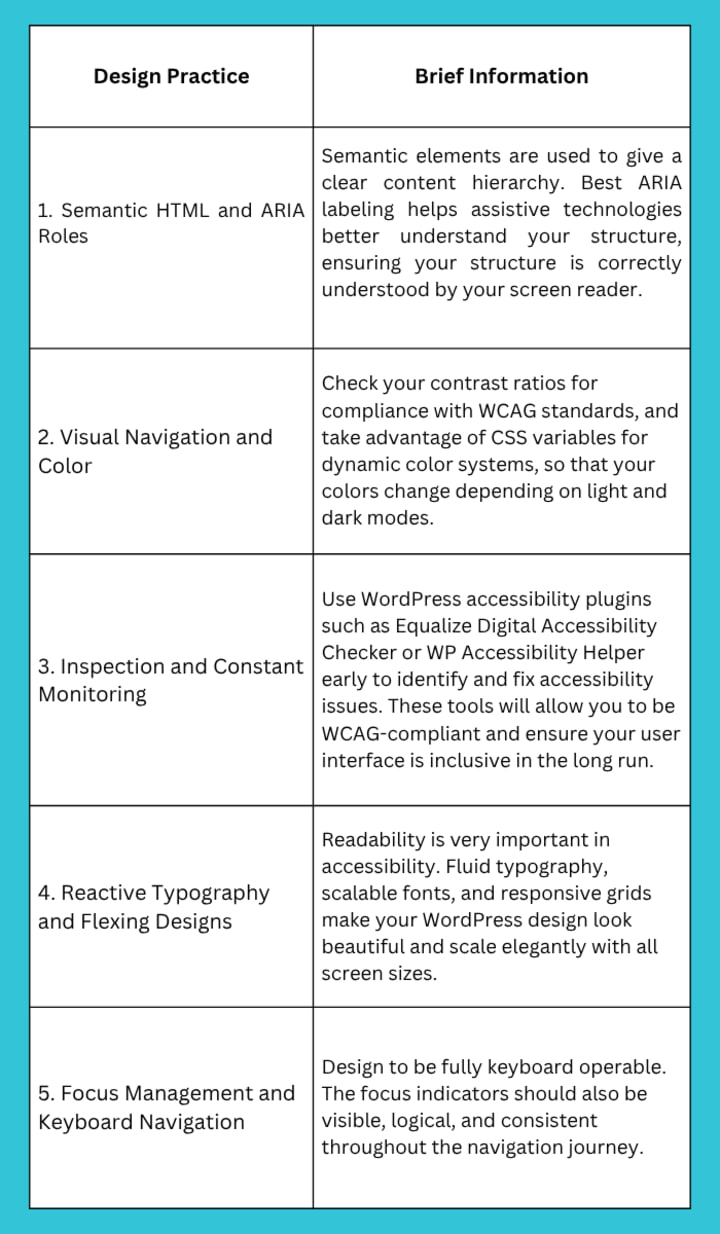
These technical enhancements are not only within the requirements of accessibility, but they also optimize WordPress user experience, such that there would be a smoother, quicker, and more accessible platform.
Read More: Leading WordPress Development Agencies for Advanced UX Designs
Building Accessibility into Your WordPress Design Culture
Accessibility should be embedded into your design culture, not appended as a late-stage review. To integrate it properly, follow the practices below:
1. Incorporate Accessibility KPIs
Develop measurable accessibility goals as part of your design and QA process to be able to assess the consistency of all WordPress development services. This not only fuels accountability but also inculcates inclusivity as a quantifiable business gauge.
2. Train Design and Dev Teams
Be sure that your team is familiar with the principles of inclusive design and WCAG standards. Empower developers and designers to take ownership of accessibility from the earliest stages of ideation.
3. Embed Accessibility into Design Systems
Add accessible color palettes, hierarchy of headings, and models of interaction as reusable resources in your design system. This makes all components compliant with accessibility by default.
The objective should be to develop a culture of constant improvement where designers, developers, and testers consider improving accessibility on WordPress websites as a quality standard instead of a requirement.
Future Trends of WordPress Website Accessibility and UX
The next evolution of WordPress UX design practices will blend automation and accessibility. Voice navigation, adaptive AI content delivery, and generative UX layouts are already reshaping the design narrative.
1. Intelligent Access and UX Automation
AI is changing accessibility management on WordPress websites. Machine learning applications automatically detect and fix problems like missing alt text, contrast flaws, and navigation loops. These smart systems are opening the road to optimization of real-time accessibility, cutting down the number of manual efforts, and guaranteeing scale compliance with WCAG.
2. Voice and Conversational Interfaces
The second generation of interaction is hands-free. As voice assistants and screen readers become the new normal, voice-friendly WordPress website design is necessary. The conversational UX will be a part of future-ready sites, making them accessible to users who have auditory or other input needs.
3. Accessibility as a Core Business Metric
Accessibility is evolving to be more than just a design checklist. It is becoming a clear business objective as compliance requirements increase globally; it is now a part of the KPI, workflow, and performance metrics discussions that very often cite connections between inclusivity, brand trust, and return on investments (ROI).
4. Full-Site and Modular Design Systems
The Full Site Editing (FSE) and the block-based architecture of WordPress have increased the flexibility of design. The flexibility relies on accessible systems and compliant modules to ensure that each page and each block is compliant with accessibility standards without compromising user experience and/or performance.
5. Personalized and Inclusive User Experiences
Accessibility is transitioning into personalized services. WordPress websites will become highly customizable, allowing users to adjust font sizes or colors, or layout to suit preferences. This change in user control brings inclusiveness and enhances engagement with retention.
6. Multi-Platform Accessibility (Headless and PWAs)
Progressive Web Apps (PWA) and the Headless WordPress architecture are solutions that open accessibility for an advanced web experience. It is about consistent accessibility across devices and platforms for a seamless experience on mobile, wearables, as well as offline environments.
Conclusion
Usability and accessibility have changed from two different vectors to one design philosophy frame that defines the performance and scalability of modern digital ecosystems. In the future, organizations will be successful in the marketplace based on their ability to strike the right balance between aesthetics, performance, and inclusivity.
Combining best practices in WordPress design and a more proactive approach toward WordPress accessibility, business entities could create experiences that appeal to all users, rather than a select few. This is not only a compliance issue, but it is a competitive difference. An all-inclusive interface will create greater interaction, less friction, and brand perception through all digital touchpoints.
Inclusivity must become a measure of quality, not an addition to an already optimized site, whether you are doing a redesign of an existing site or considering a full redesign of a WordPress site. The organizations that incorporate accessibility nowadays will be the leaders of the digital experience economy tomorrow.
Collaborate with professionals who understand the importance of accessibility, performance, and innovation. Look to hire WordPress developers to design and deploy compliant, high-performing, and human-centered digital experiences capable of driving measurable growth.
Frequently Asked Questions
1. How to improve website accessibility in WordPress using advanced design practices?
You can easily improve accessibility using semantic HTML, improving color contrast, using keyboard-navigable components, and continuous testing through screen reader access. Advanced practices of WordPress design - such as responsive design systems and accessible plugins - are advantageous for inclusive and compliant WCAG websites.
2. What are the best advanced WordPress design practices to optimize UX and accessibility?
Make sure you are using a structured content hierarchy with consensus-based visuals and flexible components. You can even combine the accuracy of accessibility audits with optimizations for speed and performance to provide a seamless experience for everyone while still maintaining brand consistency.
3. How to implement WCAG-compliant UX in a custom WordPress design?
With Principles of Accessible Design, you are starting with a color palette that adheres to the WCAG 2.1 guidelines, properly labeled ARIA roles, and alt text. And through the cost of development, you will also want to make sure that your custom theme includes an accessibility testing workflow to stay compliant throughout every user journey.
About the Creator
Nathan Smith
Nathan Smith, Technical Writer at TechnoScore, excels in software docs, API guides, and UX. Skilled in HTML, CSS, JS, JIRA, and Confluence, with expertise in DevOps, AI/ML, QA, Cloud, App Development, and Staff Augmentation services.
Keep reading
More stories from Nathan Smith and writers in FYI and other communities.
The Ultimate Guide to Scaling Web Apps with Laravel Octane
Web traffic has experienced exponential growth, with over 5.65 billion internet users generating unprecedented digital demand. To meet this demand, modern web applications must handle massive concurrent loads while maintaining fast response times. This makes high-performance architectures and frameworks not just desirable but absolutely critical for online success.
By Nathan Smith4 months ago in FYI
The Method That Turns Action Into Accuracy
For most of our lives, we are taught a simple rule for success: Ready, Aim, Fire. Prepare carefully. Plan extensively. Wait until the target is perfectly clear—then act. On paper, this sounds wise and responsible. In reality, it often leads to hesitation, overthinking, and missed opportunities.
By Fred Bradford3 days ago in FYI


Comments
There are no comments for this story
Be the first to respond and start the conversation.