
How to generate a personalized synthetic voice with your Voice Tone?
Increasingly realistic synthetic voice
Voice Generation: A Revolution in Human-Computer Interaction
The human voice is an essential tool for communication, enabling us to convey emotions, ideas, and information with remarkable clarity and nuance. However, the ability to synthesize human-like speech has long been a challenge for computer scientists and engineers. In recent years, however, advances in artificial intelligence (AI) have made significant strides in this field, leading to the emergence of voice generation technology.
Voice generation, also known as text-to-speech (TTS), is the process of converting written text into spoken audio. Traditional TTS methods relied on pre-recorded voice samples, which limited the range of voices and emotions that could be produced. However, the advent of AI has enabled the development of generative TTS systems that can create entirely new voices and synthesize speech with unprecedented realism.
Voice generation technology has a wide range of applications, including:
• Content creation: Voice generation can be used to create personalized narrations for audiobooks, podcasts, and educational materials. It can also be used to create voiceovers for videos and presentations.
• Accessibility: Voice generation can be used to create assistive technologies for people with visual impairments or other disabilities. It can also be used to translate text into different languages, making content more accessible to a wider audience.
• Customer service: Voice generation can be used to create chatbots and virtual assistants that can provide customer service support. It can also be used to personalize voice prompts and greetings.
• Entertainment: Voice generation can be used to create more engaging and immersive experiences for games, virtual reality applications, and other forms of entertainment.
Which tool should I use to generate a personalized voice?
Eleven Labs AI Platform: Revolutionizing Voice Synthesis
In the realm of artificial intelligence, Eleven Labs has emerged as a pioneer, developing a cutting-edge AI platform that redefines text-to-speech technology. Their innovative tools empower users to generate lifelike speech in virtually any language, voice style, or emotion, transforming the way content is created and consumed.
Unleashing the Power of Generative Speech Synthesis
Eleven Labs' AI platform stands at the forefront of generative speech synthesis, a sophisticated approach that leverages AI models to produce natural and expressive spoken audio from text. Unlike traditional text-to-speech methods, which rely on pre-recorded voice samples, generative synthesis dynamically creates speech patterns, resulting in unique and engaging voices.
A Global Reach for Enhanced Accessibility
Eleven Labs' AI platform extends its reach across a vast linguistic landscape, supporting over 29 languages, and enabling content creators to engage audiences worldwide. This global accessibility is further amplified by the platform's ability to adapt speech styles to specific regions or cultures, ensuring that synthesized voices resonate with diverse audiences.
A Platform that Empowers Creators
The Eleven Labs AI platform has empowered a thriving community of creators, from podcasters and audiobook producers to educators and language learners. Its intuitive interface and user-friendly tools make it accessible to individuals of all skill levels, democratizing the process of creating high-quality audio content.
How to use Eleven Labs to generate a personalized voice with your tone of voice?
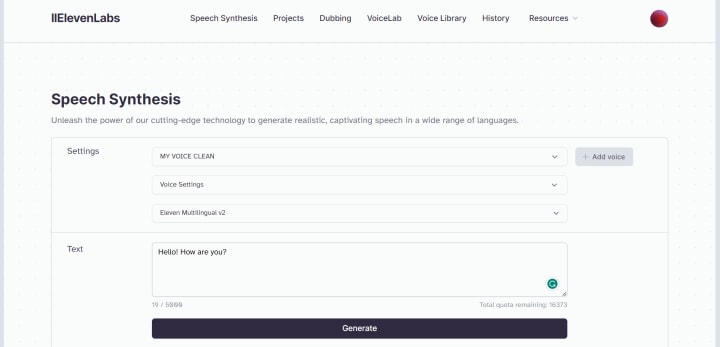
Follow the steps below
- You need to create an account at Eleven Labs. You can start with the basic plan, if you like the result you can upgrade to a paid plan.
- Next, you need to record an audio with your real voice.
- Upload your audio and give it a name.
- Select your voice by clicking on the name you assigned.
- Write any text, or you can copy it from somewhere and paste it into the text box. Then click on generate voice.
- And ready! Now you have audio generated with your tone of voice to use wherever you want.
Please! Give me your feedback about this content.
About the Creator
Keep reading
More stories from writers in Futurism and other communities.
About Binding Prometheus
I want to start actively advocating on behalf of my own work, and the most valuable part of my canon is, without a doubt, Binding Prometheus, the play I have been working on since 2019 and only finished in 2023 as part of my MA. The play itself is an amalgamation of a million different inspirations. On one end, it evokes the Ancient Greek myth-play, deriving its own title from the earliest extant work of Western drama we have, Aeschylus’s Prometheus Bound. On the other end, it borrows significantly from the sci-fi bulwarks from over the years, namely Mary Shelley’s Frankenstein and Karel Capek’s Rossum’s Universal Robots. The play could be an episode of Black Mirror, I fear. I don’t know. I’ve only ever seen one episode of Black Mirror.
By Steven Christopher McKnight26 days ago in Futurism
Saudi Arabia Home Healthcare Market: Aging Population, Chronic Diseases & Market Growth
According to IMARC Group's latest research publication, Saudi Arabia home healthcare market size reached USD 4,214.4 Million in 2025. The market is projected to reach USD 7,583.4 Million by 2034, exhibiting a growth rate of 6.75% during 2026-2034.
By Faisal Al-Harbi6 days ago in Futurism
10 Times Rotten Tomatoes and I Disagreed
***Disclaimer*** I will be ranking these movies in the following manner: The greater the divide between Rotten Tomatoes and I, the higher up on the list (and I am referring to the critic's score, not the audience score). I will also show Rotten Tomatoes' score on each one in addition to my score. I am curious to know what everyone thinks, please let me know in the comments below!
By Madison "Maddy" Newtona day ago in Geeks



Comments
There are no comments for this story
Be the first to respond and start the conversation.