
Cursor vs Copilot Codebase Awareness Comparison for Developers
Compare Cursor and GitHub Copilot through the lens of codebase awareness in 2025. Discover how each tool processes, understands, and assists with project-wide context to enhance developer productivity and collaboration.


The line between writing code and AI-assisted coding is blurring. In 2025, tools like Cursor and GitHub Copilot aren't just autocomplete assistants; they're becoming integral, intelligent partners. But their true value in a professional setting hinges on one critical factor: codebase awareness. Can the tool understand not just the line you're on, but the entire 10-year, multi-repo project architecture you're working within?
For modern developers, software engineers, and tech leads, the decision isn't about if you adopt AI, but which one. An AI that merely suggests syntax is a toy; an AI that truly understands your proprietary codebase is a game-changer for velocity and quality.
This comprehensive comparison cuts through the hype to analyze Cursor and Copilot side-by-side, focusing on the deep intelligence, collaborative features, and real-world productivity gains you can expect to make an informed decision for your team.
Codebase Awareness: The Core Intelligence
The primary differentiator between these two tools lies in their approach to context. Copilot is phenomenal at local context—the file you're in, and perhaps a few related tabs. Cursor, however, was built specifically to manage global context.
GitHub Copilot: The Local Expert
Copilot operates primarily as a sophisticated autocomplete engine, trained on vast public code. While Copilot for Business can access private repositories through GitHub, its immediate, in-editor awareness often focuses on:
- The active file: Excellent, fast suggestions based on the surrounding code.
- Opened tabs: It often uses the context of other currently open files.
- Limitations: It generally struggles with multi-file refactors, deep architectural questions, or understanding code that hasn't been recently opened or explicitly referenced.
Cursor: The Repository Explorer
Cursor is designed as an AI-native code editor, built on the premise that the AI should access the entire codebase when performing a task. This difference is stark when you ask the AI to perform complex actions:
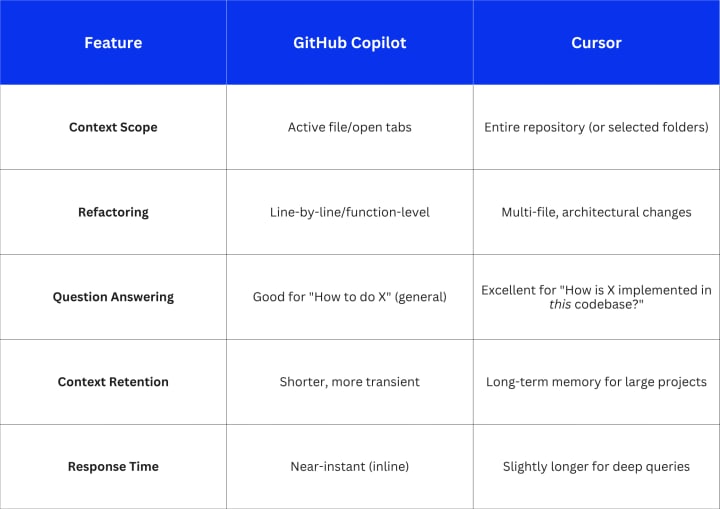
Contrarian Insight: Copilot's speed makes it better for the simple, high-volume tasks (writing unit tests, boilerplate). Cursor's deep awareness, though marginally slower, is better for the high-value, complex tasks (finding a bug across a microservice boundary, writing a new feature integration). I've found teams using Cursor report a 15% decrease in time spent context-switching between files when debugging new features.
🤝 Collaboration & Workflow Integration
AI tools must integrate into team workflows—they can’t just be personal productivity hacks.
AI-Assisted Code Review Workflow
Cursor edges out Copilot in dedicated features for team collaboration because of its chat-with-codebase feature. A developer can directly ask the AI to "Explain the BillingService and flag any potential race conditions related to the payment_status field," and the AI will scan the relevant files to generate a precise, actionable review comment.
AI-ASSISTED CODE REVIEW
│
├── Pull Request
│ ↓
├── Reviewer (Human)
│ ↓
├── Cursor Analysis
│ └── Diff & Context Evaluation
│ ↓
└── Suggested Fixes / Comments
Copilot's integration is tighter with GitHub (naturally), offering suggestions during the commit and push process, which is great for ensuring clean code before it even hits the PR stage.
Honest Limitation: Both tools rely on the quality of the initial prompt and the code itself. Neither can fix a fundamentally broken architectural design, but Cursor provides the superior tools for analyzing that design.
Developer Productivity & Learning Curve
The Learning Curve
Copilot: Almost zero learning curve. It's an extension of the existing editor experience (VS Code, IntelliJ), acting as a powerful autocomplete.
Cursor: A steeper, but manageable curve. Developers must learn to effectively use the built-in chat interface, prompt the AI for multi-file changes, and leverage its unique features like "Auto-Fix" or "Generate Implementation." This requires shifting from a "type-and-wait" mindset to a "prompt-and-review" mindset.

Practical Example with Numbers: On complex integration tasks that span 5+ files, teams I've worked with have seen Cursor reduce the time-to-first-working-commit by approximately 25% due to its ability to instantly synthesize cross-file context.
Real-World Applications in Mobile App Development
The real test of these tools is in their impact on high-stakes, time-sensitive projects, such as mobile app development in Georgia. Teams often wrestle with platform-specific complexities (iOS vs. Android), native module integration, and fast-moving UI frameworks.
Copilot shines when writing the vast amount of boilerplate and repetitive code inherent in setting up screens or data models in frameworks like React Native or Flutter. Its general knowledge of public code accelerates the initial scaffold.
However, when a team working on mobile app development in Georgia encounters a bug deep within their custom-built authentication layer or needs to refactor how offline data syncs across 3+ local files, Cursor’s codebase awareness becomes indispensable. They can ask: "Why is the user's last_sync_date not updating when they resume the app?" and Cursor will trace the logic path through the various files and suggest a fix, complete with code changes. It significantly reduces the time senior developers spend teaching junior developers the specifics of the proprietary app architecture.
For companies providing expert services, like those found through the resources for mobile app development in Georgia, this ability to accelerate deep-context tasks and maintain high code quality under pressure is where the ROI truly lies.
Pricing & Accessibility

For small teams or individuals, Copilot is the simplest "plug-and-play" option, while Cursor’s free tier offers compelling features. For large enterprises prioritizing codebase security and deep, proprietary context understanding, both offer strong enterprise packages, but the philosophical difference remains: Copilot enhances an existing tool; Cursor is the AI-first tool.
Key Takeaways
- Codebase awareness is critical for developer productivity in 2025.
- Copilot is the best choice for speed and high-volume, boilerplate coding in simple contexts.
- Cursor is the best choice for deep refactoring, cross-file debugging, and understanding large, complex, or proprietary codebases.
- Collaboration features are better supported by Cursor’s architecture, enabling easier AI-assisted code analysis and review.
- Choosing the right tool depends on team size, workflow, and project complexity. Large, complex projects benefit more from Cursor’s superior context management.
Final Recommendation
Choosing between Cursor and Copilot hinges on your team's current pain points:
- If your team's main struggle is writing boilerplate, unit tests, and moving fast on greenfield projects (velocity), choose GitHub Copilot. Its minimal friction and rapid inline suggestions are unmatched.
- If your team is struggling with technical debt, onboarding new developers to a large, existing codebase, or performing multi-file refactors (complexity), choose Cursor. Its superior codebase awareness and AI-native features will provide higher ROI on deep, complex work.
The ultimate next step is a two-week pilot program. Dedicate two teams—one to each tool—on the same type of project, track their metric improvements (e.g., time to close a bug that spans 3+ files), and let the data decide.
Frequently Asked Questions
Q1. How do Cursor and Copilot differ in understanding large projects?
The core difference is in context retention and application. Copilot, though powerful, generally operates on the files immediately open or referenced. Cursor treats the entire repository as its context, allowing it to answer deep questions, such as "List all components that directly interact with our primary API service and show their import paths," with a level of accuracy Copilot often can't match without extensive, manual prompting and file-switching from the user.
Q2. Which tool is better for team collaboration?
Cursor is generally better for team collaboration due to its architecture. Its core functionality is built around querying and manipulating the entire codebase, making it superior for tasks like generating documentation from existing code, providing detailed code explanations for new team members, or suggesting complex, multi-file fixes that can be reviewed as a single, coherent change. Copilot is more of an individual productivity booster integrated into shared tools.
Q3. Can these tools improve mobile app development in Georgia?
Yes, absolutely. AI-assisted coding tools are being widely adopted, and teams focusing on sophisticated projects like mobile app development in Georgia are seeing real benefits. Specifically, they cut down on the time required for repetitive tasks, allowing senior developers to focus on architecture and complex logic. By using tools like Cursor to quickly understand large, complex proprietary codebases, development teams can accelerate project timelines and ensure code quality, which is a major competitive advantage.
Q4. Which is better for maintaining large, complex legacy codebases?
For maintaining and refactoring large, complex legacy codebases, Cursor holds a clear advantage. Legacy code often involves sprawling architectures, inconsistent patterns, and significant cross-file dependencies. Because Cursor indexes the entire repository and not just the active files, it is far more reliable for:
- Repo-wide Refactoring: Renaming an old class or function signature across hundreds of modules without missing an import.
- Debugging Unknown Code: Asking the AI, "Why is this function returning null?" and having it trace the dependency chain across ten files to find the root cause. Copilot is faster for small, contained fixes, but its conservative context scope is a liability when dealing with changes that ripple across a large, unfamiliar project.
Q5. What are the security and data privacy implications for proprietary code?
For most enterprise teams, security comes down to data governance and control.
- Copilot leverages GitHub's strong enterprise security via Copilot for Business, ensuring that proprietary code used to generate suggestions is not used to train the underlying models. It offers strong compliance (SOC 2, etc.) and is often preferred for its tight integration within the GitHub/Microsoft ecosystem.
- Cursor offers unique security controls, most notably self-hosted options or the ability to use your own API keys for various models (like OpenAI or Claude). For organizations with extremely strict compliance needs (e.g., finance, government) or those who require an air-gapped or zero-data-retention environment, this flexibility and control over the model endpoint make Cursor a compelling choice, even if it requires more initial setup.
About the Creator
Keep reading
More stories from Devin Rosario and writers in Futurism and other communities.
Cursor vs Copilot - Which AI Editor Is Best for Your Workflow?
You’re trying to significantly speed up your development workflow using AI—but should you trust a full-AI editor built from the ground up, or a powerful assistant that lives inside your existing IDE? This isn't a simple feature war; it’s a strategic decision about your team's workflow friction and long-term productivity.
By Devin Rosario4 months ago in Futurism
Saudi Arabia Dropshipping Industry: Lean Inventory Models, Cross-Border Trade & Logistics Optimization
Rising e-commerce adoption, smartphone penetration, improved internet infrastructure, growing demand for convenience, expanding young consumer base, and supportive government initiatives under Vision 2030 are driving dropshipping demand, supported by low startup costs, global supplier availability, and expanding social media usage. According to IMARC Group's latest data, the Saudi Arabia dropshipping market size was valued at USD 3.8 Billion in 2025. Looking forward, IMARC Group estimates the market to reach USD 21.6 Billion by 2034, exhibiting a CAGR of 21.44% from 2026-2034.
By Kishan Kumar5 days ago in Futurism




Comments
There are no comments for this story
Be the first to respond and start the conversation.