
Best Knowledge Management Software of 2025: Expert Reviews & Ratings
Compare Features, Pricing, and User Feedback for 2025’s Top Knowledge Management Tools

Running a business means making decisions fast, and that often depends on how quickly teams can find the right information. That’s where Knowledge Management software makes a big impact. These tools help organize company knowledge, so employees don’t waste time digging through emails or old documents to get answers.
G2 Real user feedback shows that companies using knowledge management tools have cut average handling times by as much as 30% and seen customer satisfaction improve by up to 25%. Whether it's supporting customers, onboarding new employees, or making sure teams stay aligned, the right Knowledge Management software can boost efficiency and overall performance.
Thanks to built-in AI, automation, and smart search features, modern Knowledge Management platforms are easier than ever to use. You don’t need a technical background to set them up, and many tools are built to grow with your team, whether you’re a startup or a large enterprise.
This article explores the best Knowledge Management software tools of 2025, breaking down what each one offers in terms of usability, AI features, collaboration, and value. If you’re looking to improve how your business shares and uses knowledge, this guide is for you.
What is Knowledge Management Software?
Knowledge Management software is a tool that helps organizations capture, organize, and share information to improve productivity, collaboration, and decision-making. It serves as a central hub for company knowledge, making it easy for teams to access the right information at the right time for customer support, internal training, or day-to-day tasks.
Benefits of Using Knowledge Management Software
- Improved Efficiency - Easy access to accurate information means less time wasted and fewer repeated questions.
- Enhanced Collaboration - Teams can share insights and updates in real time, improving communication and problem-solving.
- Smarter Decision Making - With a clear view of organizational knowledge, employees can make faster, more informed decisions.
- Increased Innovation - Sharing knowledge encourages new ideas and continuous improvement across teams.
- Reduced Knowledge Loss - Valuable know-how stays within the company, even when employees leave or change roles.
Top Knowledge Management Software Tools to Consider in 2025
1. Knowmax
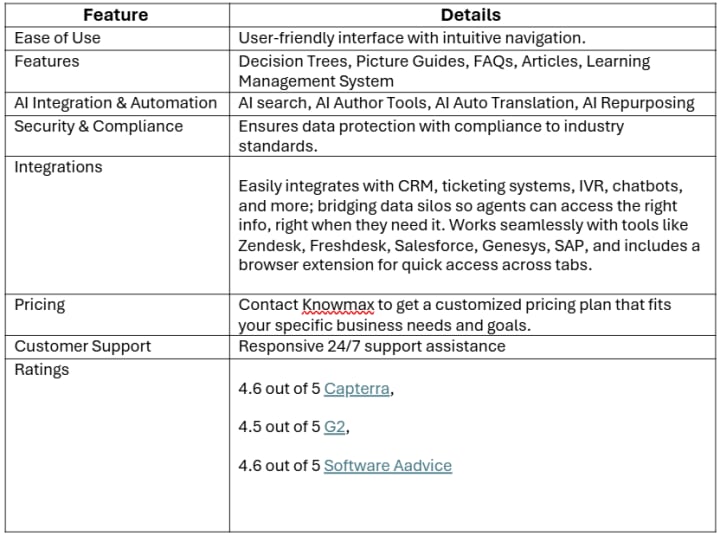
Knowmax is an AI-powered knowledge management system built for customer experience (CX) teams to streamline support operations. It allows users to build a dynamic knowledge base across multiple content formats like interactive decision trees, step-by-step visual guides, support articles, and FAQs.
With built-in Gen AI tools, it simplifies content creation, search, and migration making it easier to manage and scale knowledge assets. The platform also features micro-segmented analytics, enabling administrators to closely monitor how knowledge is used and identify areas for improvement.
Knowmax supports seamless integration with other tools and channels, helping CX teams deliver consistent, omnichannel support. Its in-built learning management system (LMS) further enhances agent training, ensuring faster onboarding and better service quality.
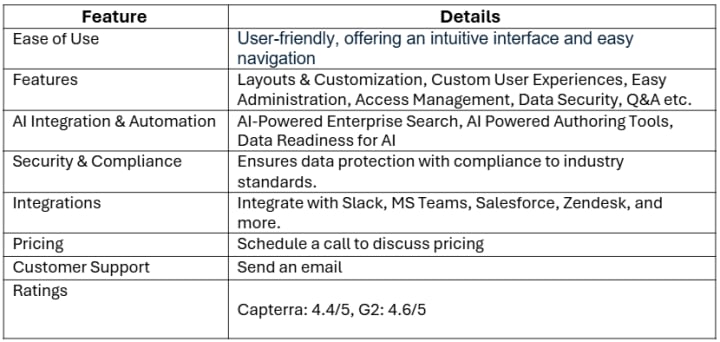
Bloomfire is a knowledge engagement platform that centralizes information, making it easily accessible for teams. It emphasizes enhancing employee engagement and improving decision-making processes.
3. Document360
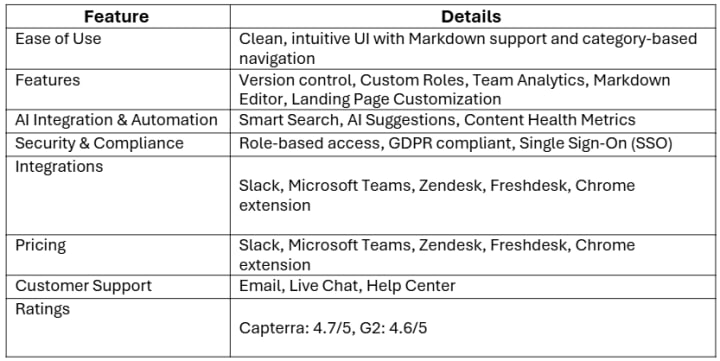
Document360 specializes in creating self-service knowledge bases for both internal teams and external customers. It focuses on providing a seamless experience in knowledge creation and management.
4. Guru
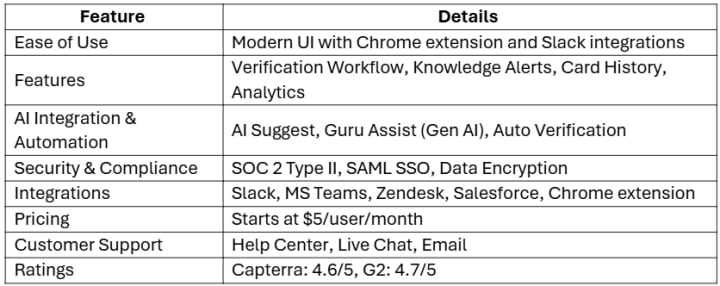
Guru is a knowledge management solution that delivers information directly into workflows, ensuring teams have access to the right knowledge at the right time.
5. Atlassian Confluence
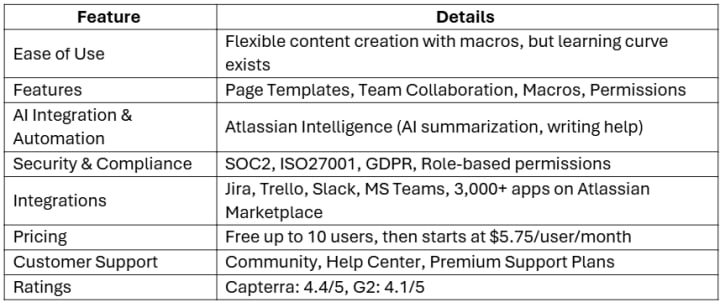
Atlassian Confluence is a collaboration tool used to help teams collaborate and share knowledge efficiently. It's widely adopted for its robust documentation and integration capabilities.
6. KMS Lighthouse
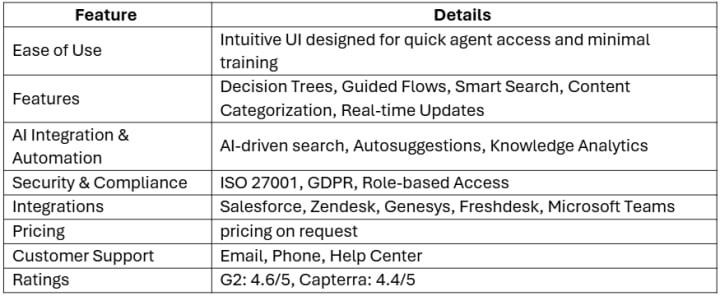
KMS Lighthouse offers a knowledge management solution that enhances customer and employee experiences through real-time access to accurate information.
7. Helpjuice Inc.
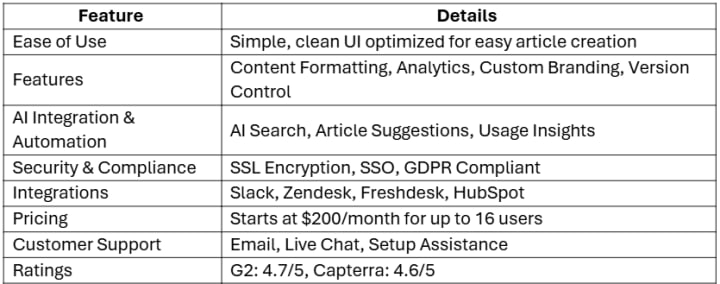
Helpjuice specializes in knowledge base software that helps organizations scale their customer support and internal knowledge sharing.
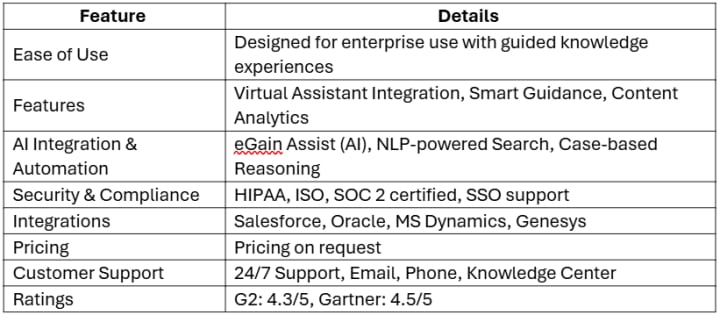
8. eGain Knowledge Hub
eGain is a leading provider of AI-powered knowledge management solutions, focusing on enhancing customer service operations through intelligent automation and personalized support.
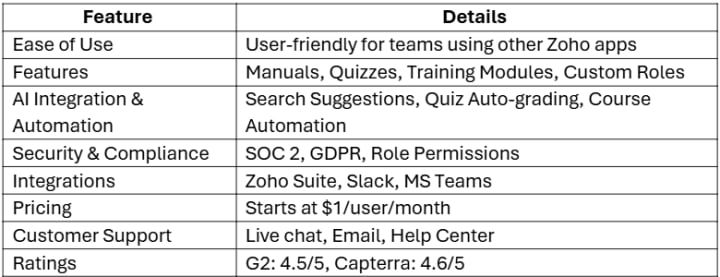
9. Zoho Learn
Zoho Learn is part of the Zoho ecosystem, offering a comprehensive platform for knowledge management and learning, suitable for businesses of all sizes.
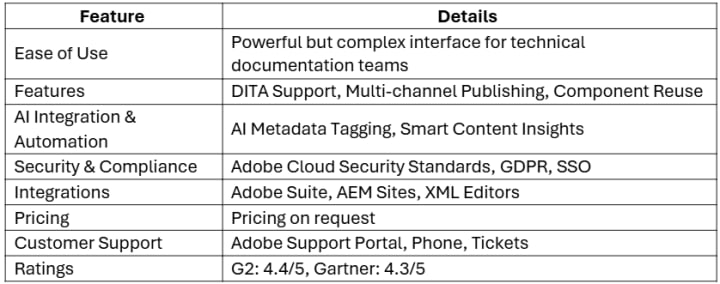
10. Adobe Experience Manager Guides
Adobe Experience Manager Guides is a cloud-native component content management system (CCMS) designed for managing and delivering structured content at scale.
Choosing the Right Knowledge Management Software for Your Business
Choosing the right knowledge management software helps your team find answers faster, solve problems quickly, and improve customer service. To find the best fit for your business, start by understanding why you need Knowledge Management software. Is it for your customer service team, internal employees, or self-service for customers?
Once that’s clear, look for software that offers the right features, works well with your current tools, and is easy to use. It should also be secure, easy to scale as your company grows, and come with good customer support. Lastly, always ask for a free trial or demo to test how well it works for your team.
- Know your purpose – What problem are you solving? Agent support, self-service, or internal use?
- Must-have features – Search, FAQs, visual guides, analytics, and easy content updates.
- Works with your tools – Make sure it connects to your CRM, helpdesk, chatbot, etc.
- Easy to use – A clean and simple layout helps everyone adopt it quickly.
- Secure and reliable – Look for strong data protection and certifications.
- Grows with you – Should support more users, teams, and locations as you grow.
- Good support – Check if they offer training, onboarding, and regular help.
- Try before you buy – Always test the software with your real users before making a decision.
Choosing What Works Best for You
Every business has its own way of working, and the same goes for how it manages knowledge. The tools listed above all offer different strengths, but the best one for you depends on what your team needs. Some focus on self-service or team collaboration, while others, like Knowmax, are built to support customer-facing teams like call center agents.
For call centers especially, having the right knowledge at the right time can make a big difference. When agents don’t have to dig through multiple systems or guess the right answer, it saves time on every call. That not only helps resolve customer issues faster but also reduces training time for new agents and cuts down on costly repeat contacts, saving both time and money in the long run.
Whether you're improving customer service, supporting internal teams, or doing both, the goal is the same: make it easier for people to find clear, accurate answers. Test out a few options, see which one fits your workflow, and choose a platform that supports your team today and as you grow.
FAQs About Knowledge Management Tools in 2025
Q: What’s the most AI-powered Knowledge Management software today?
A: Knowmax, eGain, and Guru are among the most AI-powered Knowledge Management tools, offering features like AI search, auto-suggestions, content repurposing, and predictive recommendations.
Q: What are the 4 types of knowledge management?
A: The four types are:
- Knowledge Creation
- Knowledge Storage
- Knowledge Sharing
- Knowledge Application
Q: Can Knowledge Management tools improve customer satisfaction scores?
A: Yes. By giving agents fast access to accurate answers, Knowledge Management tools reduce response time and errors leading to better customer experiences and higher satisfaction scores.
Q: What’s the difference between an internal wiki and a knowledge base?
A: An internal wiki is usually informal and collaborative, while a knowledge base is structured, searchable, and designed for quick access to verified information often used for customer service.
About the Creator
Knowmax
Knowmax is an AI Guided Knowledge Management Platform. We empower your CX teams to deliver mistake-proof service across touchpoints with contextual and actionable knowledge.
About Binding Prometheus
I want to start actively advocating on behalf of my own work, and the most valuable part of my canon is, without a doubt, Binding Prometheus, the play I have been working on since 2019 and only finished in 2023 as part of my MA. The play itself is an amalgamation of a million different inspirations. On one end, it evokes the Ancient Greek myth-play, deriving its own title from the earliest extant work of Western drama we have, Aeschylus’s Prometheus Bound. On the other end, it borrows significantly from the sci-fi bulwarks from over the years, namely Mary Shelley’s Frankenstein and Karel Capek’s Rossum’s Universal Robots. The play could be an episode of Black Mirror, I fear. I don’t know. I’ve only ever seen one episode of Black Mirror.
By Steven Christopher McKnight27 days ago in Futurism



Comments (1)
Knowledge management software sounds like a game-changer. I've seen firsthand how sifting through old emails and docs for info can be a huge time suck. The 30% cut in handling times and 25% boost in customer satisfaction are pretty impressive. I'm curious, though. How do these tools handle sensitive company info? And which ones are best for small teams just starting out? It'd be great to hear more about that in the guide.