
What Happens if the Battery Dies in the Smart Lock?
With the convenience and security of smart locks becoming increasingly popular, one concern users often face is, "What happens if the battery dies?"

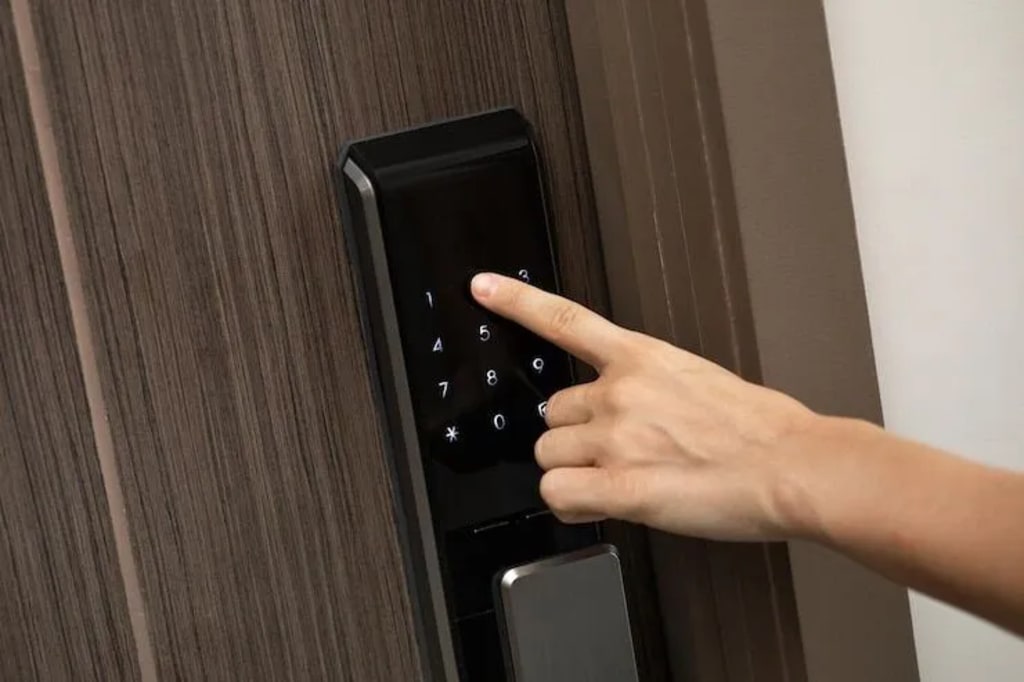
With the convenience and security of smart locks becoming increasingly popular, one concern users often face is, "What happens if the battery dies?" No one wants to be locked out of their home or office just because the lock's battery ran out!
This article will dive into how smart locks handle battery failures and everything.
Understanding How Smart Locks Work
Smart locks are essentially electronic door locks with built-in features like Wi-Fi, Bluetooth, or Zigbee technology. They allow you to control access to your home remotely, receive real-time updates, and unlock your door using a smartphone or a digital keypad rather than a traditional key. However, because they rely on battery power, it’s essential to be prepared in case the battery fails.
Signs of a Dying Battery in Your Smart Lock
Most smart locks are designed to warn users well in advance of a dead battery. Here are a few signs your smart lock's battery might be on its way out:
Visual Alerts: Some smart locks have LED indicators that change color or flash when battery power is low.
Audible Alerts: Many models provide audible beeps or alerts when the battery level is running low.
App Notifications: If your smart lock is connected to a mobile app, it may send a notification when the battery needs replacement.
Recognizing these early warning signs can prevent lockout situations. Make it a habit to monitor these indicators, so you’re not left unprepared.
What Happens When the Battery Dies?
If the battery in your smart lock dies, the lock mechanism is disabled, leaving you unable to unlock it electronically. However, smart lock manufacturers are well aware of this possibility and typically design solutions to prevent users from getting locked out.
Most Common Solutions for Dealing with a Dead Battery in Smart Locks
Manual Key Override
Many smart locks include a hidden keyhole that allows you to unlock the door with a traditional key if the battery dies.
This keyhole is often concealed beneath a faceplate or behind a cover, preserving the aesthetic of the lock.
Battery Backup Ports
Some models feature an emergency battery backup port, allowing you to temporarily power up the lock using an external battery pack, usually a 9-volt battery. This option lets you regain access, even with a dead battery.
Simply connect the 9-volt battery to the designated terminals, then input your passcode or use your smart device to unlock the door.
Portable Power Banks
Some advanced locks support USB power banks. In such cases, you can plug in a compatible power bank to give the smart lock a temporary power boost.
Alternative Unlocking Methods
Some smart locks are equipped with alternative entry methods, such as fingerprint or voice recognition. These might work even if the primary power source fails, depending on the lock’s internal power-saving modes.
App-Enabled Notifications for Proactive Battery Changes
Smart locks that integrate with apps can help you stay informed of battery status. Through regular updates, you can receive early alerts that give you plenty of time to change the battery.
What to Do If You’re Locked Out Because of a Dead Battery
While smart locks are designed to minimize lockouts, there’s always the chance that the battery dies unexpectedly, or you miss the low-battery warnings. This is a detailed guide on re-entering:
Use the Backup Key
If your smart door lock has a keyhole, use the backup key to unlock it. Be sure to keep this key in a secure but accessible location for emergencies.
Emergency Battery Option
If your lock has a 9-volt battery port, press a battery against the terminals. This should give it enough power to allow you to input your passcode and unlock the door.
Call a Trusted Friend or Neighbor
If you’ve shared digital access with a trusted person, they may be able to assist in unlocking the door remotely. For locks with Bluetooth, a close-range connection with your friend’s phone might also work.
Contact Professional Assistance
If all else fails, calling a professional locksmith familiar with smart locks is a reliable option.
Tips for Avoiding Lockouts Due to Dead Batteries
Preventing a lockout due to dead batteries is always the best approach. Here’s how to make sure you’re proactive in managing your smart lock’s battery life:
Check Battery Levels Regularly
Most smart locks last several months on a single set of batteries, but usage patterns and environmental factors can affect battery life. Aim to check battery levels every few months.
Set Reminders for Battery Changes
Use your smartphone to set a recurring reminder. Replace your smart lock’s batteries every six to twelve months as a precaution, even if they’re not dead.
Keep Backup Batteries on Hand
Store spare batteries or an emergency 9-volt battery near the door or in your car. This way, you’ll always have access to a temporary power source in case of an emergency.
Choose Lithium Batteries Over Alkaline
Alkaline batteries are more susceptible to draining in cold weather, while lithium batteries perform better in temperature extremes. Additionally, they usually live longer.
Use the Manufacturer’s App for Alerts
If your smart lock has a companion app, make sure notifications are enabled. The app will send you timely reminders for battery replacement.
Install a Backup Power Solution (If Available)
Some smart lock models offer additional backup solutions, like rechargeable battery packs or built-in capacitors, which can offer temporary power. Check your lock’s specifications and consider upgrading if available.
Pros and Cons of Battery-Powered Smart Locks
Battery-operated smart locks offer excellent flexibility and advanced functionality, but they come with certain considerations. A brief review of the benefits and drawbacks:
Pros:
Convenience and Keyless Entry
Smart locks allow you to go key-free, and many models offer multiple entry options (such as codes, fingerprint scanning, or mobile unlock).
Remote Management
With app connectivity, you can lock or unlock the door from anywhere, manage who has access, and receive alerts if someone attempts unauthorized entry.
Energy Efficient
Most smart locks are designed to be energy efficient, so battery replacements are relatively infrequent.
Cons:
Potential Lockouts
Battery dependency means you could get locked out if the battery dies unexpectedly and you’re unprepared.
Temperature Sensitivity
In extreme cold or heat, batteries may drain faster than usual, reducing the lock’s lifespan and reliability.
Upkeep and Monitoring Required
Unlike traditional locks, smart locks require a bit of regular upkeep, such as battery checks and occasional replacement.
Final Thoughts
Smart locks offer convenience and security but require proactive maintenance to prevent lockouts. Understanding features, keeping backup keys, and monitoring battery conditions can help ensure safety.
IPSA Mart offers a premium range of smart locks (biometric door lock also) blending advanced security technology with a sleek design. Ideal for modern homes, their locks provide keyless convenience, enhanced safety, and user-friendly features. With cutting-edge innovation, IPSA Mart's smart locks ensure reliability and style, making secure living effortlessly accessible for every household.
About the Creator
IPSA Mart
Consumer experience is prime to IPSA MART, Being best in architectural hardware solutions and specializing in electronic door locks & many more.
Wise~Guys
— Look Behind what's in Front of You ~ Make Good Choices — Hey, So how you Doin'..! Made~Men — Mobster Movies romanticise a distinctive, elegant appearance, impeccable attire style, along with the 'Families' expressive lingo. Making their 'Bones' gave them Panache — with vintage fedoras, tailored pin-striped suits, mirror-polished wing-tip shoes adorned with tassels; with their 'Gun Moll' gorgeous dates on their arms.
By Jay Kantor20 days ago in Families
Bettijo Hirschi
Introduction Bettijo Hirschi is a multi‑talented creative professional from the United States. She works as a designer, art director, photographer, writer, and event planner. Bettijo has built a long career in creative work and media. People know her for her artistic skills, her work in magazines and television, and her lifestyle blog. She is also known in recent news because of changes in her personal life.
By Farhan Sayed6 days ago in Families
How to Succeed at the Benson Directory®
Congratulations and welcome to the Benson Directory® employee #22391! As our newest call handler, you will have the privilege of speaking with dozens of unique and interesting people on a daily basis as well as the opportunity to earn bonuses for high performance. Contained within this handbook you will find a set of ease to follow instructions designed to help you settle in to your new role and begin paving the way to success.
By S. A. Crawford4 days ago in Fiction



Comments
There are no comments for this story
Be the first to respond and start the conversation.