
Eye-Friendly Lighting for Midnight Study Sessions
How to Protect Your Eyes and Boost Focus During Late-Night Study Hours

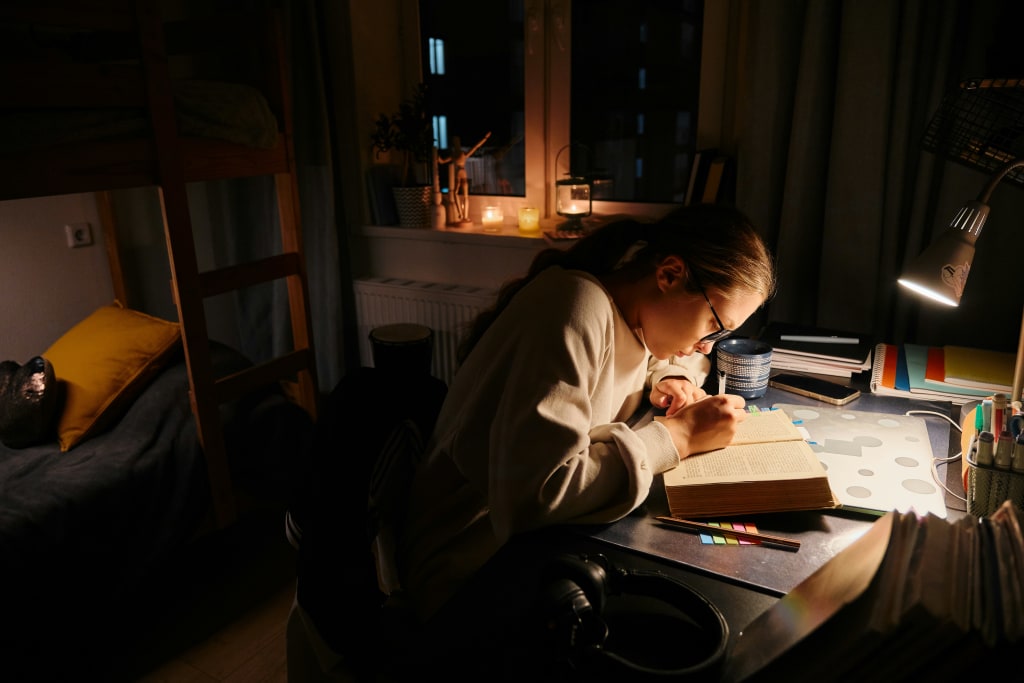
Late-night studying can be productive, peaceful, and even enjoyable. If your lighting is set up correctly. Poor lighting can cause eye strain, headaches, and fatigue, making it more difficult to focus or recall what you read. A well-planned setup helps you stay alert, protect your eyes, and create a calm atmosphere that supports deep work. Whether you’re preparing for exams or catching up on research after work, the right blend of brightness, color temperature, and placement can turn quiet midnight hours into your most effective study window. With a few smart choices, you can build a lighting plan that feels natural and keeps you going without discomfort.
Setting the Right Mood for Focus
Lighting influences your energy, motivation, and ability to concentrate. Warm light tends to relax your mind, while cooler light keeps you more alert, so a balanced mix works best for late study. Start by identifying the tasks you do most: reading printed pages, typing, or sketching diagrams, then tune your lighting to support those tasks. When you align light quality with your activity, your eyes work less, your posture improves, and your attention lasts longer.
Avoid harsh overhead glare that washes out pages and creates sharp shadows. Use a desk or floor lamp with an adjustable head, and aim the beam so it covers the work zone without shining into your eyes. Diffusers, lamp shades, and frosted bulbs soften the output and spread it evenly across your desk. This approach maintains clarity while lowering strain.
As the night progresses, gradually reduce the overall brightness and shift slightly warmer. This gentle change supports your body’s wind-down cycle while still giving you the clarity you need to finish a chapter or complete a problem set. Consistency helps; keep a routine where your lights follow your schedule so your brain knows what to expect.
Choosing Bulbs That Support Eye Health
Bulb choice matters as much as the fixture. LEDs are a strong pick for study spaces because they are efficient, dimmable, and stable. For reading and note‑taking, aim for a neutral color temperature in the 3000K–4000K range, which delivers clear text and accurate colors without feeling cold. A high Color Rendering Index (CRI 90+) can make diagrams and highlights easier to see, which reduces re‑reading and squinting.
Watch for flicker and uneven output, which can trigger headaches. Quality LEDs from reliable brands usually control flicker through better drivers. Try a couple of options to see what looks most comfortable to your eyes, and keep packaging notes so you can replace bulbs with the same specs when needed.
Desk Lamp Positioning for Comfort
Positioning is critical because poor angles create shadows and glare. Place the lamp on the opposite side of your writing hand, left side for right‑handed writers and right side for left‑handed writers. So your hand does not block the beam. Keep the head slightly above eye level and angle it down so the hotspot lands on the page, not your pupils. A swing‑arm or gooseneck design lets you fine‑tune height and distance for typing, handwriting, or reading large textbooks, which keeps the light where you need it and away from reflective screens.
Balancing Ambient and Task Lighting
Relying on a bright desk lamp in a dark room forces your eyes to adapt between a bright page and a black background. Add ambient light with a dim floor lamp, wall sconce, or an overhead fixture on a low setting to raise the room’s baseline. Once the background is a little brighter, the contrast eases, and you can maintain focus longer without rubbing your eyes.
Place ambient sources behind or beside you rather than directly in view. Indirect light that bounces off walls or ceilings creates a soft glow that supports concentration. If you use LED strips, tuck them under a shelf edge or behind a monitor to reduce hotspots while outlining your workspace.
Aim for a layered approach: ambient light for overall comfort, task light for precision, and optional accent light for mood. When these layers work together, pages stay legible, screens feel gentle, and the room looks organized instead of stark.
Adding Warmth Without Losing Clarity
Cool light can keep you awake, yet it may feel clinical over time. Pair a neutral task lamp with a warm ambient source to get clarity on the page and a cozy backdrop in the room. The mix supports alertness during intense reading while keeping your space inviting.
If you use smart bulbs, set scenes for different phases of the night. Start with a neutral tone while mapping out notes, then shift warmer tone as you review or quiz yourself. Gradual changes guide you toward a smoother transition to sleep when you finish.
Reducing Glare and Reflections
Glare robs contrast and makes text harder to parse. Angle lamps so beams do not bounce off glossy textbook paper, glass desktops, or reflective screens. A matte desk pad, an anti‑glare monitor filter, and a slightly lower screen brightness that matches the room all help. Keep screens perpendicular to the main light and avoid placing lamps directly behind the monitor where they reflect straight back at you. Small adjustments like these prevent squinting and keep your eyes relaxed through long sessions.
Making Use of Smart Lighting Features
Dimming, timers, and routines make late‑night study more comfortable. Dimmable fixtures let you fine‑tune output for different tasks, and timers can cue a five‑minute stretch break every hour so your eyes and shoulders reset. Motion sensors are handy near bookshelves or doorways, turning on guidthe ance light when you step away without flooding the desk when you return.
Consider voice or app control so you can tweak levels without losing momentum. Label scenes such as Outline, Read, and Review, each with its brightness and warmth. Once saved, switching modes takes a second, and your lighting stays consistent with the task at hand.
If you are upgrading hardware or adding new circuits, professional lighting installation ensures switches, dimmers, and fixtures end up in the right places, with compatibility between bulbs and controls. Clean wiring and the right drivers reduce flicker, extend bulb life, and make every scene feel smooth.
Protecting Your Eyes with Break‑Friendly Lighting
Your eyes work hard during detailed study, so schedule recovery just like you schedule tasks. Follow the 20‑20‑20 guideline: every 20 minutes, look at something 20 feet away for 20 seconds. During these pauses, drop brightness a notch and sit back from the page. The change in focus distance relaxes eye muscles and resets your posture.
Hydration and blink rate matter as well. Place water within reach and remember to blink fully when reading dense text. If your eyes feel dry, lower the screen brightness to match the room and use a desk fan on a gentle setting, pointed away from your face, to prevent airflow from drying your eyes.
Personalizing Your Study Space for Long Nights
Lighting is personal, so let your style guide the final layer. Some learners thrive with a vintage metal task lamp and a warm floor lamp behind the chair. Others prefer a sleek clamp light, a neutral overhead source, and a subtle LED strip under the shelf to outline the workspace. Keep surfaces tidy, route cables cleanly, and choose shades that diffuse light evenly. When your space looks organized and feels calm, your brain can commit more energy to recall and problem-solving.
Key Takeaways for Midnight Study Lighting
Set a layered plan that combines a neutral task light with gentle ambient support, then fine‑tune angles to avoid shadows and glare. Choose stable, high-quality LED bulbs with a color temperature of around 3000K–4000K and a strong CRI, and position the lamps so that the beams land on the pages rather than your eyes. Use dimmers, scenes, and timers to match light to the task and your study rhythm, and take regular micro‑breaks to rest your vision. With a few deliberate choices, you can protect your eyes, sustain focus, and make midnight study sessions both productive and comfortable.
About the Creator
Mayar Hadjem
Hi, I’m Mayar Hadjem 👋 Content writer with 3+ years of experience in real estate, architecture & personal finance. I turn complex ideas into simple, engaging stories to inform, inspire & connect with readers.
Keep reading
More stories from Mayar Hadjem and writers in Families and other communities.
How Feasibility Studies Help You Avoid Costly Project Surprises
Before any large construction or development project begins, excitement can overshadow practical concerns. Investors, owners, and stakeholders often have big ideas about what they want to build, but ideas alone don’t ensure success. A feasibility study acts like a reality check. It takes the dream and tests it against real-world factors such as budget limits, location restrictions, market demand, and technical challenges.
By Mayar Hadjem7 months ago in Journal




Comments
There are no comments for this story
Be the first to respond and start the conversation.