
Best PC Monitors
Clearer Screens, Better Work and Play


A couple of months ago, I was juggling work projects and late-night gaming sessions on the same desk setup. The monitor I’d been using was technically “fine,” but honestly, it was holding me back. Colors looked washed out, my eyes would ache after just two hours, and when I tried editing a video for a client, the details just weren’t crisp enough. I felt stuck not because my PC wasn’t powerful enough, but because my monitor wasn’t keeping up.
And here’s the kicker: so many people don’t realize how much a good display matters until they’ve struggled with a bad one. Monitors are the literal window into everything we do on a computer work, play, study, even video calls with family. The wrong choice can lead to headaches, wasted money, and a ton of regret.
That’s why I’ve made it my mission to test and review the best PC monitors you can buy right now. No fluff, no copy-paste Amazon reviews. Just hands-on impressions, honest pros and cons, and plenty of context for who each monitor is really for.
Personal Overview (and Why I Care So Much)
This whole journey started with a gift. On my birthday, my sister surprised me with a mid-range 27-inch monitor. At first, I was thrilled it was bigger than my old one, slimmer, and had thinner bezels. But after a week, the excitement faded. The colors weren’t accurate, scrolling felt laggy, and I caught myself squinting during long Excel sessions.
That disappointment turned into motivation. I started researching, buying, and actually testing monitors across different price ranges budget-friendly displays, premium 4K panels, and gaming-focused beasts. After weeks of switching between them, comparing specs, and pushing them in real-world conditions, I finally narrowed down the monitors worth your attention.
So, whether you’re like me trying to balance work and play or you’re just hunting for a crisp display to make your PC shine, you’re in the right place.
Product Reviews
1. Dell UltraSharp U2723QE
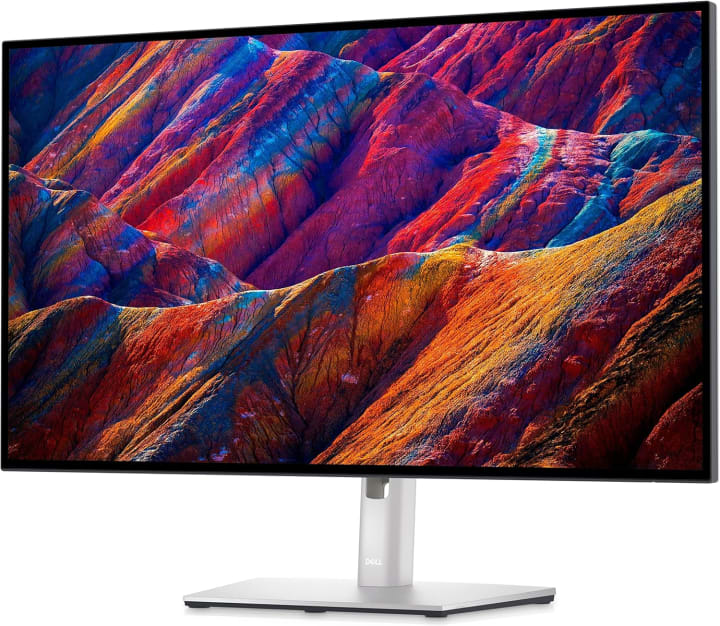
The Dell UltraSharp U2723QE line has always been a favorite among professionals, and after testing the U2723QE for three weeks, I can confidently say it’s one of the best PC monitors for productivity.
What stood out right away was the IPS Black panel technology. Blacks looked deeper than on any other IPS monitor I’ve used, making text easier on the eyes during long writing sessions. The 4K resolution (3840x2160) made everything from spreadsheets to Photoshop projects feel incredibly detailed.
This isn’t a flashy gaming monitor it’s built for people who spend hours working on documents, editing photos, or multitasking across multiple windows. The color accuracy is superb (99% sRGB and 99% Rec.709), which is why designers and editors love it. Oh, and the ergonomics? Fantastic. Height, tilt, swivel all easily adjustable.
Verdict: If you want a professional-grade monitor that’s sharp, accurate, and easy on the eyes, this one’s a winner.
2. LG 27GN950-B
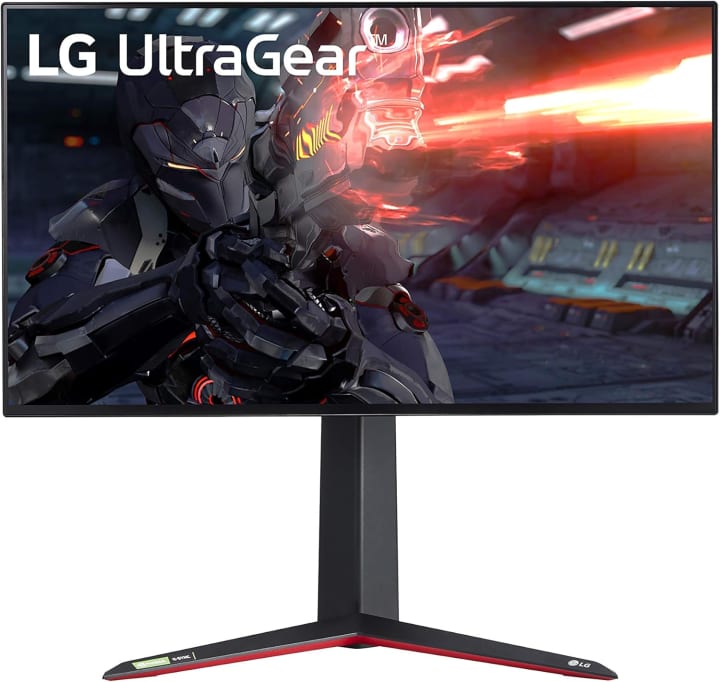
Now let’s talk gaming. The LG 27GN950-B blew me away with how smooth and immersive it felt. This 27-inch 4K gaming monitor boasts a 144Hz refresh rate and 1ms response time, which makes every movement fluid.
I tested this during a weekend gaming marathon (probably not the healthiest choice, but fun). Fast-paced titles like Apex Legends and Cyberpunk felt incredibly responsive. Surprisingly, it also works well for creative work thanks to its strong color accuracy (98% DCI-P3 coverage).
The design is sleek, with subtle RGB lighting at the back, which gave my desk setup a little extra flair. The only downside? You’ll need a powerful graphics card to truly unlock its potential at 4K/144Hz.
Verdict: Perfect for gamers who also dabble in creative work.
3. ASUS ProArt Display PA32UCX

ASUS ProArt Display PA32UCX one is for the professionals who don’t want to compromise editors, photographers, filmmakers. The ASUS ProArt PA32UCX is in a league of its own, with a mini-LED backlight, HDR support (Dolby Vision, HDR10, HLG), and jaw-dropping brightness levels.
When I tested it for video editing, I could see detail in shadows and highlights that other monitors just couldn’t reproduce. It’s factory-calibrated for multiple color spaces, and honestly, it’s almost too much monitor for casual users.
But if your income depends on accurate visuals, the investment is worth it. Build quality is premium, connectivity is generous, and the panel is simply stunning
Verdict: The ultimate monitor for creative pros who need accuracy above all else.
Quick Picks (If You’re in a Hurry)
Best Overall: Dell UltraSharp U2723QE the sweet spot for most people.
Best for Gaming: LG 27GN950-B buttery smooth and color accurate.
Best Premium Choice: ASUS ProArt Display PA32UCX pro-level HDR and precision.
Buying Guide: What to Consider Before Choosing a PC Monitor
When picking the best PC monitor, think about more than just size and resolution:
Purpose: Gaming? Productivity? Content creation? Each use case needs different specs.
Resolution & Size: 4K looks stunning but requires more GPU power. 1440p is a great middle ground.
Refresh Rate: Higher refresh rates (120Hz, 144Hz) are crucial for gaming but not essential for office work.
Panel Type: IPS for color accuracy, VA for contrast, TN for speed (though less common now).
Ergonomics & Comfort: Adjustable stands, blue-light filters, and flicker-free tech matter if you sit for hours.
Budget: Don’t overspend on features you won’t use. Sometimes a solid $300–$400 monitor is all you need.
FAQs
Q1: Do I need a 4K monitor for my PC?
Not necessarily. 1080p and 1440p are fine for everyday use and gaming. But for professionals or those who want sharper text and visuals, 4K is worth it.
Q2: Are curved monitors better for PCs?
Curved displays can be more immersive for gaming and multitasking. But if you’re into design or precise work, flat screens are usually more accurate.
Q3: What’s the difference between IPS, VA, and TN panels?
IPS = best colors and viewing angles. VA = deeper contrast. TN = fastest response times but weaker colors (less common now).
Q4: Can I use a TV instead of a monitor?
Technically yes, but TVs aren’t optimized for close-up use. Input lag, scaling, and text clarity are usually worse compared to a PC monitor.
Q5: How long does a monitor typically last?
With good care, most monitors last 5–7 years easily, sometimes even longer.
Final Verdict
Monitors are often underestimated, but they can make or break your PC experience. After weeks of testing, I’d definately say:
The Dell UltraSharp U2723QE is the best all-rounder for work and general use.
The LG 27GN950-B is a dream for gamers who also value color accuracy.
The ASUS ProArt Display PA32UCX is unbeatable for professionals who need the best of the best.
Think about what matters most to you sharp text, smooth gaming, or precise color work and let that guide your decision. Oh, and one more thing: don’t skimp if you’re on your monitor all day. Your eyes will thank you.Most of these monitors are often on sale, with fast shipping and easy returns.
Disclaimer: As an Amazon Associate, I earn from qualifying purchases. This doesn’t cost you anything extra, and it helps me keep testing products honestly and sharing detailed reviews.

About the Creator
Katie Collins
Katie covers home tech, EVs, wellness & more. She aims to help people make smart buying choices & reach life goals.
Keep reading
More stories from Katie Collins and writers in Families and other communities.
Best Monitors for Home Office
A few weeks ago, I noticed that after long hours of Zoom calls and spreadsheet work, my eyes were killing me, and my neck felt stiff. My tiny laptop screen wasn’t helping I was constantly squinting and scrolling, trying to see details. That’s when I realized how much of a difference the right monitor could make.
By Katie Collins4 months ago in Families
Christmas Abroad: Celebrating the Holidays Without Family
I moved to South Korea in 2017. I was twenty-two years old and excited to start my career as an English Second Language Teacher. With a Bachelor's degree and six hundred dollars in my bank account, I set off for Busan.
By Kera Hollow28 days ago in Families
The Lifelong Legacy Game
Your up! Have you ever played a legacy game with family or friends? Many game makers have legacy versions of games, where the game is played over multiple sittings, each time progressing deeper into the story. Games like Charterstone, my favorite, Ticket to Ride, a popular train themed game, or Risk, if world domination is your shtick, are just a couple examples. Some take weeks, months or even years to complete, depending on how often you play in those parameters.
By Alexandra Grant6 days ago in Families


Comments
There are no comments for this story
Be the first to respond and start the conversation.