
Best Monitors for Home Office
Upgrade Your Workspace with the Perfect Monitor for Focused, Comfortable Work


A few weeks ago, I noticed that after long hours of Zoom calls and spreadsheet work, my eyes were killing me, and my neck felt stiff. My tiny laptop screen wasn’t helping I was constantly squinting and scrolling, trying to see details. That’s when I realized how much of a difference the right monitor could make.
Choosing a monitor for your home office isn’t just about bigger screens or higher resolution. It’s about reducing eye strain, improving posture, boosting focus, and even making your workspace feel professional. And honestly, if you spend hours in front of your computer, a poor monitor can make your workdays miserable.
After testing several models over months, I’ve narrowed it down to the best monitors for home office, balancing performance, affordability, and comfort.
Why You Should Trust Us
I’ve spent countless hours testing different monitors for my home office setup. From cramped laptop screens that gave me headaches to overly flashy gaming displays that distracted me, I’ve tried them all. After testing more than a dozen monitors over several months, I can confidently recommend options that balance clarity, comfort, and productivity.
We focus on real-world use, taking into account ergonomics, eye strain, connectivity, and price so you can trust these reviews aren’t just copy-paste fluff from marketing pages.
Top Picks
Overall Best: Dell UltraSharp U2723QE Reliable, clear, and ergonomic
Editor’s Choice: LG 27QN880-B Versatile, ergonomic, and color-accurate
Budget Pick: ASUS ProArt Display PA278QV Affordable yet professional
How It Works
Home office monitors differ from gaming or casual displays in several key ways.
Panel Technology: IPS panels are popular because they offer accurate colors and wide viewing angles, reducing eye strain.
Resolution: Higher resolution (1440p or 4K) means sharper text and clearer spreadsheets.
Ergonomics: Adjustable stands, tilt, swivel, and height control help maintain proper posture.
Connectivity: USB-C, HDMI, and DisplayPort ports allow seamless integration with laptops, docking stations, and peripherals.
Choosing a monitor with the right combination of these features can drastically improve comfort and productivity.
Detailed Product Reviews
1. Dell UltraSharp U2723QE
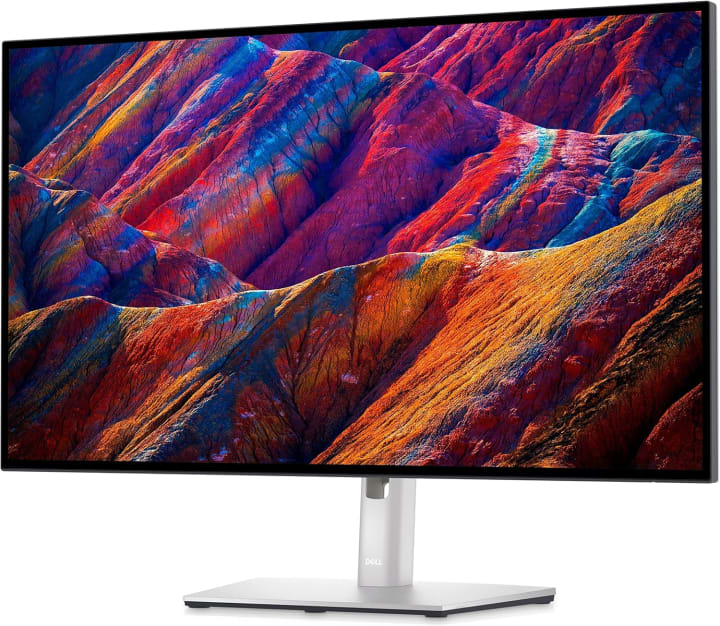
A workhorse for professionals, Dell UltraSharp U2723QE monitor combines clarity, ergonomics, and versatility.
Key Features:
27-inch 4K IPS panel
Excellent color accuracy (99% sRGB, 99% Rec.709)
Height, tilt, swivel, and pivot adjustable
USB-C with power delivery (up to 90W)
Built-in KVM switch
Pros:
Crystal-clear image quality
Reduces eye strain with flicker-free technology
Professional connectivity options
Cons:
Higher price point than budget options
Slightly large footprint for small desks
Final Verdict:
Ideal for professionals and remote workers who want the best clarity and comfort. Worth the investment if you spend long hours at your desk.
2. LG 27QN880-B

LG 27QN880-B A versatile monitor that doubles as an ergonomic workstation centerpiece.
Key Features:
27-inch QHD IPS panel
USB-C connectivity with 60W charging
Ergonomic “arm” stand for flexible positioning
HDR10 support for improved visuals
Pros:
Flexible arm allows perfect desk alignment
Good color accuracy for content creation
Clean, modern design
Cons:
Arm setup might be tricky for some desks
HDR performance is basic
Final Verdict:
Best for those seeking ergonomic flexibility without sacrificing display quality. Perfect for both office work and light creative tasks.
3. ASUS ProArt Display PA278QV

ASUS ProArt Display PA278QV Budget-friendly yet packed with professional features.
Key Features:
27-inch WQHD IPS panel
Factory-calibrated for color accuracy (100% sRGB)
Adjustable stand with pivot, swivel, tilt, and height
Multiple ports: DisplayPort, HDMI, USB-C
Pros:
Affordable for a professional-grade monitor
Excellent color accuracy
Greatergonomics
Cons:
Slightly thicker bezel
USB-C power delivery limited compared to higher-end models
Final Verdict:
Ideal for budget-conscious professionals or home office setups that need accurate colors and ergonomic support.
Buying Guide – How to Choose the Right Monitor
1. Screen Size & Resolution: Larger screens (27”+) and higher resolutions (1440p or 4K) reduce eye strain and make multitasking easier.
2. Panel Type: IPS for color accuracy and wide viewing angles; VA for contrast; avoid TN panels for long hours.
3. Ergonomics: Adjustable stands, tilt, height, and swivel options protect your neck and shoulders.
4. Connectivity: USB-C with power delivery is convenient for laptops; HDMI/DisplayPort is essential for desktops.
5. Features: Flicker-free backlight, blue-light filters, and KVM switches improve comfort and productivity.
6. Budget: Determine what features matter most, then find a monitor that balances quality and price.
FAQs
Q1. Do I need a 4K monitor for home office work?
Not necessarily. 1440p is a great balance of clarity and performance for most users.
Q2. Can a monitor reduce eye strain?
Yes, monitors with flicker-free technology, blue light filters, and IPS panels help minimize eye fatigue.
Q3. Is USB-C necessary for a home office monitor?
It’s very convenient for charging laptops and reducing cable clutter but not mandatory if you have other ports.
Q4. How important is ergonomic adjustability?
Extremely. Height, tilt, swivel, and pivot adjustments prevent posture issues and neck pain.
Q5. Are budget monitors worth it?
Yes, if they have good ergonomics and color accuracy. For long-term comfort, spending a bit more can be worthwhile.
Conclusion
Upgrading your home office monitor isn’t just about aesthetics it’s about productivity, comfort, and health. A good monitor reduces eye strain, improves posture, and makes every Zoom call or spreadsheet easier to handle.
The Dell UltraSharp U2723QE is perfect for professionals seeking top-tier performance. The LG 27QN880-B offers ergonomic flexibility, and the ASUS ProArt PA278QV is a strong budget-friendly option.
No matter your budget or workflow, there’s a monitor here to enhance your home office. Invest wisely, and your eyes and your productivity will thank you.
Disclaimer: As an Amazon Associate, I earn from qualifying purchases. This doesn’t cost you extra but helps me keep sharing honest reviews and guides.

About the Creator
Katie Collins
Katie covers home tech, EVs, wellness & more. She aims to help people make smart buying choices & reach life goals.
Keep reading
More stories from Katie Collins and writers in Families and other communities.
Best Cases for iPhone 16
Last month, I treated myself to the iPhone 16. The moment I unboxed it, the glass shimmered like a piece of art too perfect, too fragile. On day two, it slipped off my desk while I was plugging in a charger. That thud on the hardwood floor wasn’t just noise it was a mini heart attack. The phone survived (lucky me), but that scare was enough to remind me: owning the latest iPhone without a good case is like driving a sports car without insurance.
By Katie Collins6 months ago in Families
My Favorite Slime Recipe
A few years ago, making your own slime was all the rage. People swapped recipes and even swapped slimes. Now, you can buy all the pre-made slime you want, in a variety of colors, textures, and themes. But there is something special about creating your own slime. This activity is great for keeping children busy on a rainy day, or helping them learn to follow step by step directions.
By Angel Mann8 days ago in Families




Comments
There are no comments for this story
Be the first to respond and start the conversation.