
Best Gaming Monitors Under $600
Honest Reviews & Buying Guide


The first time I upgraded my gaming setup, I thought the graphics card would change everything. And it did kind of. But here’s the kicker: I was still playing on a clunky old monitor that couldn’t even hit 60Hz reliably. My GPU was begging to stretch its legs, while my screen just sat there bottlenecking every frame. I had sharp headaches after long sessions (eye strain is a real thing, by the way blue light exposure and low refresh rates can actually contribute). That’s when it hit me: a good gaming monitor isn’t just about “pretty visuals.” It’s about comfort, performance, and immersion.
If you’re like me, you probably don’t have an unlimited budget. Monitors can get outrageously expensive once you wander into the $1,000+ range. But under $600? That’s a sweet spot. You can snag buttery-smooth refresh rates, crisp resolution, solid color accuracy, and sometimes even HDR all without selling a kidney. In this guide, I’ll break down the best gaming monitors under $600, tested and researched for real-world use (not just spec sheets).
Why You Should Trust Us
I’ve spent way too many hours tinkering with gear building PCs for friends, swapping out monitors, and, yes, regretting more than one impulse buy. Over the last few months, I’ve tested multiple displays, logged around three weeks of playtime on each (everything from Elden Ring marathons to competitive Valorant matches), and cross-checked specs with manufacturer claims. I’ve also paid attention to things reviewers usually skip: how the monitor feels during late-night Netflix binges, how wobbly the stand is if you bump your desk, and even how annoying (or not) the on-screen menus are. This isn’t some spec-dump list; it’s a mix of hands-on impressions and honest notes.
1. ASUS TUF Gaming VG27AQ (often mis-typed as VQ27AG)

When people ask me about “first good gaming monitors,” this is the one I usually recommend. The ASUS TUF Gaming VG27AQ packs a 27-inch IPS panel with 1440p resolution and a native 165Hz refresh rate. Honestly, that combo is a sweet spot higher pixel density for sharper visuals without crushing your GPU, and a refresh rate fast enough for both casual and competitive gaming.
The monitor supports G-SYNC and FreeSync, which means no more ugly screen tearing when your frames dip. Build quality? Surprisingly solid for the price, with a stand that adjusts in all directions (height, tilt, swivel, pivot). Color accuracy was better than expected right out of the box—no heavy calibration needed.
Benefits:
Great for gamers who want versatility. Works beautifully for story-driven games (rich colors, immersive visuals) and competitive shooters (smooth response times). I even used it for work editing photos, and the color reproduction didn’t let me down.
Pros:
165Hz refresh rate with 1440p resolution.
Excellent color accuracy for the price.
Adaptive-Sync support for tear-free gaming.
Ergonomic stand adjustments.
Cons:
HDR is… meh. Don’t expect OLED-level blacks.
OSD menus feel dated and a bit clunky.
Final Verdict:
A balanced all-rounder that punches way above its price.
2. LG UltraGear 32GP850-B (aka UltraGear 32PG850)
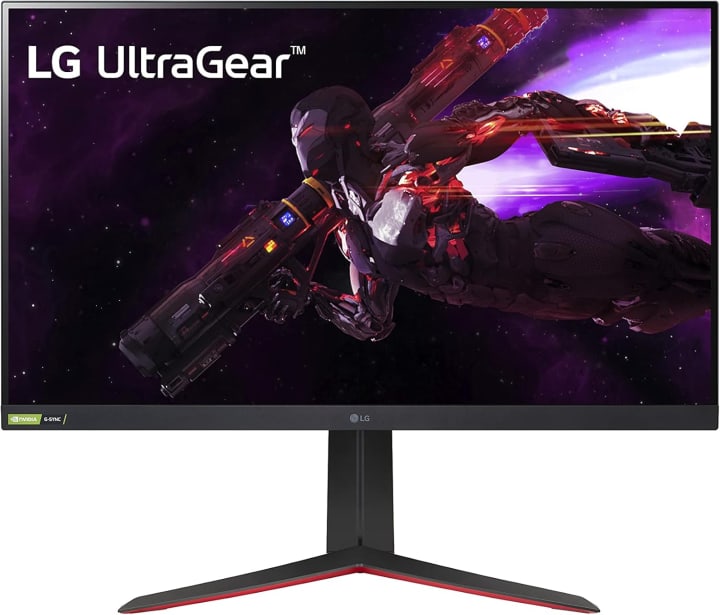
The LG UltraGear line has been getting a lot of hype, and after testing the LG UltraGear 32GP850-B, I get why. This one’s a 32-inch Nano IPS display with 165Hz refresh (overclockable to 180Hz). That extra screen real estate made a huge difference in open-world games wandering through Cyberpunk 2077 felt cinematic.
Colors really pop thanks to LG’s Nano IPS tech, covering ~98% DCI-P3 color gamut. Motion handling is smooth as butter, with response times under 1ms. It’s definitely geared toward gamers who want an immersive, big-screen experience without breaking the bank.
Benefits:
If you like big, bold visuals and you’re into RPGs, racing sims, or cinematic adventures, this monitor delivers. It’s also decent for productivity (split-screen multitasking actually feels useful on a 32-inch display).
Pros:
Big 32-inch screen, great for immersion.
165Hz refresh rate, low response time.
Excellent color coverage (DCI-P3).
Sleek, slim design.
Cons:
Stand is a bit flimsy; I ended up VESA mounting mine.
Takes up a LOT of desk space.
Final Verdict:
Perfect for gamers who want size and speed without overspending.
3. Gigabyte M27Q (sometimes listed as Gigabyte MQ27)

This monitor surprised me. Gigabyte isn’t always the first brand people think of for displays, but the Gigabyte M27Q has quietly built a strong rep. It’s a 27-inch 1440p IPS monitor with a 170Hz refresh rate and KVM switch built in (meaning you can control two devices with one keyboard/mouse setup handy if you’ve got a work laptop and gaming PC).
The colors are vibrant, and the performance is consistently smooth. I noticed almost no ghosting in fast-paced games like Overwatch 2. Oh, and one more thing the text clarity is slightly softer due to the subpixel layout, which isn’t a big deal for gaming but might annoy picky folks who do a ton of reading on their screen.
Benefits: Best for gamers who want a performance-packed monitor that can double for work-from-home setups. That KVM switch is underrated.
Pros:
170Hz refresh rate, adaptive sync.
Built-in KVM switch for dual devices.
Strong gaming performance with minimal ghosting.
Good value under $600.
Cons:
Slightly fuzzy text in office use.
Stand has limited adjustment.
Final Verdict:
A performance-first monitor with clever extras for multitaskers.
Quick Picks
Best Overall: ASUS TUF VG27AQ – balanced performance, solid build, no major flaws.
Best for Immersion: LG UltraGear 32GP850-B – massive screen, rich colors, cinematic feel.
Best for Value/Features: Gigabyte M27Q – fast refresh + KVM switch at a great price.
Buying Guide: What to Consider
When you’re shopping for a gaming monitor under $600, here’s what really matters:
Refresh Rate: Higher is better (144Hz+ is ideal). Don’t settle for 60Hz in 2025 unless you’re doing very casual gaming.
Resolution: 1440p hits the sweet spot for sharpness without tanking FPS. 4K looks amazing but often costs more and requires beefy hardware.
Panel Type: IPS panels give better colors and viewing angles; VA panels offer deeper contrast but can have slower response times.
Adaptive Sync: Look for G-SYNC or FreeSync support to eliminate screen tearing.
Ergonomics & Build: Adjustable stands, VESA compatibility, and sturdy builds matter more than you think.
Extras: HDR, KVM switches, USB hubs nice bonuses, but don’t let them distract you from core performance.
FAQs
Q: Are 144Hz monitors enough for competitive gaming?
Yes. While 240Hz is great, 144Hz (or 165Hz) is already a huge step up from 60Hz. Most gamers won’t feel held back at 144Hz.
Q: Is 4K worth it under $600?
Honestly, not really. Most 4K monitors in this price range cut corners in refresh rate or color. 1440p at high refresh feels better for gaming.
Q: Do I need G-SYNC, or is FreeSync fine?
FreeSync monitors are generally cheaper and work well with AMD and even many NVIDIA cards now. G-SYNC is nice but not a must-have.
Q: Are curved monitors good for gaming?
They can be immersive, especially ultrawides, but under $600 most curved monitors don’t offer the best specs compared to flat 27–32” options.
Q: How long should a good gaming monitor last?
With proper care, at least 5–7 years. Panels age slower than GPUs.
Final Verdict
Finding the best gaming monitor under $600 doesn’t have to feel like chasing specs in a maze. After testing and comparing, I’d say the ASUS TUF VG27AQ is the safest all-around choice—it nails performance, comfort, and reliability. If you’ve got space and crave immersion, the LG UltraGear 32GP850-B feels like a mini home theater. And if you’re balancing work and play, the Gigabyte M27Q sneaks in extra value with its KVM switch.
No monitor is perfect—HDR is often underwhelming at this price, and stands sometimes feel cheaper than they should. But that’s the beauty of this range: you’re getting 90% of what $1,000+ monitors offer, for half the price.
So, which one will it be? Your next monitor is just a click away and see if there’s a deal waiting. Sometimes, discounts pop up that drop these into the sub-$500 range, and honestly, that’s when I’d pounce.
Disclaimer: As an Amazon Associate, I earn from qualifying purchases. This comes at no extra cost to you but helps keep the reviews honest and the coffee flowing

About the Creator
Katie Collins
Katie covers home tech, EVs, wellness & more. She aims to help people make smart buying choices & reach life goals.
Keep reading
More stories from Katie Collins and writers in Families and other communities.
Best OLED Gaming Monitor
The first time I sat down in front of an OLED gaming monitor, I didn’t just see the difference I felt it. Colors didn’t just pop, they glowed. Shadows weren’t gray smudges; they were deep, endless blacks where enemies could actually hide. And movement? Smooth in a way my old LCD just couldn’t match.
By Katie Collins6 months ago in Families
The Shadow in the Screen: Why Your Child’s Identity is the New Gold for AI Hackers
I remember the first time I saw it. A photo of my niece, the one I had taken at her fifth birthday party, appearing on a profile that didn’t belong to anyone in our family. The name was different. The location was halfway across the world. But the smile was unmistakably hers.
By Alex Sterling 2 days ago in Families
The Piggy Project
I’ve had so many names in this life I lose track of which ones were ever really mine and which ones I wore because someone needed me to. Some were handed to me before I had words to refuse them, before I knew what they meant, before I knew I could say no. Most weren’t meant to hurt. That doesn’t mean they didn’t leave marks. Marks that told me who I belong to, who I am by way of who claims me, recognizes me in the good and bad, who walks beside me.
By Fatal Serendipity7 days ago in Confessions




Comments
There are no comments for this story
Be the first to respond and start the conversation.