
What is Call Center Knowledge Base and How to Build it?
Understanding Call Center Knowledge Bases and Effective Strategies for Building One

Have you ever noticed how much time your agents spend searching for answers during customer calls?
Research shows that a significant portion of their time, 35%, according to Forrester, gets wasted on this very task. This not only leads to extended call durations but also frustrates both the agents and customers, ultimately impacting the quality of service provided. When call center agents are left scrambling for information, customer satisfaction drops, and efficiency takes a hit.
So, what’s the solution to this pressing issue? A Call Center Knowledge Base.
A knowledge base centralizes all critical information in one easy-to-access location, enabling agents to quickly retrieve accurate answers and resolve customer issues with ease.
By reducing the time spent searching for information, agents can handle calls faster, leaving customers satisfied and improving overall service efficiency.
In this article, you’ll explore what a call center knowledge base is, how to build one, and the top tools to help you get started on enhancing your customer service operations.
What Is a Call Center Knowledge Base?
A Call Center Knowledge Base is a centralized repository of information that helps your agents to find quick and accurate answers while handling customer queries. It includes SOPs, scripts, FAQs, and troubleshooting guides, that are organized to support faster resolution and consistent service.
Why Does Your Call Center Need a Knowledge Base?
Have you ever seen your agents waste time finding something through scattered info? If yes, then you also know that leads to longer calls and frustrated customers, leading to a bad impact on your business.
For solve this problem, you definitely need a knowledge base. A knowledge base gives your agents quick, reliable access to the right answers.
Here’s how a call center knowledge base helps:
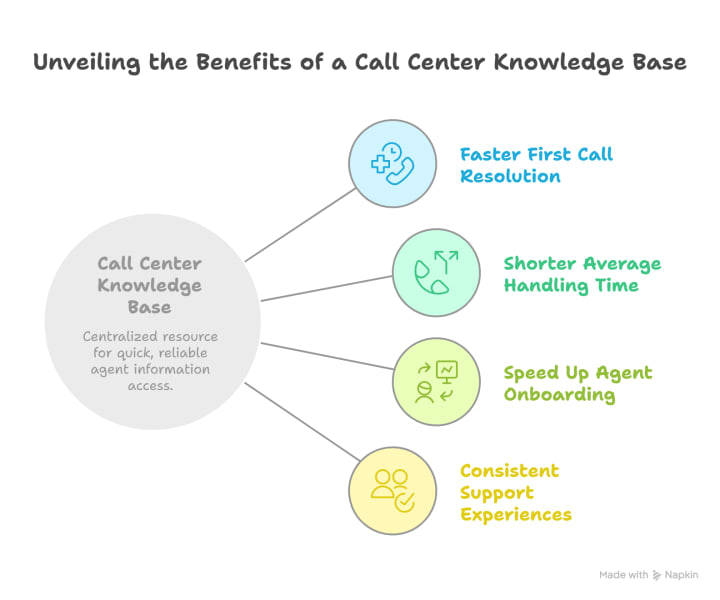
With a good knowledge base, your agents can quickly access accurate answers; they resolve customers' queries during the first interaction, improving customer satisfaction and cutting down on repeat calls.
No more switching screens or hunting for details. A structured knowledge base enables faster, smoother conversations without compromising accuracy.
With the help of a knowledge base, new agents ramp up quickly using pre-built flows, SOPs, and step-by-step guidance, that will reduce the training time and dependency on team leads.
With a centralized knowledge base, your agents can give customers the same clear, approved answers across phone, chat, and email, ensuring consistency in every interaction.
How to Build a Call Center Knowledge Base
Building a knowledge base It takes more than just uploading documents. It’s about organizing the right content, making it accessible, and ensuring agents use it. Here’s a step-by-step guide:
Step 1: Identify Common Customer Queries
The very first step is finding the customers' queries and issues. You can start by collecting data from:
- Call recordings
- Chat transcripts
- CRM notes
- Agent interviews
Always look for patterns. What questions keep coming up? These should be your first content priorities.
Step 2: Structure Content in a Search-Friendly Format
Your second step is using clear categories such as:
- Troubleshooting
- How-To Guides
- Billing & Payments
- Policies & Procedures
Each article should follow a simple format:
- Problem statement
- Step-by-step resolution
- Visual aid (screenshot or video)
Step 3: Use Visuals and Decision Trees
Sometimes, there aren’t enough words, and you need to add:
- Infographics for step-by-step guides
- Videos for feature walkthroughs
- Decision trees for complex troubleshooting
Step 4: Make It Easy to Search
A knowledge base is only useful if your agents can find what they need. Create a platform with:
- AI-powered search
- Auto-suggest based on keywords
- Synonym recognition
Step 5: Collaborate with Subject Matter Experts
Involve your product, legal, and operations teams to ensure accuracy. Set up content ownership, so each section has a designated reviewer.
Step 6: Keep It Updated
Make content reviews monthly or quarterly ritual. Outdated articles can be worse than having no knowledge base at all. So, keep your knowledge base updated as per the procedure, protocol, or feature changes.
How To Choose the Right Call Center Knowledge Base Software
Choosing the right call center knowledge base software depends on your team’s needs, scalability, and ease of use. Look for features like smart search, workflow support, integrations, and content management. Here is the list of important features that you always keep in mind:
1. Intuitive Search Bar That Works Like Google (But for Your Support Team)
Your agents don’t have time to scroll through folders, PDFs, or scattered info. A good knowledge base includes a smart, AI searchable interface that shows the most relevant answers instantly, even for incomplete or misspelled queries.
2. Step-by-Step Troubleshooting & Guided Workflows
Instead of heavy documents, agents get easy-to-follow steps, often through interactive decision trees. These workflows help reduce errors and ensure consistent handling of complex issues.
3. Visual Content That Speaks Louder Than Text
Sometimes a screenshot or short video does the job better than a paragraph. Visual guides, like annotated images or quick clips, help your agents grasp processes faster, especially in tech-heavy or multilingual environments.
4. Ready-to-Use Call Scripts and Predefined Responses
Whether it’s greeting a customer or handling a refund, your agents get access to scripted responses that are ready to use. This keeps messaging consistent and ensures compliance.
5. Real-Time Updates & Content Ownership
A strong knowledge base allows content teams to instantly update articles, track version history, and notify agents of critical changes without delay.
6. Role-Based Access & Personalization
With access controls, agents only see content relevant to their role or region. This keeps the interface clean and reduces the chances of confusion or error.
7. Empowered New Agent Onboarding
With the help of a knowledge base, new hires don’t need to learn from seniors for weeks. A structured knowledge base gives them on-demand access to training content, SOPs, and guided flows. It reduces the learning curve, boosts confidence, and enables them to start handling calls independently and faster.
8. Multilingual Support for Global Teams
A modern knowledge base should support multiple languages to help teams across regions deliver accurate answers in the customer’s preferred language.
Top 5 Knowledge Base Tools for Call Centers
1. Knowmax
Knowmax is an AI-powered knowledge management platform purpose-built for call centers and customer support teams. It provides an efficient solution for agents, enabling them to find the right answers quickly through its interactive decision trees, visual guides, and robust search functionalities.
This platform consolidates information into a single source of truth, ensuring consistency and accuracy across customer interactions.
By empowering agents with easy access to knowledge, Knowmax significantly reduces call resolution times, improves first-contact resolution (FCR) rates, and enhances overall customer satisfaction (CSAT).
Moreover, Knowmax’s seamless integration with existing call center systems ensures that knowledge flows smoothly across the organization, while its scalability makes it suitable for businesses of all sizes. Whether handling routine queries or complex cases, Knowmax enables customer support teams to work smarter, not harder, boosting both agent productivity and customer experience.
Key Features:
- AI-powered search with autosuggestions and typo recognition
- Decision trees and guided workflows to simplify troubleshooting
- Visual guides with images, videos, and picture-based SOPs
- Predefined call scripts for consistent agent responses
- Real-time updates with role-based access and content ownership
- Multilingual content support for global teams
- Smart onboarding tools that help new agents become productive faster
2. Document360
Document360 is a powerful knowledge base platform designed to help call centers build organized, self-service knowledge repositories for both agents and customers. It provides advanced content management features with an intuitive interface for seamless use.
Key Features:
- Organized content categorization for quick access
- Version control to track content changes
- Role-based permissions for secure and controlled access
- Analytics to evaluate and optimize content performance
3. Guru
Guru is a knowledge management solution that seamlessly integrates with existing workflows, providing agents with real-time access to reliable information during customer interaction.
Key Features:
- AI-driven search for quick and accurate results
- Browser extension to streamline workflow integration
- Verification system to ensure content accuracy
- Analytics to track and measure knowledge usage and effectiveness
4. Zendesk Guide
Zendesk Guide is a knowledge base tool tailored for teams already using Zendesk for ticketing and omnichannel support.
Key Features:
- Seamless integration with Zendesk Support
- AI-powered content suggestions
- User permission control and analytics
- Multilingual knowledge base
- Self-service portal builder
5. Freshdesk Knowledge Base (by Freshworks)
Freshdesk offers a robust knowledge base as part of its omnichannel customer support suite. It helps support teams create, organize, and manage content efficiently ideal for call centers looking for an integrated solution.
Key Features:
- AI-powered search and article suggestions
- Decision trees and canned responses
- Multilingual knowledge base
- Internal and external knowledge base setup
- Access controls and workflow approvals
- Easy integration with Freshdesk ticketing system
To Sum it Up
A well-structured AI knowledge base is essential for streamlining call center operations, improving efficiency, and enhancing customer satisfaction. By providing agents with quick access to accurate information, reducing training time, and ensuring consistency across channels, it empowers your team to deliver better, faster support. Choose the right Knowledge management tool based on your team’s needs, and watch your customer service transform with greater speed, accuracy, and reliability.
About the Creator
Knowmax
Knowmax is an AI Guided Knowledge Management Platform. We empower your CX teams to deliver mistake-proof service across touchpoints with contextual and actionable knowledge.



Comments
There are no comments for this story
Be the first to respond and start the conversation.