
Understanding the Power of Context API in React
Mastering State Management and Component Communication with React's Context API


The Context API in React is a feature that allows for sharing data between components without the need for passing props down through multiple levels of the component tree. This can be especially useful when you have data that needs to be shared between many components or when you have deeply nested components.
In this article, we will explore the Context API in React and provide some code examples to demonstrate how you can use it in your own applications.
What is the Context API?
The Context API is a way of passing data down through the component tree without the need for props. It allows you to share data between components that are not directly related, such as a parent and a child that are several levels apart.
The Context API is built on two React components: the Provider and the Consumer. The Provider component is used to wrap the components that need to access the shared data, and the Consumer component is used to access that data.
Creating a Context
To create a new Context, you can use the createContext() method from the React library. This method returns a new Context object that can be used to share data across components.
Here is an example of creating a new Context:
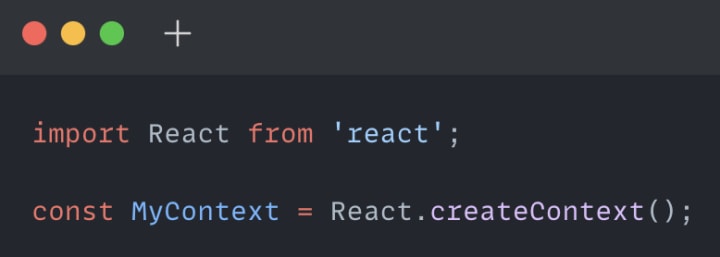
This creates a new Context object called MyContext.
Providing Data to the Context
To provide data to the Context, you need to use the Provider component. The Provider component can be used to wrap the components that need to access the shared data.
Here is an example of providing data to the Context:
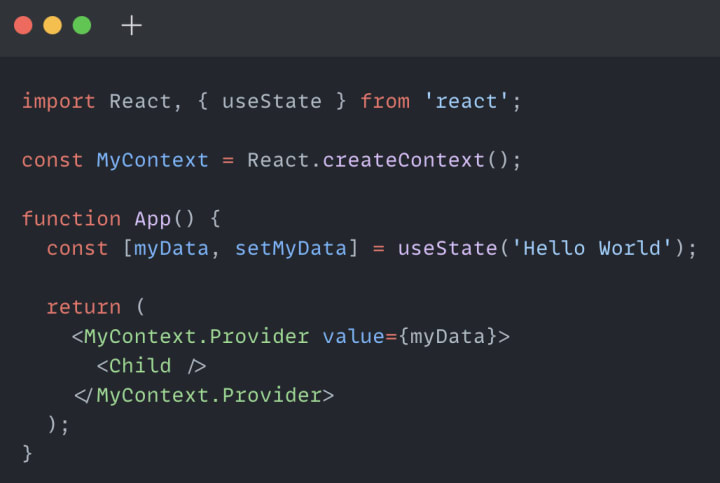
In this example, the MyContext.Provider component is used to wrap the Child component. The value prop is used to pass data to the Child component. In this case, we are passing the string 'Hello World'.
Accessing Data from the Context
To access data from the Context, you need to use the Consumer component. The Consumer component can be used to access the shared data.
Here is an example of accessing data from the Context:
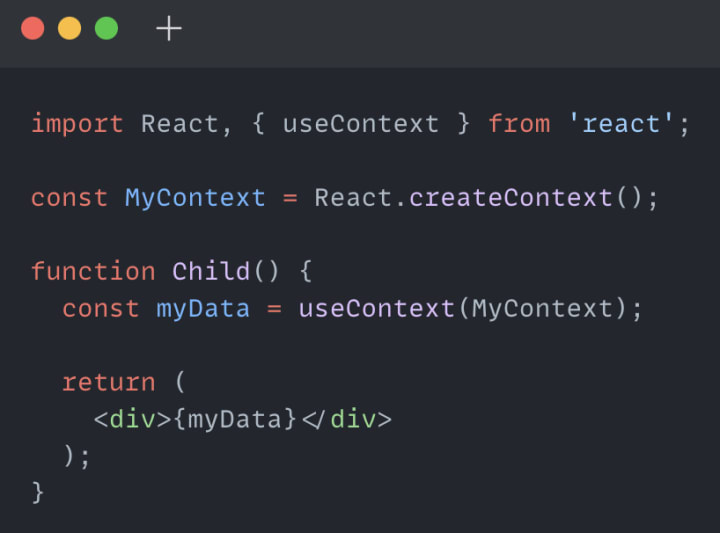
In this example, the useContext hook is used to access the data from the Context. The MyContext object is passed as an argument to the useContext hook. This returns the data that was passed to the MyContext.Provider component in the parent component.
Passing Functions to the Context
In addition to passing data to the Context, you can also pass functions. This can be useful when you want to update the data in the Context.
Here is an example of passing a function to the Context:
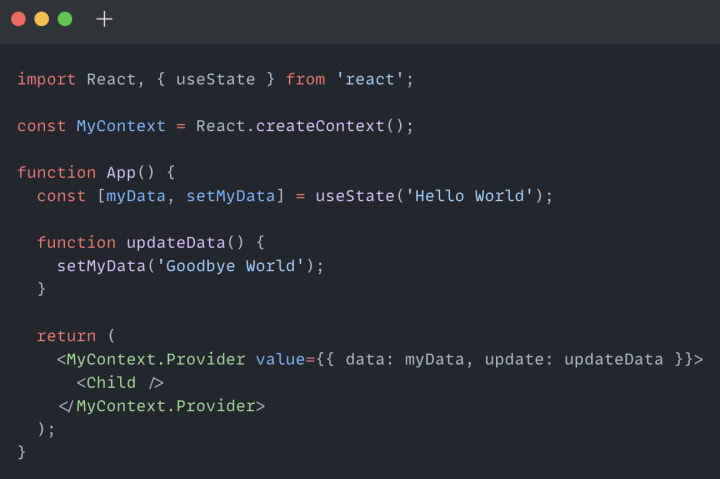
In this example, we are passing an object with two properties: data and update. data contains the string 'Hello World' and update is a function that updates the data in the Context to ‘Goodbye World’. This object is passed as the value prop to MyContext.Provider component.
To access the data and function from the Context, we can modify the Child component like this:
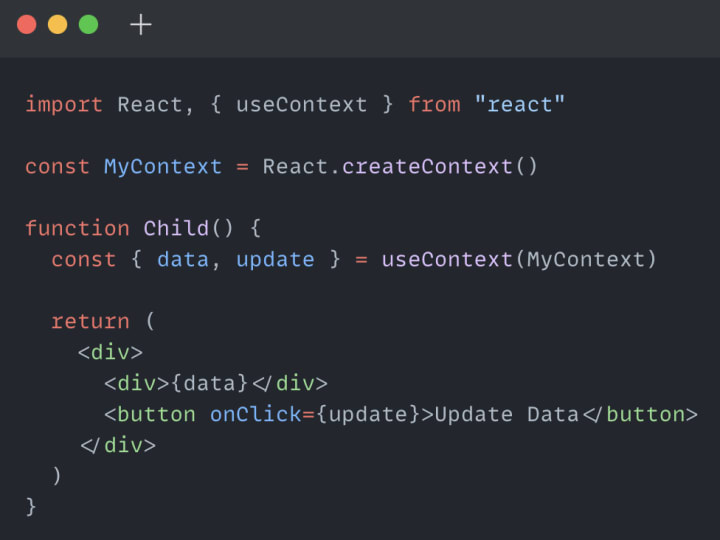
In this example, we are using object destructuring to extract the data and update function from the Context. We are then rendering the data and a button that calls the update function when clicked.
Updating Data in the Context
To update the data in the Context, you need to call the update function that was passed to the Context. You can do this by calling the function directly or passing it down through a prop to a child component.
Here is an example of updating the data in the Context:
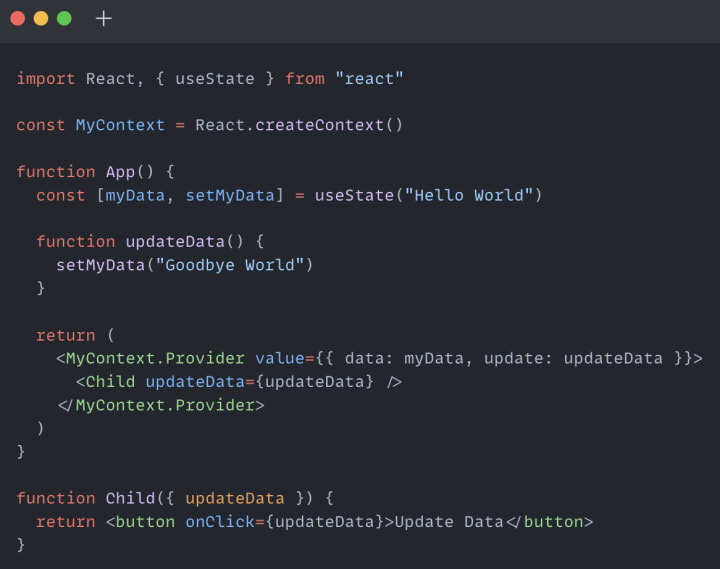
In this example, we are passing the updateData function down to the Child component through a prop. The Child component renders a button that calls the updateData function when clicked.
Conclusion
The Context API in React is a powerful tool that allows for sharing data between components without the need for passing props down through multiple levels of the component tree. With the Provider and Consumer components, you can easily provide and access data from the Context.
By passing functions to the Context, you can also update the shared data in a simple and efficient way. This makes the Context API a great choice when you have data that needs to be shared across many components or when you have deeply nested components.
I hope this article has helped you understand the Context API in React and how you can use it in your own applications. Remember to check out the React documentation for more information and examples.
About the Creator
FARDA KARIMOV
I'm a front-end engineer creating visually appealing and user-friendly web experiences. On Vocal Media, I share insights and advice on front-end development and design trends. Join me to explore the world of front-end development.
Keep reading
More stories from FARDA KARIMOV and writers in Education and other communities.
Mastering Arrow Functions in JavaScript: A Comprehensive Guide
Introduction Arrow functions are a relatively new feature in the world of JavaScript that allows for a more concise and expressive syntax when writing functions. Since their introduction in ES6 (ECMAScript 2015), arrow functions have become increasingly popular due to their ease of use and readability.
By FARDA KARIMOV3 years ago in Education
How Global Experiences Shape Smarter, More Creative Leaders
Leadership today demands more than experience and technical skill. It requires imagination, empathy, and the ability to see problems from new angles. One of the most potent ways leaders develop these qualities is through travel. When leaders step outside familiar routines, they gain insight that books and meetings cannot offer. Exposure to new cultures, environments, and ways of thinking shows clearly how creative leadership through travel can unlock ideas that change how leaders think, decide, and inspire others.
By Nathalie Kyriakoua day ago in Education
Can You Really Earn Money With Transcription? The Real Income Reality
The short answer is yes—you can earn money with transcription. But the more honest, useful answer is this: transcription only becomes worthwhile when you understand how the income actually works, not how it’s often presented online.
By Mahesh Kumar2 days ago in Education




Comments
There are no comments for this story
Be the first to respond and start the conversation.