
Mastering Arrow Functions in JavaScript: A Comprehensive Guide
Learn how to simplify and enhance your JavaScript code with Arrow Functions


Introduction
Arrow functions are a relatively new feature in the world of JavaScript that allows for a more concise and expressive syntax when writing functions. Since their introduction in ES6 (ECMAScript 2015), arrow functions have become increasingly popular due to their ease of use and readability.
In this article, we will explore the different aspects of arrow functions in JavaScript, including their syntax, behavior, and how they differ from traditional function declarations.
Syntax
The syntax of arrow functions is very different from traditional function declarations. Arrow functions are defined using the arrow notation (=>), which replaces the function keyword. Here is an example:

As you can see, the arrow function declaration is much more concise than the traditional function declaration. This is because arrow functions are implicitly returned, meaning that the return keyword is not required in most cases. In the example above, the expression a * b is automatically returned from the arrow function.
Another important aspect of arrow function syntax is the use of parentheses. When an arrow function has a single parameter, the parentheses are optional. However, if there are no parameters or multiple parameters, parentheses are required. Here are some examples:
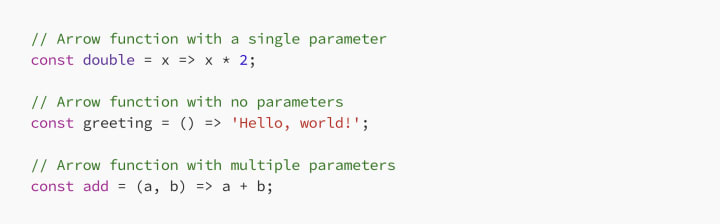
Behavior
Arrow functions behave differently from traditional function declarations in a few key ways. One of the most notable differences is the way that they handle this keyword.
In traditional function declarations, the value of this is determined by the context in which the function is called. This can be very confusing and can lead to bugs in your code. Arrow functions, on the other hand, use lexical scoping to determine the value of this. This means that the value of this is determined by the location of the arrow function in the code, not the context in which it is called.
Here is an example that demonstrates this behavior:

In this example, the sayHello method uses a traditional function declaration, while the sayHelloArrow method uses an arrow function. As you can see, the sayHello method correctly prints the name and age of the person, while the sayHelloArrow method prints undefined for both properties. This is because the this keyword in sayHelloArrow refers to the global object, not the person object.
Another important difference between arrow functions and traditional function declarations is the way that they handle the arguments object. In traditional function declarations, the arguments object is an array-like object that contains all of the arguments passed to the function. Arrow functions, on the other hand, do not have an arguments object. If you need to access the arguments passed to an arrow function, you must use the rest parameter syntax.
Here is an example that demonstrates this behavior:

In this example, the printArgs function uses a traditional function declaration and logs the arguments object to the console. The printArgsArrow function, on the other hand, uses an arrow function and logs an array of arguments using the rest parameter syntax. As you can see, the two functions produce different outputs, and it is important to understand the differences when working with arrow functions.
Differences from traditional function declarations
While arrow functions share many similarities with traditional function declarations, there are a few key differences that are important to understand.
Firstly, arrow functions do not have their own this, arguments, super, or new.target keywords. This means that they inherit these values from the surrounding lexical scope. In contrast, traditional function declarations create their own execution context, which includes these keywords.
Secondly, arrow functions cannot be used as constructors. This means that they cannot be used with the new keyword to create new objects.
Finally, arrow functions are always anonymous. This means that they cannot be named, and must be assigned to a variable or passed as an argument to another function.
Advantages of arrow functions
Arrow functions have several advantages over traditional function declarations, including:
Conciseness: Arrow functions are much more concise than traditional function declarations, which makes them easier to read and write.
Clarity: Arrow functions make it clear where this keyword is pointing, which can help to reduce bugs and make the code easier to understand.
Implicit returns: Arrow functions are implicitly returned, which makes the code more streamlined and easier to read.
Lexical scoping: Arrow functions use lexical scoping to determine the value of this, which makes it easier to reason about the behavior of the code.
Conclusion
Arrow functions are a powerful addition to the JavaScript language that can make your code more concise and easier to read. They are particularly useful for handling callbacks and working with arrays and can help to reduce bugs and improve the clarity of your code.
While arrow functions are similar to traditional function declarations in many ways, there are a few key differences that are important to understand. By mastering the syntax and behavior of arrow functions, you can take advantage of their many benefits and write better, more efficient code.
About the Creator
FARDA KARIMOV
I'm a front-end engineer creating visually appealing and user-friendly web experiences. On Vocal Media, I share insights and advice on front-end development and design trends. Join me to explore the world of front-end development.
Keep reading
More stories from FARDA KARIMOV and writers in Education and other communities.
Integrating Redux Toolkit into a React App: Step-by-Step Guide with Code Examples
Redux is a state management library for JavaScript applications. It provides a predictable and easy-to-reason-about state management solution. However, using Redux can be quite verbose and repetitive, especially when dealing with large-scale applications. That’s where Redux Toolkit comes in. Redux Toolkit is a package that simplifies the process of using Redux, making it easier to set up and manage.
By FARDA KARIMOV3 years ago in Education
How GPS Tracking for Tools and Equipment Can Save Your Business
Tool theft is a growing problem for construction companies, contractors and tradespeople. At kynekt.id we provide best GPS tracking for tools and equipment, Whether it’s a jobsite break-in or equipment walking off during work hours, losing tools can cost thousands of dollars and delay projects. Fortunately, We offer a practical solution that’s becoming more affordable and easier to use every day.
By Kynekt Limiteda day ago in Education
Are Wormholes Mathematically Allowed by Physics? Exploring the Equations Behind Cosmic Shortcuts
What Is a Wormhole? A wormhole is a hypothetical structure that connects two separate regions of spacetime through a tunnel-like geometry. Instead of traveling the long way through space, a wormhole could provide a shortcut by bending spacetime itself.
By shahkar jalal7 days ago in Education
Center Stage with Paul Stewart
*** I'm keen to republish the interviews I did for my series with Vocal creators. It's been a few years and I thought it might be nice to revisit these wonderful conversations. I'll be releasing them one at a time for a few weeks/months.
By Heather Hublerabout an hour ago in Interview




Comments
There are no comments for this story
Be the first to respond and start the conversation.