
The Complete Guide to Using iHeartPDF's Merge PDF Tool
PDF Converters
Managing multiple PDF files often feels like herding cats—especially when you’re dealing with dozens of documents scattered across various devices, emails, and cloud drives. Whether you're a student trying to combine class notes, a lawyer preparing case files, or a digital nomad keeping business docs tidy, you know the struggle. Fortunately, iHeartPDF’s Merge PDF tool makes merging PDFs a seamless, stress-free experience—and best of all, it's completely free.
In this guide, we’ll dive deep into what makes iHeartPDF a game-changer, why merging PDFs matters, and how this tool can simplify your workflow.
🧩 Why Do You Need to Merge PDFs?
Before diving into the tool itself, let’s answer a basic but vital question: why bother merging PDFs at all?
In many real-world scenarios, dealing with fragmented documents can lead to chaos:
Students may have lecture notes split across weekly files.
HR managers often receive scanned documents in chunks from job applicants.
Freelancers need to send invoices, contracts, and receipts in one file.
Researchers want to share a single cohesive document instead of 15 attachments.
These examples show just how valuable a reliable PDF merging tool can be. It reduces clutter, increases professionalism, and most importantly—it saves time.
🚀 Enter iHeartPDF: Merge Like a Pro
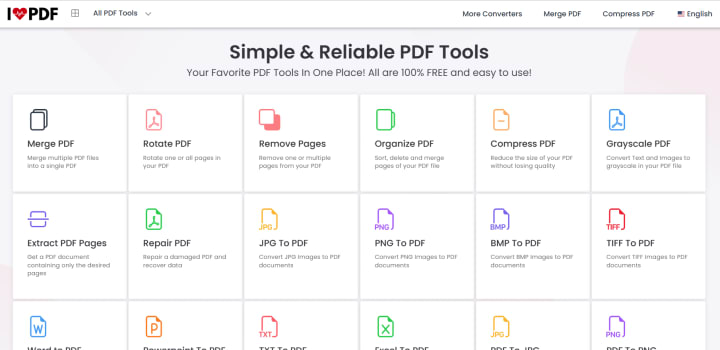
Now let’s talk about the star of the show—iHeartPDF Merge PDF. This web-based tool offers an intuitive interface where anyone—even those without tech skills—can merge PDF files in seconds.
Here’s what makes it stand out:
🔹 1. Effortless Interface
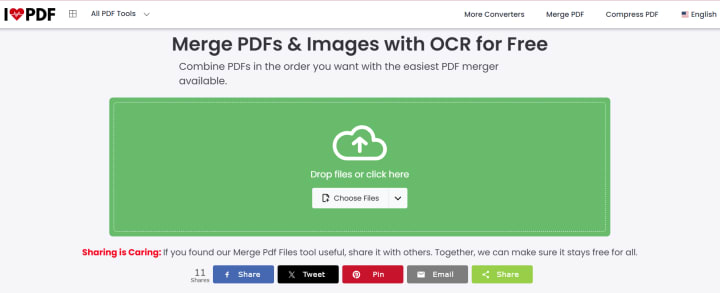
No steep learning curve. Just drag, drop, and click. Upload your PDFs from your device or drag them directly into the browser window. You can easily rearrange the order before hitting "Merge PDF."
🔹 2. Completely Online
No downloads, no bloatware, and no sneaky installations. Everything happens right in your browser, making it fast and accessible from anywhere.
🔹 3. Safe and Private
Your documents are processed over secure connections and automatically deleted from the server after completion. This means your sensitive data is never stored or misused.
🔹 4. Totally Free
Unlike many "free" PDF tools that hide features behind a paywall, iHeartPDF.net offers powerful tools with no subscription required.
🖼️ Visual Walkthrough
Here’s how simple it is:
Upload files from your device.
Reorder them however you like.
Click “Merge PDF” and wait a few seconds.
Download your combined file instantly.
Want to make minor edits after merging? Try their PDF Editor tool to add annotations or fill out forms.
💼 Who Is It For?
One of the most impressive things about iHeartPDF is how versatile it is. It’s not just for office workers or students—it's for anyone who works with documents regularly.
Educators & Students
Compile lecture slides, exam papers, or notes into a single file before sharing with the class.
Finance Professionals
Merge bank statements, invoices, and receipts into one organized report for audits.
Content Creators
Package eBooks, guides, or portfolios into professional-looking PDFs.
Legal Teams
Combine evidence, contracts, or case notes for court submissions or internal review.
🛠️ Beyond Merging: A Full PDF Toolkit
iHeartPDF isn’t just about merging. Once you’ve used the merge tool, you might find yourself exploring their full suite of PDF services:
Compress PDF: Reduce large file sizes for faster sharing.
PDF to Word: Convert PDFs into editable Word documents.
Edit PDF: Add text, shapes, or images to any PDF.
It’s like having Adobe Acrobat Pro—but without the price tag.
🔁 Real-Life Example
Let’s say you’re a university student named Sarah. You’ve just finished a semester of digital coursework and need to submit all your assignments in a single PDF. Instead of wasting time copying and pasting everything into a Word doc, you:
Visit: iheartpdf.net/merge-pdf
Upload each assignment file in the order you want
Merge and download your single file
Submit it confidently, knowing it’s all clean and organized
The process takes under 2 minutes. That’s the kind of efficiency we all need.
🛡️ Is It Safe to Use?
Absolutely. iHeartPDF uses HTTPS for all its transactions, ensuring secure communication. Files are deleted from the server after the task is completed, so your privacy is never at risk.
🧠 Final Thoughts: Why iHeartPDF Deserves a Spot in Your Toolkit
The internet is flooded with PDF tools, but few strike the perfect balance between simplicity, security, and functionality. That’s why iHeartPDF’s Merge PDF tool deserves your attention.
Whether you're merging documents for work, school, or personal use, iHeartPDF gets the job done in just a few clicks. No downloads. No subscriptions. Just a clean, easy-to-use interface that saves time and headaches.
About the Creator
Keep reading
More stories from writers in Education and other communities.
Beyond the Resume: How to Assess Startup Teams When Backgrounds Fall Short
Investors and partners often begin evaluating startup teams by scanning resumes, titles, and past employers. While experience offers helpful signals, it rarely tells the full story in early-stage ventures. Startups operate in uncertain environments where adaptability and judgment matter as much as credentials. Therefore, relying solely on experience can lead to missed opportunities or misplaced confidence.
By Rushi Manche6 days ago in Education
Best Laptop for Digital Art
In the vibrant world of digital art, the right laptop can be your greatest creative ally. Whether you're sketching breathtaking illustrations, designing compelling graphics, or animating entire worlds, you need more than just a machine you need a digital canvas that brings your ideas to life.
By Home Care Ranks7 days ago in Education
🅼🅸🅳🅽🅸🅶🅷🆃 🆂🅽🅰🅲🅺🆂
"It's 10 in Tuscon! We all know what that means... It's Time for Midnight Snacks with your man, Gerald Gee! Ready to spend the night together? Me too! I'm full of snacks and can't wait to regurgitate them all back into your hungry ears. Crack a brew! Pop some corn! Anything to get ready for one hell of a show where the talk maybe cheap but the words cut deep...
By Lamar Wiggins3 days ago in Fiction
Thoughts on Vocal and the way the world is
"Death cannot stop true love, only delay it." – Wesley in The Princess Bride. I decided to come back to Vocal on a very cold and dark night at the end of December. I had been, and still am, convalescing from a horrible staph infection that had gone misdiagnosed for months. This, paired with the increasing challenges of being healthy, making the best choices for my co-parented child, being a wife, and being a director at a new job, was a lot to manage.
By Jazzy 7 days ago in Confessions



Comments
There are no comments for this story
Be the first to respond and start the conversation.