
Static variable vs Session variable in c#
variable uses

In C#, a static variable is a variable that is declared with the static keyword and is associated with the type rather than an instance of the type. This means that the variable is shared among all instances of the type and can be accessed without creating an object of the type.
A session variable, on the other hand, is a variable that is stored in the user's session and is specific to that session. It is commonly used in web applications to store user-specific data, such as user preferences, shopping cart items, and authentication information.
The main difference between a static variable and a session variable is their scope and lifetime. A static variable has a lifetime that is tied to the application domain and is available to all instances of the type, whereas a session variable has a lifetime that is tied to the user's session and is only available to that session.
Static variables are useful for storing data that needs to be shared across all instances of a type, such as a counter or a configuration setting. Session variables are useful for storing data that is specific to a user and needs to persist across multiple requests, such as user preferences or authentication information.
It's important to note that session variables should be used with caution, as storing large amounts of data in a session can lead to performance issues and scalability problems. Additionally, session variables are vulnerable to security attacks, such as session hijacking and session fixation, so it's important to ensure that they are properly secured.
Here's an example that demonstrates the difference between a static variable and a session variable in C#:
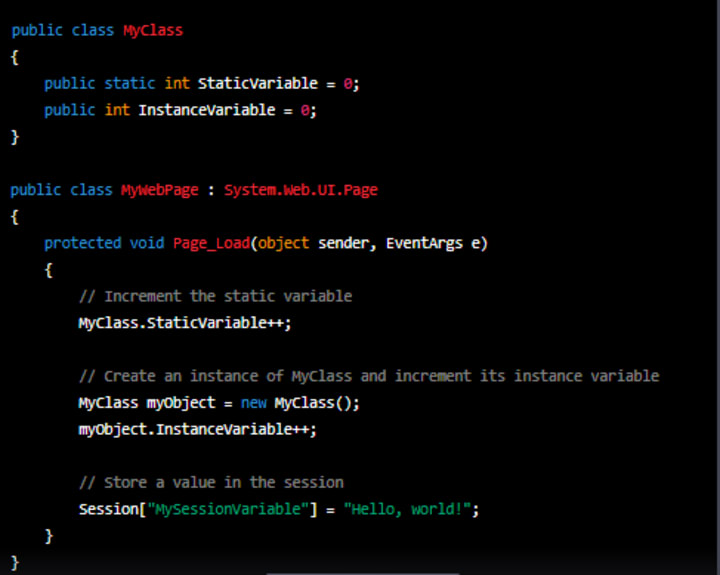
In this example, we have a class called MyClass that contains both a static variable (StaticVariable) and an instance variable (InstanceVariable). We also have a web page (MyWebPage) that inherits from System.Web.UI.Page.
In the Page_Load method of the web page, we increment the static variable (MyClass.StaticVariable) and create an instance of MyClass (myObject) and increment its instance variable (myObject.InstanceVariable).
We also store a value in the session (Session["MySessionVariable"]). This value will be available to the current user's session for the duration of their visit to the website.
So, in summary, the static variable (MyClass.StaticVariable) is shared among all instances of the class and persists for the lifetime of the application, whereas the instance variable (myObject.InstanceVariable) is specific to a single instance of the class and is destroyed when the instance is destroyed. The session variable (Session["MySessionVariable"]) is specific to the current user's session and persists for the duration of their visit to the website.
Here's an example continuation that demonstrates how to access the static and session variables from other parts of the code:
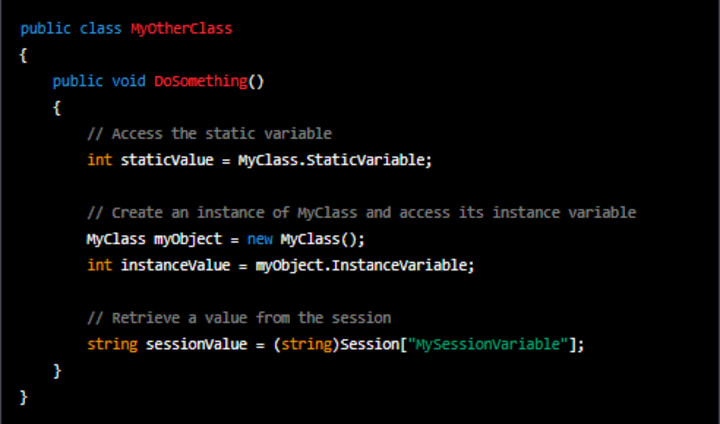
In this example, we have another class called MyOtherClass. In the DoSomething method of this class, we access the static variable (MyClass.StaticVariable) by simply referencing it with the class name.
We also create an instance of MyClass (myObject) and access its instance variable (myObject.InstanceVariable) by referencing it with the object name.
Finally, we retrieve the value of the session variable (Session["MySessionVariable"]) by using the Session object, which is available in ASP.NET web applications.
It's important to note that in order to access the session variable, you need to be running in the context of an ASP.NET session. This means that you need to be running within an ASP.NET page or control, or you need to explicitly pass the Session object to your method.
Also, keep in mind that static variables are shared across all instances of a class, so any changes made to the static variable by one instance will be visible to all other instances. Similarly, session variables are specific to a single user's session, so any changes made to the session variable by one user will not be visible to other users.
About the Creator
Bharath S
From Oddanchatram, Tamil Nadu, India
Turning a History Lesson Into an Escape Room Game
History is often taught through lectures, textbooks, and timelines — methods that can feel dry and distant. But what if students could experience history instead of just reading about it? One of the most engaging ways to do this is by transforming a history lesson into an escape room game. This interactive approach combines problem-solving, teamwork, and storytelling to make history memorable and exciting.
By Games Mode On4 days ago in Education
Ai Basics Everyone Should Know for the Future
Artificial Intelligence (AI) is no longer a distant concept reserved for scientists or tech companies. It’s already shaping how we work, learn, communicate, and make decisions. From recommendation systems on streaming platforms to AI assistants that help write emails, analyze data, or generate images, AI has quietly become part of everyday life.
By Anthony Bahamonde3 days ago in Education


Comments
There are no comments for this story
Be the first to respond and start the conversation.