
JAVASCRIPT OBJECTS
JAVASCRIPT OBJECTS FOR BEGINNERS


OBJECT
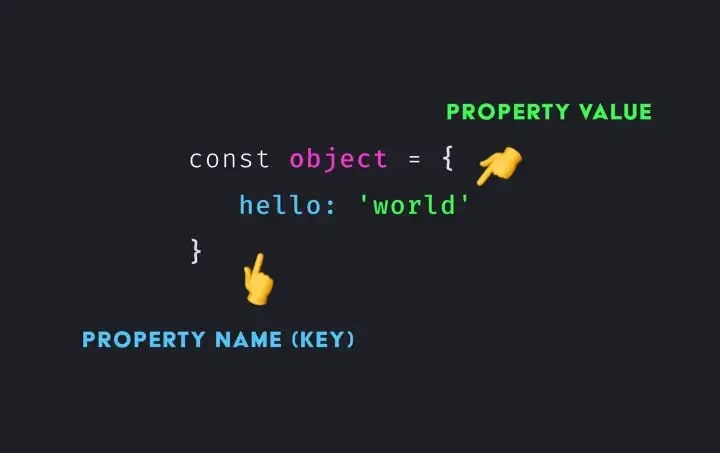
The object type represents one of Javascript datatypes.Objects contains “key and values” .
{ } ->Represents an empty object
let empty_object = {};
Spaces and line breaks are not important
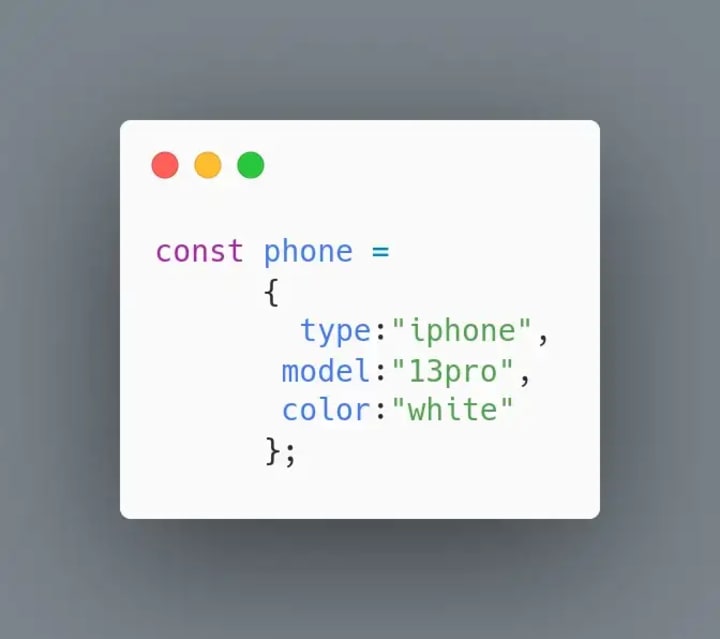
let phone = {type:”iphone”, model:”13pro”, color:"white"};
* In this above line contains keys and values ......
keys are type, model,color.....
* Suppose you put keys in double word like data base
use double quotation ("data base")
* Whenever we put an values they should be declared in double quotation or single quotation,Except intergers
values are "iphone","13pro", "white".....
HOW TO CALL OBJECT ⬇️
let object= {
FirstName : "pikachu",
LastName : "bk",
age : 18
};
console.log(object)
output:-
{FirstName: 'pikachu', LastName: 'bk', age: 18}
if you want only first_name You can use dot/bracket notation
-Bracket notation[]
console.log(object['FirstName']);
-Dot notation .
console.log(object.FirstName);
**Little more advanced concept in obj**
-let input = “FirstName”;
-let data= {
FirstName : “pikachu”,
LastName : “bk”,
age : 18
};
console.log(object.input);
output:-
undefined
Because we dont have input as a field in data.suppose we use bracket
notation we get output.
For example
console.log(object[input]);
output:-
pikachu
Object.keys()
const data = {
a: ‘pikachu’,
b: 42,
c: false
};
console.log(Object.keys(data));
output:-
(3) [‘a’, ‘b’, ‘c’]
Object.values()
const object1 = {
a: ‘somestring’,
b: 42,
c: false
};
console.log(Object.values(object1));
output:-
(3) [“somestring”, 42, false]
Object.entries()
const obj = {
first_name: 'pikahu',
last_name: "bk"
};
console.log(Object.entries(obj));
-output:-
(2) [Array(2), Array(2)]
1. 0 :(2)['first_name', 'pikahu']
2. 1: (2) ['last_name', 'bk']
Math objects:- ⬇️
console.log(Math.PI);
output:-
3.141592653589793
const values = 5.8;
console.log(Math.round(values));
➡️ 6
console.log(Math.floor(values));
➡️ 5
console.log(Math.ceil(values));
➡️ 6
console.log(Math.trunc(values));
➡️ 5
Math.random
console.log(Math.random());
Whenever we use math.random function....we get random numbers in our output.......
Returns a random integer from 0 to 9
console.log (Math.floor(Math.random() * 10));
Returns a random integer from 0 to 100
console.log (Math.floor(Math.random() * 100));
❤️“Have a Fine_Day”❤️
MORE ABOUT JS OBJECTS:
JavaScript objects are a fundamental part of the JavaScript programming language. They are used to store and organize data, and can be used to create complex and dynamic web applications.
An object in JavaScript is a collection of properties, each of which has a name and a value. Properties can be any type of data, including numbers, strings, booleans, and even other objects. Objects can be created using the object literal notation, which is denoted by curly braces ({}), or by using the object constructor function, which is the "Object" function.
One of the most powerful features of JavaScript objects is their ability to store and manipulate data in a dynamic and flexible way. For example, a simple object can be used to store information about a person, such as their name, age, and address. This object could then be used to display this information on a web page, or to save it to a database.
JavaScript objects also support inheritance, which allows objects to inherit properties and methods from other objects. This allows for the creation of complex object hierarchies, and makes it easy to reuse and extend existing code.
Another important feature of JavaScript objects is their ability to be used as a map, or associative array. This means that properties can be accessed using their name as a string key, rather than by their index. This makes it easy to work with large amounts of data and to organize it in a logical way.
In addition to these core features, JavaScript objects also support a wide range of methods and properties that can be used to manipulate and work with data. These include methods for iterating through properties, for getting and setting property values, and for adding and removing properties.
In conclusion, JavaScript objects are a powerful and versatile feature of the JavaScript programming language. They allow for the storage and manipulation of data in a dynamic and flexible way, and provide a wide range of methods and properties for working with that data. Understanding the basics of JavaScript objects is essential for any developer working with JavaScript, and will open the door to creating complex and dynamic web applications.
THINK TWICE💭-code once!
THANKS_FOR_READING_!🌟
❤️“Have a Fine_Day”❤️
About the Creator
bk_bharathikannan
YOUNG FRONTEND DEVELOPER
Keep reading
More stories from bk_bharathikannan and writers in Education and other communities.
Instagram clone using HTML & CSS
SOURCE CODE <!DOCTYPE html> <html lang="en"> <head> <meta charset="UTF-8" /> <meta http-equiv="X-UA-Compatible" content="IE=edge" /> <meta name="viewport" content="width=device-width, initial-scale=1.0" /> <title>INSTAGRAM</title> <link rel="stylesheet" href="instagram.css" /> <link rel="stylesheet" href="https://cdnjs.cloudflare.com/ajax/libs/font-awesome/6.2.0/css/all.min.css" integrity="sha512-xh6O/CkQoPOWDdYTDqeRdPCVd1SpvCA9XXcUnZS2FmJNp1coAFzvtCN9BmamE+4aHK8yyUHUSCcJHgXloTyT2A==" crossorigin="anonymous" referrerpolicy="no-referrer" />
By bk_bharathikannan3 years ago in Education
How Global Experiences Shape Smarter, More Creative Leaders
Leadership today demands more than experience and technical skill. It requires imagination, empathy, and the ability to see problems from new angles. One of the most potent ways leaders develop these qualities is through travel. When leaders step outside familiar routines, they gain insight that books and meetings cannot offer. Exposure to new cultures, environments, and ways of thinking shows clearly how creative leadership through travel can unlock ideas that change how leaders think, decide, and inspire others.
By Nathalie Kyriakou5 days ago in Education
Can You Really Earn Money With Transcription? The Real Income Reality
The short answer is yes—you can earn money with transcription. But the more honest, useful answer is this: transcription only becomes worthwhile when you understand how the income actually works, not how it’s often presented online.
By Mahesh Kumar5 days ago in Education


Comments (1)
❤️