
HRMS System: The Digital Engine Behind Efficient Human Resource Management
HRMS

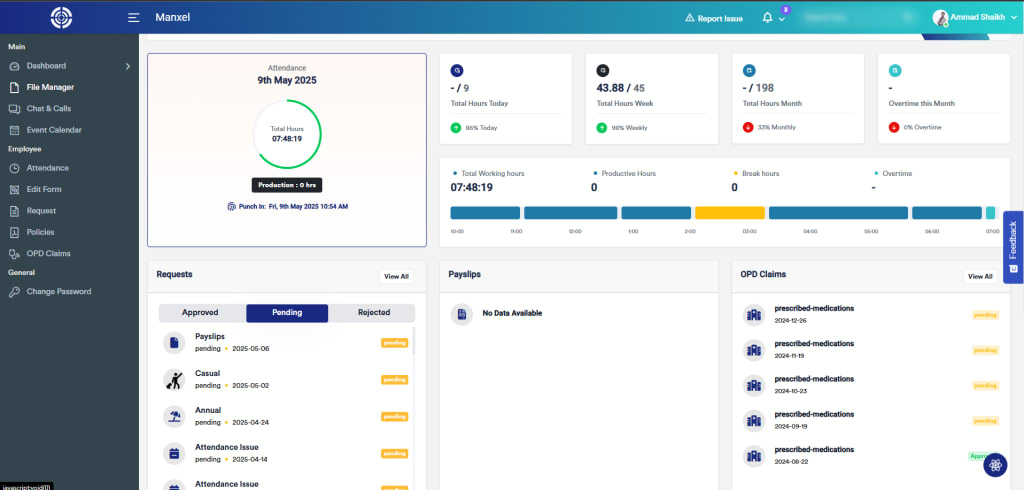
In a rapidly evolving corporate landscape, organizations are expected to do more with less—especially when it comes to managing their workforce. From recruiting top talent to ensuring compliance with labor laws, the demands on HR teams have grown significantly. Manual systems and outdated tools just can’t keep up.
That’s why businesses around the world are turning to the HRMS system—a technology-driven solution that transforms traditional HR processes into efficient, automated, and strategic functions.
1. What Is an HRMS System and How Does It Work?
An HRMS system (Human Resource Management System) is a software solution designed to automate and streamline every core HR function. It acts as a digital command center where all human resource operations—such as hiring, onboarding, payroll, attendance, training, and performance—are managed under one centralized system.
Unlike disconnected systems or paper-based files, an HRMS provides:
A centralized database of employee records
Real-time data access for HR teams and leadership
Tools for automation, analytics, and compliance
Role-based access for employees, managers, and HR admins
Whether you're onboarding a new hire or generating compliance reports, the HRMS system ensures accuracy, speed, and traceability throughout.
Core Modules in a Standard HRMS System:
Recruitment Management: Handles job postings, applicant tracking, and candidate communications.
Employee Database: Stores personal details, job history, documents, and performance records.
Attendance and Leave: Tracks time-in/out, holidays, sick leave, and vacation days.
Payroll Processing: Calculates salaries, taxes, bonuses, and deductions automatically.
Performance Evaluation: Supports feedback cycles, KPIs, appraisals, and reviews.
Training and Development: Manages learning paths, certifications, and skills tracking.
Employee Self-Service: Allows staff to view payslips, apply for leave, or update their info.
An HRMS is scalable, meaning it can support a team of 20 or 20,000 employees with the same efficiency.
2. Key Advantages of Implementing an HRMS System
Adopting an HRMS system brings a wide range of benefits—both operational and strategic—for any organization, regardless of size or industry.
A. Automation of Repetitive Tasks
Manual tasks such as attendance logging, salary processing, and document updates consume HR bandwidth. An HRMS automates these processes, allowing your HR staff to focus on employee engagement, workforce planning, and innovation.
B. Increased Accuracy and Reliability
HR errors—like incorrect payroll deductions or mismatched attendance—can lead to employee dissatisfaction and even legal action. With automated workflows and built-in validations, an HRMS minimizes human error.
C. Better Decision-Making Through Analytics
Most modern HRMS systems come with dashboard analytics that provide actionable insights on headcount, attrition, absenteeism, and performance. These insights support smarter, faster decision-making.
D. Enhanced Employee Engagement
HRMS self-service portals empower employees to manage their own requests—whether it’s downloading a tax document or applying for leave. This creates a culture of transparency and trust.
E. Cost Efficiency
While an HRMS system involves an upfront investment, it saves money over time by reducing administrative overhead, improving retention, and eliminating costly errors.
F. Compliance and Legal Readiness
With constantly changing labor laws and tax regulations, compliance can be a major burden. HRMS platforms help you stay up to date with automated alerts, audit logs, and compliance reports.
3. How to Choose and Successfully Implement an HRMS System
Choosing an HRMS system is a strategic decision that requires alignment between HR, IT, finance, and leadership teams. The right solution depends on your organization’s goals, budget, and technical readiness.
Step 1: Assess Your Needs
Begin by listing out the current challenges you’re facing:
Are your payroll calculations prone to errors?
Is recruitment taking too long?
Are employees frustrated by HR delays?
Your needs will define the key features you must look for in an HRMS system.
Step 2: Compare Solutions and Vendors
Look for systems that:
Offer modular features (so you can expand gradually)
Are cloud-based with mobile accessibility
Provide strong data security and GDPR compliance
Offer local payroll and tax compliance support
Can integrate with your existing systems (like accounting tools)
Popular platforms include BambooHR, Darwinbox, Manxel (in Pakistan), and SAP SuccessFactors.
Step 3: Develop a Rollout Strategy
Don’t try to deploy everything at once. Roll out high-priority modules (like payroll and leave tracking) first. Gradually introduce other features once users are comfortable.
Step 4: Train and Support Users
Offer detailed training sessions and create help documents or video tutorials. Appoint internal champions who can guide others and resolve common questions.
Step 5: Monitor and Improve
Track system usage, gather employee feedback, and make continuous improvements. The HRMS system is not a one-time setup—it should evolve with your business.
Conclusion: The HRMS System Is the Core of Modern Workforce Management
In today’s data-driven, fast-paced world, how you manage your people is just as important as what you sell or produce. Without a modern, digital approach to HR, companies risk falling behind in recruitment, compliance, and employee satisfaction.
The HRMS system provides the infrastructure, insights, and efficiency that today’s workforce demands. It frees HR teams from repetitive tasks and gives leadership the data they need to make smart, informed decisions.
About the Creator
Ejaz Hussain
Email marketing | SEO |Blog
Keep reading
More stories from Ejaz Hussain and writers in Education and other communities.
HRMS System: The Strategic Tool Every Growing Business Needs
As companies grow, their HR needs become more demanding. Whether it's managing a global workforce or keeping up with changing labor laws, HR teams today must do more with less. That’s where a modern HRMS system steps in—helping organizations automate, organize, and optimize their people processes from end to end.
By Ejaz Hussain9 months ago in Education
Twenty Years of Medical Experience: Knowledge That Will Redefine Future Healthcare
Medicine has changed profoundly over the last two decades. Scientific breakthroughs, digital innovation, and evolving healthcare policies have reshaped how medical professionals diagnose illnesses, treat patients, and manage healthcare systems. Conditions that were once difficult to detect or treat now benefit from advanced imaging, improved medications, and minimally invasive procedures. These developments have significantly improved survival rates and overall patient outcomes.
By Yousuf A. Gaffar, M.D6 days ago in Education


Comments
There are no comments for this story
Be the first to respond and start the conversation.