


Flow charts have a lot of practical uses, but they’re not frequently considered to be a design endeavor. A flow chart can be both attractive and useful as a design element.
The most common rationale for utilizing flow charts is to express complex information more visually. You can see how elements in a process or flow interact with one another.
The flow chart’s design ensures that this information is communicated clearly.
The first step in creating a flow chart is determining what you need to convey. What is the chart’s goal, and what is the takeaway for those who look at it?
The answers to those questions will almost certainly lead you along a functional and delivery path. Do you intend to create a static and flat flow chart, such as an infographic? Or are you working on a flow chart that has to be updated with additional dynamic content?
You’ll be able to tell whether you’re working with an online, interactive flowchart or something you can make and export as a JPG or PDF from here.
The following phase in the design process is to sketch out what you’re trying to say. You could compare it to an informational wireframe. Sketching is a fantastic method to work on this — use pencil because there will very certainly be adjustments — and to build the flow from one part to the next.
Every flow chart has a beginning point and an endpoint. Begin the design process by connecting the middle steps with these two pieces.
To depict movement from one stage to the next, most flowcharts employ lines and arrows. Using these basic visual elements in the design to express flow is a best practice.
Consider the microcopy within the flow chart as well as the labels. Each component should be simple to comprehend and written in clear, succinct language.
10 Flow Chart Design Tips — Many of the design techniques you use on other projects can also be used to create flow charts. Here are some design considerations and ideas to make your flow chart as simple as possible.
- Decide on a color and typographic scheme. If you’re creating a flow chart for a company that already has a style guide, attempt to stick to it.
- Create and employ design components that are consistent. Shapes, lines, arrows, spacing, and text styles are all part of this. To make a good flow chart, you don’t need a huge library of items. It’s fine to use simple design elements.
- From left to right and top to bottom, information should flow. Follow common F patterns and read in a logical manner.
- Make sure the beginning and endpoints are clearly marked. Visual starts and stops give useful information at a glance and assist users in breaking down and comprehending complicated aspects.
- Throughout the flow chart, use color to code steps and create clarity. In a monochrome color scheme, you can utilize more colors in your palette than usual, or enhance depth with tints.
- Make use of standard shapes. A fantastic guide to common flow chart shapes and what they mean can be found on Lucidchart (preview above). This may delve deeper into process-oriented design than you need, but it’s a nice place to start.
- In the flowchart, don’t use more than one typeface. Avoid using unusual or difficult-to-read typefaces. Keep the text as straightforward as possible.
- Create explicit connections between the chart’s elements. Curving or winding lines, as well as directionals, can be perplexing. Every element should have a direct line to the next element in the chart.
- Wherever possible, use labels and supporting text. Keep these components as close together as feasible (ideally, 6–10 words).
- Create a look that is fitting. Flowcharts do not have to be uninteresting. Make sure the design is appropriate for the information. Create a design that people want to interact with by including supporting images.
Conclusion
Now that you are thinking about flow chart design, it’s time to get started. All of the design templates featured here are available for download from Envato Elements. You can also use some of the digital tools noted above for online flow
About the Creator
Keep reading
More stories from Oliver Lazarevikj and writers in Education and other communities.
5 Principles of Visual Design in UX
We can typically tell whether something is wrong or enticing when we see a visual. (Because under Don Norman’s philosophy of emotional design, they frequently manifest at the visceral level.) Few people can, however, explain why a layout is visually appealing. Utilizing the fundamentals of effective visual design in graphics may boost usability and enhance engagement.
By Oliver Lazarevikj3 years ago in Education
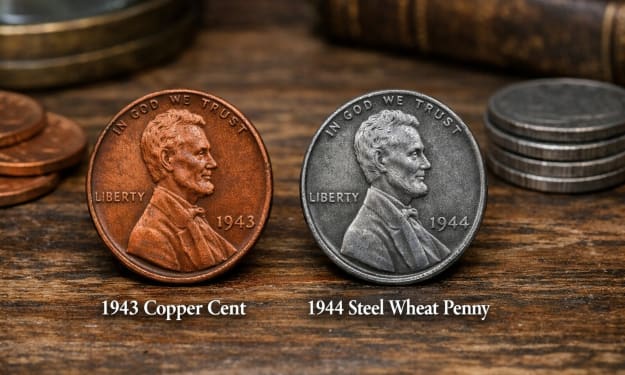
The 1943 Copper Cent vs. The 1944 Steel Penny: How to Spot the Legendary Mistakes
For over eight years as a Senior Numismatic Analyst, few questions ignite the passion of a collector like the legends of the 1943 Copper Cent and the 1944 Steel Penny. These coins represent the most famous mint errors in American history, born from the unprecedented material shifts of World War II. I've examined countless coins brought to me with hope, only to find they were clever counterfeits. The truth is, genuine examples of these errors are extraordinarily rare, but knowing exactly what to look for is the first step from fantasy to fact. This guide will cut through the myths and give you the concrete, professional methods to understand and identify these numismatic legends.
By Laura Bennettabout 17 hours ago in Education
The Core of Command: How Training, Tactics, and Character Shape Military Leaders
Military leadership is not about titles or authority alone; it is about the ability to influence, inspire, and execute with purpose. Commanders are made through intentional development, relentless training, and personal reflection. Their growth as leaders is built on three essential pillars: structured training, tactical excellence, and a strong moral compass. These elements work together to create individuals who can lead teams in high-pressure environments with clarity, confidence, and conviction.
By Eric Schnabel3 days ago in Education
The Path to Salvation
The late autumn evening air filled the monk's lungs, but it wasn't the season that chilled his bones. The heavy-handed presence of evil he had sensed upon entering the woods surrounding this mountain village had not bothered to conceal itself from him.
By Made in DNA6 days ago in Fiction



Comments
There are no comments for this story
Be the first to respond and start the conversation.