
How to get Subtitles on MovieBox Pro
Complete Guides for iOS,Android,PC,TV Users


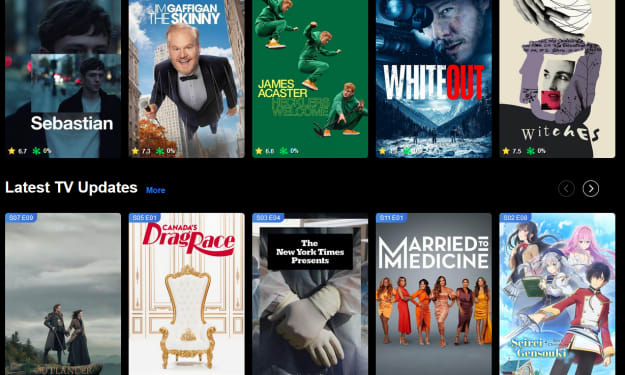
MovieBox Pro is a third-party app that offers streaming and downloading options for films and television series. It functions similarly to well-known streaming services like Netflix and Disney but it exists outside the conventional system of licensed applications.
Here are some important points regarding MovieBox Pro
Features
1. Extensive Content Library
- Provides a diverse selection of films and TV series, encompassing both recent releases and classic titles.
2. Streaming & Downloading
- Enables users to either stream content in real time or download it for offline enjoyment.
3. Various Resolutions
- Offers multiple streaming quality options, including 360p, 720p, and 1080p, to accommodate differing internet speeds and storage capabilities.
4. Subtitle Support
- Supports subtitles in various languages and allows users to upload custom subtitle files.
5. Cross-Platform Compatibility
- Works with Android, iOS, smart televisions, and PCs through emulators or online versions.
How to Access It
Not Offered on Official App Stores
- MovieBox Pro is not available on the Google Play Store or Apple App Store due to its non-compliance with standard licensing and distribution methods.
- Users typically download the app using APK files (for Android) or through alternative iOS platforms like TestFlight or sideloading.
VIP Membership
- While basic access is free, a VIP membership is available for additional features, such as higher resolutions and quicker download speeds.
Enabling Subtitles in MovieBox Pro
1. Open the Movie
- Start the MovieBox Pro app on your device.
- Choose and begin playing the film or TV episode you wish to watch.
2. Access Subtitle Settings
- During playback, tap the screen to display the playback controls.
- Locate the subtitle icon (usually depicted as a speech bubble or "CC" symbol) and tap it.
3. Select a Subtitle Option
- A menu will appear with subtitle options. You can:
- Pick a preloaded subtitle track (if available).
- Download subtitles from MovieBox Pro’s online sources (if you are connected to the internet).
- Upload your own subtitle file (if you have one).
4. Adjust Subtitle Settings (Optional)
- If necessary, adjust options for font size, color, and synchronization to ensure the subtitles match the audio correctly.
5. Enable Subtitles
- Once you make your selection, subtitles will automatically begin to display alongside the video.
Troubleshooting Tips
Availability of Subtitle Files?
If subtitle files are not present, you can obtain them separately from websites like Subscene or OpenSubtitles and then upload them to MovieBox Pro.
- Subtitle Synchronization Issues?
Explore the app for a sync adjustment feature to correct any timing discrepancies.
Legitimate Alternative Streaming Platforms
These paid services provide licensed content, ensuring legality and safety
1. Netflix
- Offers a vast library of movies, TV shows, and original productions, with various subscription options and high-quality streaming.
2. Amazon Prime Video
- Includes an array of movies, TV series, and exclusive Amazon Originals, often available with an Amazon Prime membership.
3. Disney+
- Specializes in content from Disney, Marvel, Pixar, Star Wars, and National Geographic.
4. Hulu
- Delivers current television episodes, classic series, films, and exclusive originals, available in ad-supported or ad-free plans.
5. HBO Max (or Max)
- Recognized for HBO Originals, Warner Bros. films, and additional content libraries.
6. Apple TV+
- Focuses on high-quality original series and films.
7. Peacock
- Offers NBC content, movies, and live sports (in selected regions).
8. Paramount+
- Provides movies, live television, and programming from the Paramount network.
Legal & Safety Considerations
• Unlicensed Content
Many movies and TV shows available may lack proper licensing, creating legal uncertainties regarding copyright. Use with caution, as viewing or downloading unlicensed content might breach local laws.
• Security Risks
As an unofficial app, downloading MovieBox Pro can introduce potential threats such as malware or privacy concerns. If you choose to use it, ensure you obtain it from reputable sources.
About the Creator
tutu app
I am Developer and Blogger who is writing articles for many websites. I am interesting with updated news and guides. Touch with me if you are interesting.
The Comfort of the New: Why Some Places Instantly Feel Like Home
Travelers often experience a strange phenomenon: arriving in a place for the first time and feeling as though they have always belonged. Whether it is a bustling city street, a quiet mountain town, or a sun-drenched coastal village, some locations evoke an immediate sense of familiarity and comfort. This feeling goes beyond aesthetic appeal or convenience; it touches deeper psychological, emotional, and even social aspects of human experience. Understanding why certain places feel like home can enrich travel, relocation, or even brief visits, creating connections that feel effortless and profound.
By Producer James Simon8 days ago in Education
10 Times Rotten Tomatoes and I Disagreed
***Disclaimer*** I will be ranking these movies in the following manner: The greater the divide between Rotten Tomatoes and I, the higher up on the list (and I am referring to the critic's score, not the audience score). I will also show Rotten Tomatoes' score on each one in addition to my score. I am curious to know what everyone thinks, please let me know in the comments below!
By Madison "Maddy" Newton2 days ago in Geeks



Comments
There are no comments for this story
Be the first to respond and start the conversation.