
How to Delete Education on LinkedIn: Complete Guide to Cleaning Up Your Profile
A Step-by-Step Tutorial to Remove, Edit, or Clean Up the Education Section on LinkedIn (Mobile & Desktop)


Key Takeaways:
You can easily delete education on LinkedIn using the edit feature
Deletion is permanent and only affects your profile
No one gets notified about the change
Consider editing instead of deleting if you just need to update info
Keep your LinkedIn professional, focused, and truthful
Related: Does LinkedIn Delete Messages on Both Sides?
LinkedIn is your digital resume—and just like a traditional one, it needs to be updated, relevant, and professional. Whether you’ve made a career shift, changed your academic path, or just want to clean up outdated or incorrect information, you may be asking:
👉 How to delete education on LinkedIn?
This guide gives you everything you need to know, from the step-by-step process (desktop and mobile) to best practices, and answers all your questions about removing or editing academic details on your LinkedIn profile.
Can You Delete Education from Your LinkedIn Profile?
Yes, LinkedIn allows you to delete education entries from your profile at any time. If you've added a school, university, or degree that you no longer want to display, you can remove it easily using LinkedIn's built-in editing tools.
You might want to do this if:
You transferred schools and want to remove an old listing
You entered incorrect academic information
You’re curating your profile to match your professional brand
You're cleaning up duplicate or irrelevant academic records
Whether you're looking to remove education from LinkedIn profile entirely or simply make it more accurate, the platform gives you full control.
Related: How to remove resume from linkedin
How to Delete Education on LinkedIn (Desktop Version)
Let’s walk through the exact steps to remove your education section or an individual school from your LinkedIn profile.
Step-by-Step Instructions (Desktop):
Login to your LinkedIn account
Click on your profile icon and select “View Profile”
Scroll down to the Education section
Click the pencil icon (✏️) to edit that section
Find the school or degree you want to remove
Click the “Delete” (trash icon) on the right corner of that entry
Confirm deletion
Pro Tip: If you're not ready to delete it, consider editing the entry to correct or update the data instead.
How to Delete Education on LinkedIn Using a Phone (Android or iPhone)
Using LinkedIn on your mobile device? Here's how to delete education from your profile through the LinkedIn mobile app:
Related:How to Delete LinkedIn Account Professionally
Steps (LinkedIn Mobile App):
Open the LinkedIn app on your Android or iPhone
Tap your profile picture in the top-left corner
Tap “View Profile”
Scroll down to the Education section
Tap the pencil icon (✏️) beside the education entry
In the edit view, tap “Delete” or the trash bin icon
Confirm your action
And you’re done! The education entry will be immediately removed from your mobile profile.
Note: Deleting or editing education on the LinkedIn mobile app works similarly to the desktop version, with just slight UI differences.
What Happens When You Remove Education Info?
If you’re concerned about the impact of deleting your education history, here’s what to expect:
The removed school or degree will no longer be visible to others viewing your profile
It won’t affect your job experience or other profile sections
If recruiters had filters set by education (e.g., hiring from a specific university), you might appear in fewer filtered searches
Deleting a degree on LinkedIn is a personal choice—and not always a bad one.
Editing vs Deleting Education Info
One of the most common questions is:
Should you delete or just edit a LinkedIn education entry?
Here’s the difference:
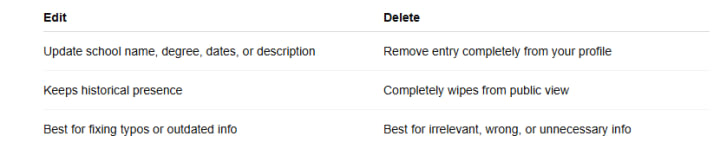
If you just want to update the education section on LinkedIn, click the pencil icon and make your changes. But if the entry no longer reflects your current career or brand, deletion is a better move.
Why You May Want to Delete Education on LinkedIn
There are several strategic reasons to remove academic info from your profile, including:
Career Change:
If you’re pivoting from one field to another (e.g., law to digital marketing), your previous degree may feel irrelevant. Removing it helps emphasize your new focus.
Resume Alignment:
You want your LinkedIn resume to match your official resume. If you’ve removed a degree from one, it should reflect on the other too.
Duplicate or Inaccurate Entries:
Some users accidentally list the same school twice, or include placeholder schools from when they first signed up. Deleting outdated entries helps clean up your LinkedIn profile.
LinkedIn Profile Cleanup:
Sometimes you just want to present a streamlined professional story—and removing old or low-relevance educational experiences can help with that.
LinkedIn Profile Settings You Should Know
When managing your education details, it’s helpful to understand LinkedIn profile settings related to visibility and editing.
You can choose who sees your education info (public, connections, or private)
Any changes (including deletions) will not trigger notifications to your network
Recruiters may use LinkedIn resume filters based on education, so keep key degrees visible if you want to maximize job discovery
These LinkedIn education section settings give you full control over what others see and how you're discovered.
Best Practices for Managing LinkedIn Education Section
Want to keep your LinkedIn profile both accurate and impressive? Here are some expert tips:
List only relevant education – especially if you're short on space or your career is unrelated to a particular degree.
Be honest – Never fake or exaggerate credentials. It can backfire professionally.
Update your academic info regularly – If you're currently pursuing a degree, keep the dates and details fresh.
Format consistently – Use the same naming style for institutions and degree titles.
Highlight key achievements – Use the description area to add honors, GPA, or notable projects—especially if you're not deleting that section.
FAQs About Deleting Education from LinkedIn
How do I remove my degree from LinkedIn?
Go to your profile, click the pencil icon in the Education section, and delete the specific entry using the trash icon.
Can I delete my school without deleting the entire education section?
Yes. You can remove individual entries while keeping the rest.
Is it possible to hide education from public view?
Yes. You can use LinkedIn profile settings to restrict visibility of certain profile sections.
Will LinkedIn notify my connections if I delete a degree?
No. LinkedIn doesn’t send notifications for deletions or edits in the education section.
Can I remove education from the LinkedIn mobile app?
Yes. You can delete or edit education using your mobile phone. Just open the app, go to your profile, and edit the education section as needed.
Final Thoughts: Should You Delete Education from LinkedIn?
LinkedIn is a powerful tool for personal branding, networking, and job search. But to get the most out of it, you need to keep your profile clean, relevant, and aligned with your current goals.
So, if you're still wondering how to delete education on LinkedIn, the answer is simple:
Go to your profile → Edit your education section → Delete the unnecessary school or degree.
Use this opportunity to create a sharper, cleaner, and more relevant profile that speaks to the future—not the past.
About the Creator
Ramsha Riaz
Ramsha Riaz is a tech and career content writer specializing in AI, job trends, resume writing, and LinkedIn optimization. He shares actionable advice and insights to help professionals stay updated.
Keep reading
More stories from Ramsha Riaz and writers in Education and other communities.
Does LinkedIn Delete Messages on Both Sides? Complete Guide to LinkedIn Message Deletion
LinkedIn has become the go-to professional networking platform for career-minded individuals, businesses, recruiters, and job seekers. With millions of daily conversations happening on the platform, users often wonder about the privacy and control they have over their messages. One common question is:
By Ramsha Riaz9 months ago in Education
5 AI Side Hustles You Can Start in 2026 to Make Money Online
Artificial intelligence isn’t just a buzzword—it’s a goldmine for anyone looking to start a side hustle or make extra income online. In 2026, AI tools are more accessible than ever, allowing individuals to automate tasks, create digital products, and provide services that were previously time-consuming or expensive.
By Majus Jasulaitis3 days ago in Education
Top Basketball Drills to Build Leadership and Court IQ
Basketball is often described as a game of speed, skill, and teamwork. While athletic ability is important, the players who truly stand out are those with strong leadership qualities and advanced court intelligence. Court IQ refers to a player's ability to read the game, make smart decisions, and anticipate teammates' and opponents' actions. Leadership involves communication, confidence, and the ability to guide teammates during intense moments of competition.
By Jeb Kratziga day ago in Education


Comments
There are no comments for this story
Be the first to respond and start the conversation.