
Do You Need a Language Coach?
Speechling, a new way to learn and practice!


And what about if it’s free? (Well, you can start using the free option!)
In case you still don’t know about it, I am talking about an app I just tried few days ago. It’s name is Speechling. Well, in fact you can either use their app or the web, both work great.
I just tried it to improve my English first, and I found it so helpful! I had to listen to a sentence / word, and then clicked to record it. And one day later, my personal language coach sent me some feedback about my pronunciation.
I must say I’m impressed. It’s free! For those who want to improve their foreign language skills, it’s a good an affordable way to do it.
These are the available languages you can practice: English, Spanish, French, German, Italian, Russian, Japanese and Chinese.
Speechling offers several activities: Dictations and listening practices, Vocabulary exercises or Feel in the blanks.
Oh, about the price, it’s free, except for the coaching services. As they say, they “cap the coaching to 10–35 sessions per month.” But if you need more, the price is not very high: from $19.99/month and this options includes unlimited daily coaching and full access to their offline premium resources, among other features.
From my point of view, if you are interested in learning languages, it’s a good tool. And, if you are extremely interested in improving a language, the price is not excessive according to what the offer.
I have changed now to German, logging in to their site. (By the way, I didn’t tell you! It’s www.speechling.com)
If you use the free version, you can not study/practice two or more languages at a time, just one. That’s why I have changed now to German language.
And this is what you can do:

Under “Study” you’ll find several options:
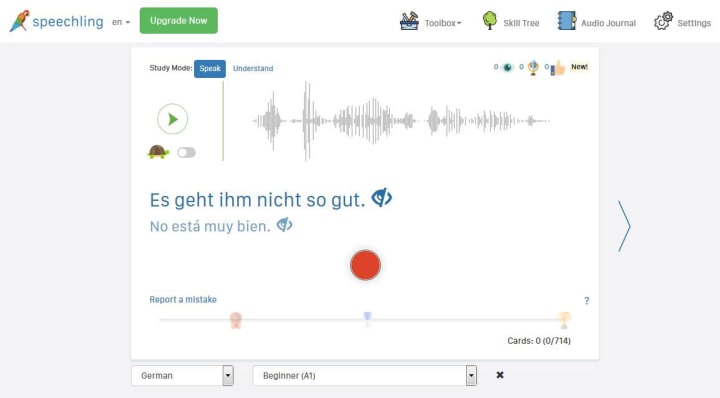
You can either choose to Speak or Understand. In this case, the Speak option is active. When listening to the sentence / word, use the “turtle” option to listen to it more slowly.
You can also choose to see / not to see the sentence in both languages (your own language and the one you are learning)
See those three options under the “skill tree”? The first one, the blue/black circle shows the number of times you have seen the sentence. The second one, the micro, the number of times you have recorded the sentence, and finally, the third one, the number of times you’ve been given a thumbs up from your coach for that sentence.
Let’s go now to the “toolbox”:
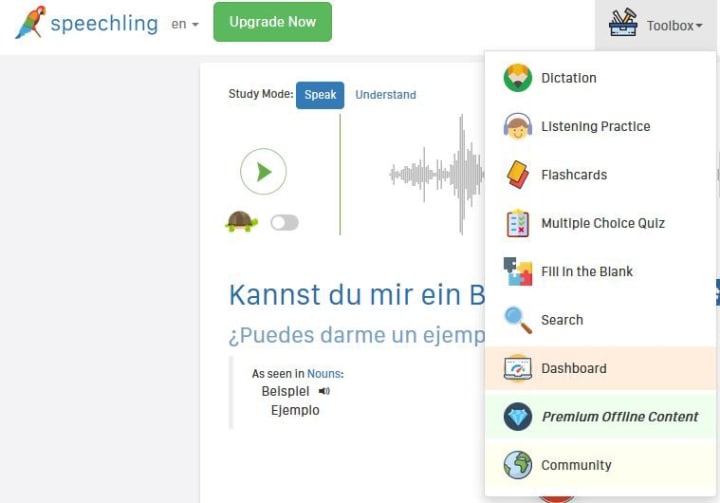
Under its menu, you can find several activities: Dictations, Listening practice, Flashcards, etc. (Note there is also a Community, the link will take you to their Facebook Group)
Next step: The Skill Tree includes several sections:
- Speechling Foundations: Numerals, calendar, nouns, verbs and adjectives.
- Speechling Core Curriculum: where you can use your vocabulary according to these 3 levels: Beginner (A1), Intermediate (A2), Advanced (B1-C2)
- Speechling Conversations (TM), where you can put into practice what you are learning by answering to questions, describing images or just.. saying anything!
- Finally, a last category: Speechling Phasebook. A nice collection, from basic expressions to bad situations, hotel or administrative sentences.
Ok, we can now go to the last option: the Audio Journal, where you will find all your work and feedback history:
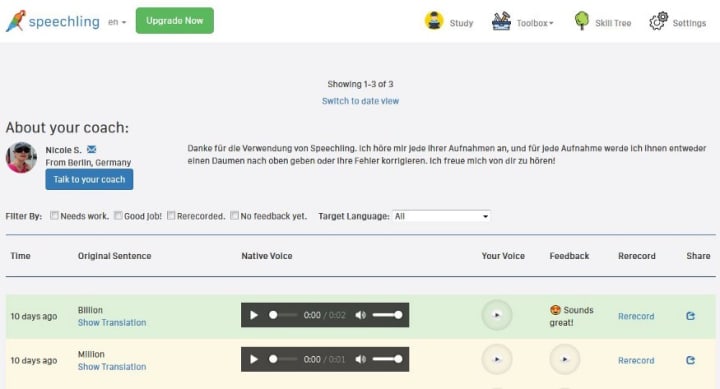
Ok, this was a simple review as I think the best way to get to know how it works is using it. Guess it’s a great way to learn and get feedback from a native speaker, the site offers a lot of activities, so why don’t to give a try? If so, hope you enjoy it!
— For more interesting content, visit my Spanish language and Spain culture Newsletter —
About the Creator
Angeles Fernández Ramírez
Born and living in Spain. After many years working for a private company in Spain, Angeles is now teaching Spanish online. https://spanishlanguage.substack.com/
Keep reading
More stories from writers in Education and other communities.
How Milwaukee Businesses Misjudge Mobile App Timelines?
Timeline optimism is one of the most expensive habits in software. In Milwaukee, it shows up quietly. A launch date is set to align with a trade show. A quarter-end deadline is chosen to please leadership. A six-month roadmap is approved because “the features aren’t that complex.” On paper, everything looks reasonable.
By Mary L. Rodriquez5 days ago in Education



Comments
There are no comments for this story
Be the first to respond and start the conversation.