
Die-Cut Sticker Mockup: A Complete Guide
Die-Cut Sticker Mockup

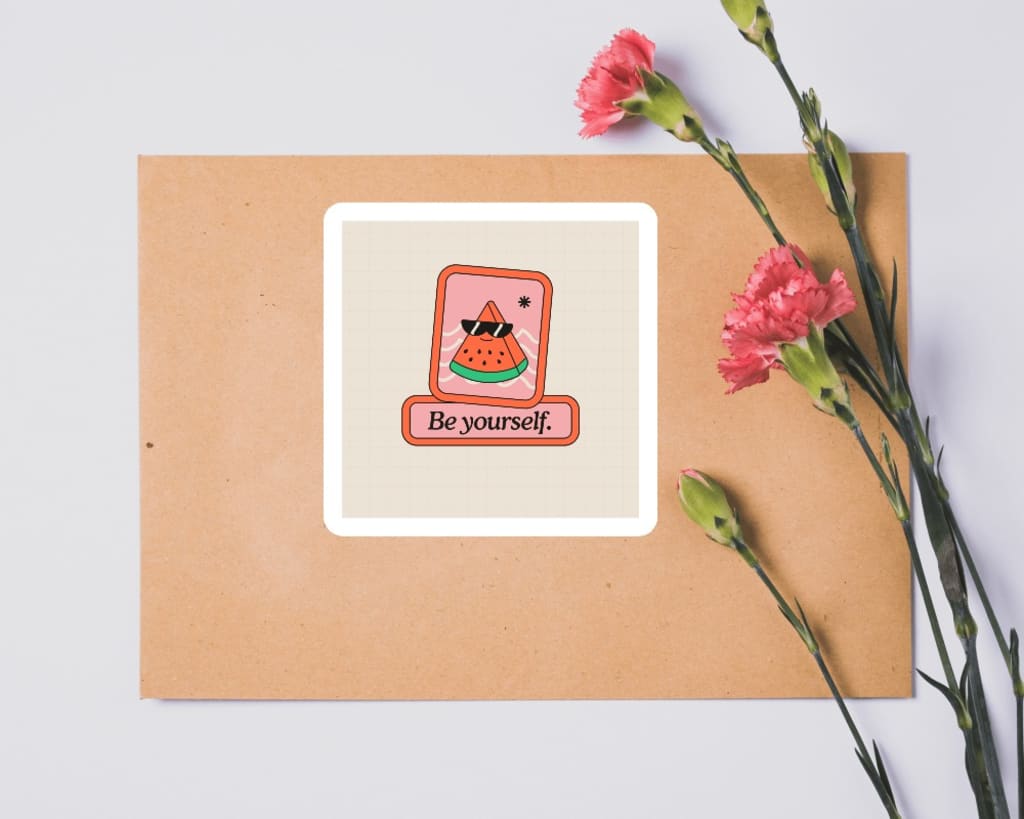
Die-cut stickers have become a popular choice for businesses, creatives, and brands because of their custom shapes and versatility. A die-cut sticker mockup is a digital template that allows designers to present their sticker mockup designs in a professional, realistic, and visually appealing way. In this blog, we will explore everything you need to know about die-cut sticker mockups, their importance, and how to create and use them effectively.
What Is a Die-Cut Sticker Mockup?
A die-cut sticker mockup is a pre-designed template that simulates how a sticker with custom shapes would look in real life. Unlike standard rectangular or circular stickers, die-cut stickers are cut precisely to match the unique outline of the design. These mockups help you visualize and showcase how the finished sticker will appear, including its size, shape, and placement on different surfaces.
Why Are Die-Cut Sticker Mockups Important?
Professional Presentation: Whether you’re pitching to clients or uploading designs on platforms like Behance, mockups provide a clean and polished way to showcase your work.
Realistic Visualization: Die-cut sticker mockups show how your sticker will look once printed, helping you identify any design flaws before production.
Marketing and Sales: Businesses can use these mockups in marketing materials, packaging previews, or even e-commerce listings to attract more customers.
Cost-Effective Testing: Creating a mockup is much cheaper than printing a physical sample. It allows designers to test different designs and make changes easily.
Key Features of a Die-Cut Sticker Mockup
- Customizable Shapes: A good mockup allows you to upload and fit your design into any custom shape.
- Editable Backgrounds: Choose different backgrounds to match the context of your presentation, whether it's a desk, wall, or product packaging.
- Lighting and Shadows: Realistic shadows and lighting effects make the sticker appear lifelike.
- High Resolution: Ensure your mockup has a high resolution so it looks sharp and professional across different platforms.
How to Create a Die-Cut Sticker Mockup
Choose a Template: Start with a high-quality die-cut sticker mockup template. You can find these templates on design resources websites or platforms like Mockey and Smartmockups.
Upload Your Design: Use a design tool like Adobe Photoshop to insert your artwork into the mockup. Most mockups come with smart object layers, so you can simply drag and drop your design.
Customize the Mockup: Adjust the background, shadows, lighting, and colors to match your brand or presentation style.
Export and Share: Once satisfied with your mockup, export it in your desired format for sharing or presentation.
Best Practices for Using Die-Cut Sticker Mockups
Focus on Realism: Ensure the mockup reflects the actual shape, colors, and texture of your sticker.
Use Contextual Backgrounds: Place your sticker on relevant surfaces like a laptop, notebook, or product packaging to show its practical use.
Keep It High-Quality: Always use high-resolution mockups to maintain professionalism.
Experiment with Angles: Show multiple angles of the sticker to give a comprehensive view.
Where to Find Die-Cut Sticker Mockup Templates
There are many platforms offering free and premium die-cut sticker mockup templates. Websites like Mockey, Placeit, and Creative Market provide a wide range of options for different shapes, sizes, and styles. These templates are easy to use, even for beginners, and come with advanced customization features.
Using a Sticker Mockup Generator
If you’re short on time or lack advanced design skills, a sticker mockup generator can be a lifesaver. These online tools allow you to create die-cut sticker mockups instantly by simply uploading your design. They offer customization options like background changes and realistic effects, making them ideal for quick and efficient results.
Conclusion
A die-cut sticker mockup is an essential tool for designers, businesses, and marketers who want to present their custom sticker designs in the best possible way. From enhancing client presentations to creating eye-catching marketing visuals, these mockups offer endless possibilities. By following the tips and best practices outlined in this guide, you can create stunning die-cut sticker mockups that stand out and make an impact. Whether you’re a seasoned designer or just starting out, utilizing mockup tools and platforms like Mockey will simplify your process and elevate your designs. Start creating your die-cut sticker mockups today and see the difference they make!
also read:
About the Creator
ladali official
I am a content creator with a love for storytelling and turning ideas into visuals that captivate and connect. I focus on creating engaging, high-quality content that speaks to audiences across platforms
Keep reading
More stories from ladali official and writers in Education and other communities.
How to make a laptop mockup free
Creating a laptop mockup for free is a fantastic way to showcase your designs, websites, apps, or digital products in a professional and visually appealing manner. Whether you’re a graphic designer, a marketer, or a small business owner, laptop mockups help add context and professionalism to your work. Here is a detailed step-by-step guide to making a laptop mockup without spending a dime.
By ladali official12 months ago in Education
From Despair to Hope: How Animal Rescue Efforts Rebuild Broken Lives
Animal rescue efforts stand as a powerful response to suffering that often goes unseen. Across towns, cities, and rural areas, animals face neglect, abandonment, injury, and fear every day. Many are left without food, shelter, or medical care. Others are harmed by abuse or natural disasters. Without help, their future is uncertain. Through patience, care, and action, animal rescue efforts transform despair into hope and give animals the chance to heal and live safely.
By Brenda McGrane7 days ago in Education



Comments
There are no comments for this story
Be the first to respond and start the conversation.