
DayZ Console Modding V2.4
changing and increasing zombie loot.


In this next edition of my DayZ Console Modding guides I want us to take a look at how zombie loot works. This will include how to change what items zombies can carry as well as how many. There are two files that we will be working with to get this done, which are:
- cfgrandompresets.xml
- cfgspawnabletypes.xml
cfgrandompresets.xml is the file where loot presets are created. This is where you will see blocks of code that start with their own naming lines along with lists of item names and chance values. The presets created here will then be named in cfgspawnabletypes.xml but more on that later.

Just as shown in the example above, the first line of each preset declared here tells the server if it is to be spawned as "cargo" or "attachments" when used in cfgspawnabletypes.xml. This is followed by a chance value to determine how likely one of the objects listed in the preset will be selected to spawn. The name of the preset is then at the end of this first line. The next few lines declare the items that will be available for the preset to select from. Followed by chance values to determine which items are more or less likely to be selected. The final line of each preset is the closing tag for the code block and must match the "cargo" or "attachments" as used on the first line.
A quick and easy way to boost the loot you can potentially get from zombies is to raise the chance value on the first line of each preset. When these have all been raised to 1.00 the chances of zombies, bags and some containers dropping items will be 100%. You can also raise the individual item chance values, but be aware that setting all of these in any one preset to 1.00 will break the game logic used to pick which item/s will spawn. This is due to how the game cycles through the item lists of each preset to make its selection. Just keep in mind the higher an items chance value is, the more likely it is to be selected. But also if you put items with higher chances at the top of a preset, you lessen the likelyhood of the items further down being selected as well.

Now it's time to open cfgspawnabletypes.xml. This is where the preset names then get declared within the entries for items, zombies and vehicles along with items declared directly such as the parts for cars, trucks and weapons. A quick way to increase the amount of items a zombie will drop is to double the amount of "cargo" presets used on their individual entries. To do this copy & paste the lines for the cargo presets so there is two of them on each zombie. Just be careful, don't double any "attachments" presets as any extras of those won't fit and will cause issues with zombie loot.

As briefly mentioned above items can also be declared on zombies directly. An easy example to mention of how to do this is the way parts are attached to vehicles and weapons. By following the same code logic as you should see used for these you can decide exactly what items a zombie will drop alongside or instead of using presets to randomise the loot drops.
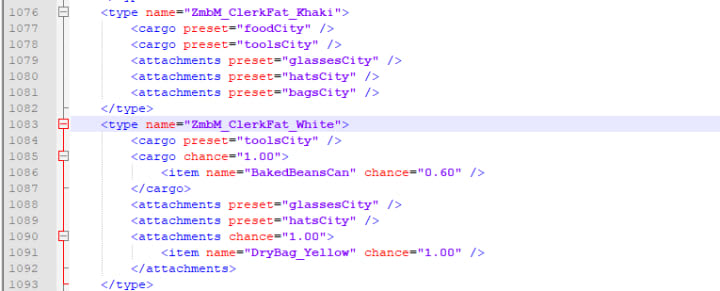
Shown in the picture above are two entries for zombies. The first of these is entirely default/vanilla, but the second entry replaces the "foodCity" cargo preset with a tin of beans and also swaps out the "bagsCity" attachments preset for a yellow dry bag. When adding to the amount of loot a zombie can drop, remember they do only have 12 slots of inventory. So any items that overfill the available space won't be on them when they die. But in theory any items you place on lines after adding a bag (also using the attachments tags) will then spawn inside the bag you have given them. This would of course allow your zombies to carry more loot. Sadly the abilty to do this depends on the devs not breaking things with updates. I am not sure of the current status, but a few updates ago (1.10) the abilty to fill the bags added to zombies was broken.
For further help, support and guidance you can join us on Discord: https://discord.gg/pp5JJDu
Just in case you missed them, here are the previous parts to the series:
https://shopping-feedback.today/stories/day-z-console-modding-v2-1%3C/a%3E
https://shopping-feedback.today/stories/day-z-console-modding-v2-2%3C/a%3E
https://shopping-feedback.today/stories/day-z-console-modding-v2-3%3C/a%3E
http://paypal.me/mrflyingbiscuits
About the Creator
L.R
I mostly find myself here to release creative flair, but also like to pass on what knowledge I can, so the odd tutorial and/or guide worms it's way to the forefront of my mind along the way =)
Teachers vs. Society's Perception
Love them or Hate Them: Teachers are Important Members of the Community It was the late 1990s and the economy was good. Everybody had money in their pockets and felt no qualm about spending. I, on the hand, never had to pull out money at the local bar and grills. All I had to do was mention I was a public school teacher and nearly every patron was willing to buy me a drink.
By Dean Traylorabout an hour ago in Education
Pearl
1980 something. we all hung out at Pearl and you and i were nothing special, or so i thought. i mean we all danced, drenched in our own sweat, our own saline solution of fear, too many beers, shots, laughter, tears, fucks in the bathroom and i don't know when we began to be afraid. do you?
By ROCK aka Andrea Polla (Simmons)3 days ago in Fiction


Comments
There are no comments for this story
Be the first to respond and start the conversation.