
Can Raspberry pi Run Linux?
Exploring the Capabilities of the Raspberry Pi
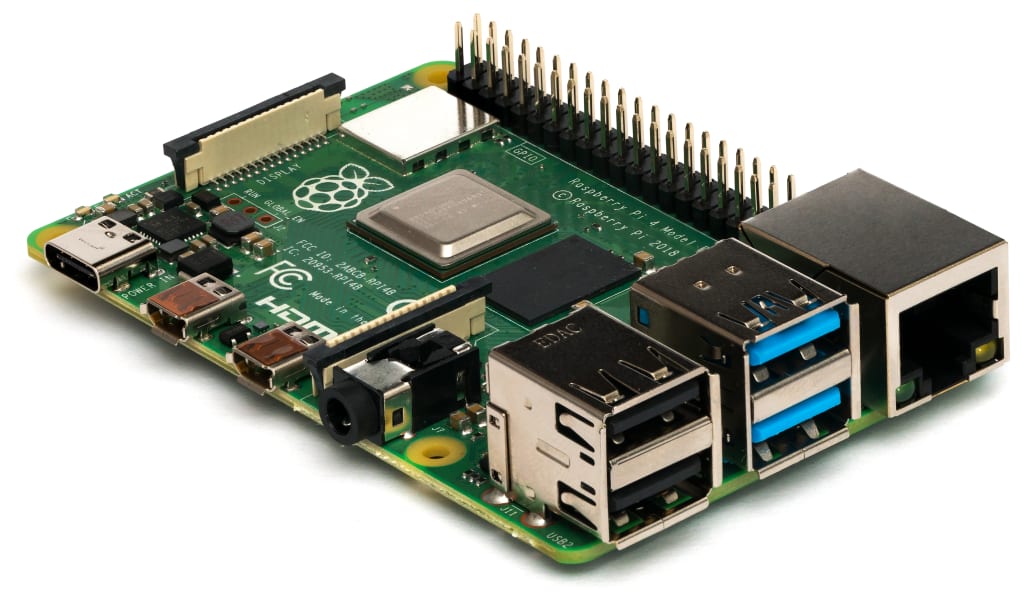
The Raspberry Pi is a small, low-cost computer that has gained popularity in recent years for its versatility and ability to run a variety of operating systems, including Linux. In this blog post, we will explore the capabilities of the Raspberry Pi 4, the latest and most powerful model, and how it can be used to run Linux.
The Raspberry Pi 4 is a single-board computer (SBC) that is about the size of a credit card. It features a 64-bit quad-core ARM Cortex-A72 CPU, 4GB of LPDDR4 memory, and a Broadcom VideoCore VI graphics processor. This powerful hardware makes it capable of running a wide range of software, including Linux.
There are several different Linux distributions that can be run on the Raspberry Pi 4, including Raspbian, Ubuntu, and Arch Linux. Raspbian is the official operating system for the Raspberry Pi and is based on Debian. It comes pre-installed with a variety of software and tools that are optimized for the Raspberry Pi's hardware. Ubuntu is another popular Linux distribution that can be run on the Raspberry Pi 4. It is a more full-featured operating system that is commonly used on desktop computers. Arch Linux is a lightweight, minimalist Linux distribution that is popular among experienced users who want full control over their system.
One of the main advantages of using Linux on the Raspberry Pi 4 is its flexibility. Linux is an open-source operating system, which means that users have access to the source code and can make changes to the system as needed. This makes it easy to customize the Raspberry Pi 4 to suit specific needs, such as setting up a home media server or creating a custom IoT device.
In addition to its flexibility, Linux is also known for its stability and security. Linux-based systems are less prone to crashes and crashes than other operating systems, and they are also less vulnerable to malware and other security threats. This makes Linux a great choice for running a Raspberry Pi 4 as a server or as part of a more complex system.
Another advantage of using Linux on the Raspberry Pi 4 is its support for a wide range of software. Linux has a vast repository of open-source software that can be easily installed and run on the Raspberry Pi 4. This includes popular applications such as LibreOffice, GIMP, and Chromium, as well as more specialized tools such as programming languages like Python and Java.
The Raspberry Pi 4 can also be used to run more specialized Linux distributions, such as Kali Linux and Ubuntu Server. Kali Linux is a distribution specifically designed for penetration testing and security research, and Ubuntu Server is a lightweight distribution that is designed for use as a server. These distributions are perfect for more advanced users who want to use the Raspberry Pi 4 for more advanced tasks.
In conclusion, the Raspberry Pi 4 is a powerful and versatile single-board computer that can run a wide range of Linux distributions. Its flexibility, stability, and security make it a great choice for a variety of uses, from running a home media server to creating custom IoT devices. Additionally, the wide range of software available for Linux makes it easy to customize the Raspberry Pi 4 to suit specific needs. With its powerful hardware and the ability to run Linux, the Raspberry Pi 4 is a great option for anyone looking to get into the world of single-board computing.
About the Creator
Keep reading
More stories from boniface gitahi and writers in Education and other communities.
Losing Weight Fast In One Day
Losing weight quickly can be a daunting task, but it is possible to see results in just one day. By following a few simple tips and making a few changes to your diet and exercise routine, you can kickstart your weight loss journey and see significant results in just 24 hours.
By boniface gitahi3 years ago in Humans
Why Great Customer Service Is Non-Negotiable for Modern Businesses
Excellent customer service is no longer something businesses can choose to offer later. It is a basic requirement in today’s fast-moving market. Customers expect respect, clear communication, and fast solutions. When they do not get these things, they leave. This is why excellent customer service is non-negotiable for businesses that want to survive and grow.
By Apex Service Partners7 days ago in Education


Comments
There are no comments for this story
Be the first to respond and start the conversation.