


The simple answer for the question “Can I learn SAP on my own?” is yes. SAP is a complex enterprise software system, so it will take a significant amount of time and effort to learn, but with dedication and the right resources, you can teach yourself SAP.
There are no shortcuts to any place worth going.
Here are some steps you can follow to get started:
Get basic idea on SAP products:
There are many applications that make up the SAP product suite, and the specific set of applications that an organization uses will depend on its specific business needs and objectives.
Here are some basic applications you need to know about:
1. SAP Logon - The SAP Logon is a client application that allows users to connect to and access SAP systems. It is typically used by SAP users to log in to the SAP GUI (Graphical User Interface) and access SAP applications and data.
To use the SAP Logon, you will need to have the SAP Logon software installed on your computer. This software is usually installed as part of the SAP GUI installation process. If you do not have the SAP Logon software installed, you will need to install it before you can use it to log in to the SAP system.
To log in to the SAP system using the SAP Logon, you will need to have a valid SAP user ID and password. Once you have entered your credentials, the SAP Logon will authenticate your login request and, if successful, will display the SAP GUI screen, which provides access to the various SAP applications and data that you are authorized to use.
2. The SAP Management Console (SAP MC) – It is a tool which can be accessed as both web based and GUI that allows SAP administrators to manage and monitor the SAP system landscape. It provides a central point of control for managing the SAP system environment, and allows administrators to perform tasks such as starting and stopping SAP instances, monitoring system performance, and configuring system settings.
The SAP MC is accessed through a web browser and requires a user ID and password to log in. Once logged in, the SAP MC provides a dashboard that displays the current status of the SAP system landscape, as well as alerts and notifications for any issues or problems that may arise.
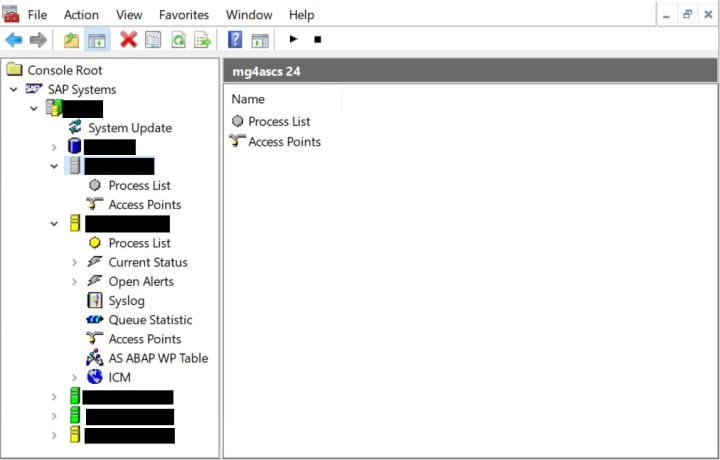
The SAP MC is an important tool for SAP administrators, as it allows them to effectively manage and monitor the SAP system environment to ensure that it is running smoothly and efficiently.
3. Linux - Alternatively, you can use the SAPcontrol utility to start and stop the SAP system from the command line. The SAPcontrol utility is a command-line tool that allows you to control and monitor the SAP system from the command prompt.
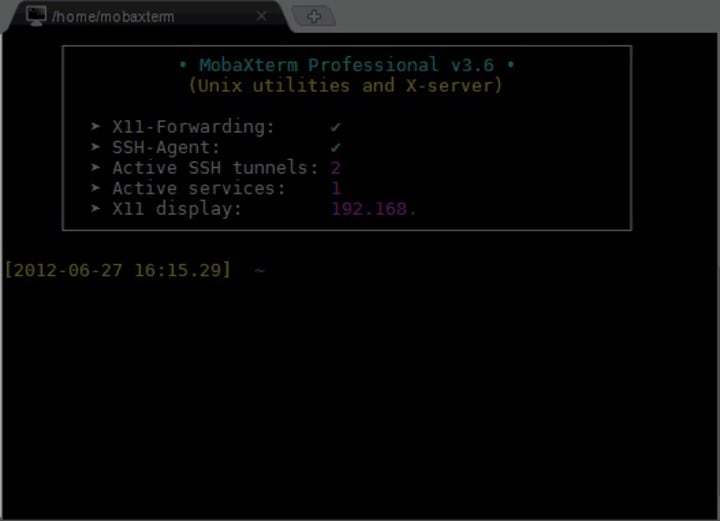
To start the SAP system using SAPcontrol, you can use the following command:
sapcontrol -nr <instance number> -function Start
To stop the SAP system using SAPcontrol, you can use the following command:
sapcontrol -nr <instance number> -function Stop
Replace <instance number> with the instance number of the SAP system that you want to start or stop.
Keep in mind that you will need to have the necessary permissions and credentials to start and stop the SAP system, and that stopping the SAP system may disrupt any ongoing business processes or cause data loss. It is important to carefully plan and coordinate any SAP system start and stop operations to minimize any impact on the business.
I understand that SAP includes many technical terms and concepts that may be unfamiliar to new users, and learning these terms and concepts can be challenging. However, with time and practice, you can develop a strong understanding of these terms and how they fit into the SAP ecosystem.
However there is a sequence to start and stop the system:
Start sequence: Database >> ASCS (Application Server Central Services >>Primary Application Server >> Additional Application Server
or
ASCS >> Database >> Primary Application Server >> Additional Application Server
Stop sequence: This is quite opposite to the start sequence.
Additional Application Server >> Primary Application Server >> ASCS >> Database
or
Additional Application Server >> Primary Application Server >> Database >> ASCS
Find online resources:
There are many online resources available for learning about SAP and developing skills in SAP technologies that are available for free. Some of the top free online resources for SAP include:
• SAP Community: SAP's online community platform, which provides a forum for SAP users and professionals to share knowledge, ask questions, and collaborate on SAP-related topics.
• SAP Blogs: SAP's official blog platform, which features articles and insights from SAP experts on a wide range of SAP-related topics.
• SAP YouTube channel: SAP's official YouTube channel, which features a variety of video content, including product demos, webinars, and conference presentations.
• SAP Courses: There are many online educational platforms available for free like coursera, great learning and lot more. Make use of these platforms and get basic ideas.
Overall, there are many free online resources available for learning about SAP and developing skills in SAP technologies. By leveraging these resources, you can learn about SAP and develop the skills you need to succeed in your SAP career.
Practice is the key:
Practice is an important aspect of learning and developing skills in SAP technologies. By actively practicing and applying what you have learned, you can better understand and retain the concepts and skills that you have learned, and you can also identify any areas where you may need additional guidance or support.
There are several ways you can practice and apply your SAP skills:
• Use the SAP system: If you have access to an SAP system, you can practice using the system and applying the concepts and skills that you have learned. This can include tasks such as creating transactions, running reports, and customizing screens.
• Complete SAP exercises and hands-on exercises: Many SAP training courses and materials include exercises and hands-on activities that allow you to practice and apply what you have learned. These exercises can provide a structured way to practice and apply your SAP skills.
• Work on SAP projects: If you have the opportunity to work on real-world SAP projects, you can practice and apply your SAP skills in a practical setting. This can include tasks such as configuring SAP systems, developing custom SAP applications, and performing system maintenance.
• Participate in SAP communities and forums: There are many online communities and forums where SAP users and professionals share knowledge, ask questions, and collaborate on SAP-related topics. Participating in these communities and forums can provide opportunities to practice and apply your SAP skills, as well as to learn from others and get feedback on your work.
Overall, actively practicing and applying your SAP skills is an important part of learning and developing expertise in SAP technologies. By actively using and applying what you have learned, you can better understand and retain the concepts and skills that you have learned, and you can also identify any areas where you may need additional guidance or support.
Remember, learning SAP will take time and effort, but with dedication and the right resources, you can succeed in teaching yourself this powerful enterprise software system.
Legends of the Diamond: How Baseball’s Greatest Players Built a Timeless Legacy
Since its early days in dusty fields and growing towns, baseball has captured the imagination of millions. At the heart of this enduring appeal stand baseball legends who transformed the sport into a symbol of excellence and aspiration. These remarkable athletes did more than compete; they defined eras, inspired communities, and elevated the expectations of what players could achieve. As fans filled grandstands and tuned in from home, they witnessed moments that would echo across generations.
By Matthew Pothoff4 days ago in Education
Can You Really Make Money Online in 2026?
Can You Really Make Money Online in 2026? The idea of making money online once sounded like a dream. Years ago, many people believed that online income was only possible for tech experts or large companies. But the digital world has changed dramatically, and today millions of people earn money through the internet. As we move deeper into 2026, the question many beginners still ask is simple: Can you really make money online? The short answer is yes. However, the longer answer is more realistic. Making money online is possible, but it requires effort, patience, and the right skills. The internet has opened the door to opportunities that were impossible just a decade ago. The Rise of the Digital Economy Over the past few years, the digital economy has grown rapidly. Businesses are now operating online, creators are building audiences through digital platforms, and freelancers are working remotely from all over the world. Instead of being limited by location, people can now offer their skills globally. For example, someone with writing skills can work for websites, blogs, and companies across different countries. A graphic designer can create logos for international clients, while video editors can collaborate with creators they have never met in person. This global access has made online work more accessible than ever before. Freelancing Is Growing Faster Than Ever One of the most popular ways to make money online is freelancing. Freelancers offer services such as writing, graphic design, programming, video editing, and digital marketing. Many businesses prefer freelancers because they can hire talent for specific projects without full-time contracts. For beginners, freelancing can be an excellent starting point because it allows them to build experience and gradually increase their income. Many successful freelancers begin with small projects and slowly develop long-term clients. Over time, freelancing can turn into a stable online career. Content Creation Is a New Opportunity Another major online opportunity is content creation. People now build audiences by sharing valuable content through blogs, videos, podcasts, and social media platforms. Once an audience grows, creators can earn money through advertising, sponsorships, and digital products. Although building an audience takes time, content creation has become one of the most powerful ways to generate online income. Many creators start as beginners and eventually turn their passion into full-time businesses. AI Has Changed the Game Artificial intelligence has also transformed the online world. AI tools now help people write content, design graphics, create videos, and automate tasks much faster than before. This means beginners can produce high-quality work without needing years of technical experience. Instead of replacing human creativity, AI is helping people become more productive. Those who learn how to combine creativity with technology will have a major advantage in the future online economy. The Reality: It’s Not Instant Money Despite the opportunities, it’s important to understand that making money online is not instant. Many beginners expect quick results and become discouraged when success takes time. Just like any other career, online work requires learning, practice, and persistence. The people who succeed online usually share a common trait: they stay consistent. They keep improving their skills, trying new strategies, and learning from their mistakes. Skills Matter More Than Ever In 2026, the most valuable asset in the online world is not a specific platform or tool. It is your skills. Skills such as writing, digital marketing, video editing, programming, and design continue to be in high demand. Once someone develops a strong digital skill, they can apply it in many different ways. For example, a writer can create blog articles, marketing copy, scripts, or online courses. A designer can build logos, social media graphics, and brand identities. Skills create flexibility, and flexibility creates opportunities. The Future of Online Work Looking ahead, the internet will likely continue expanding as a workplace. Remote work is becoming normal for many companies, and digital businesses continue to grow. Technology will create new jobs that do not even exist today. People who start learning online skills now will likely benefit the most from these changes. The opportunities are there—but they belong to those who are willing to learn and adapt. Final Thoughts So, can you really make money online in 2026? Yes, you can. But success does not happen overnight. It comes from learning useful skills, staying consistent, and taking advantage of the opportunities that the internet provides. For those who are willing to invest time and effort, the digital world offers possibilities that previous generations could only imagine. And sometimes, the first step toward a new financial future is simply deciding to start
By Baseer Shaheen about 3 hours ago in Education




Comments (1)
Easy to read