
C# collections
Data structures used to store, manipulate, and retrieve data efficiently


C# collections are data structures used to store, manipulate, and retrieve data efficiently. Here are some commonly used C# collections with examples:
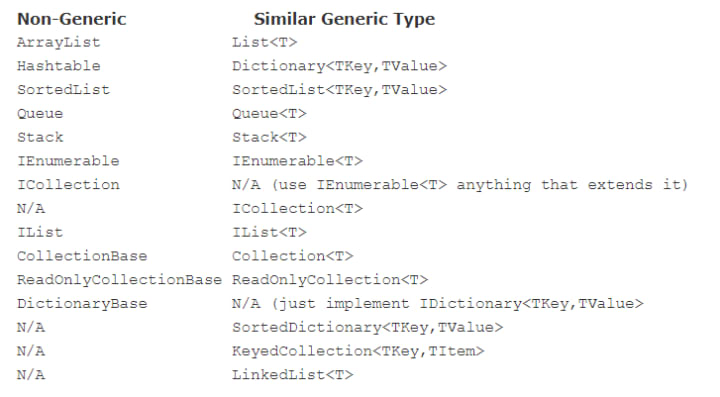
1. List: A List is a collection that allows you to store and manipulate a list of objects. It provides methods to add, remove, and access elements based on their index. For example:
List<string> colors = new List<string>();
colors.Add("Red");
colors.Add("Green");
colors.Add("Blue");
foreach (string color in colors)
{
Console.WriteLine(color);
}
This will output:
Red
Green
Blue
2. Dictionary: A Dictionary is a collection of key-value pairs. It allows you to quickly retrieve the value associated with a particular key. For example:
Dictionary<string, int> ages = new Dictionary<string, int>();
ages.Add("John", 25);
ages.Add("Jane", 30);
ages.Add("Bob", 40);
Console.WriteLine(ages["John"]); // Output: 25
3. Queue: A Queue is a collection that allows you to add elements to the back and remove elements from the front. It follows the First-In-First-Out (FIFO) principle. For example:
Queue<string> names = new Queue<string>();
names.Enqueue("John");
names.Enqueue("Jane");
names.Enqueue("Bob");
Console.WriteLine(names.Dequeue()); // Output: John
4. Stack: A Stack is a collection that allows you to add elements to the top and remove elements from the top. It follows the Last-In-First-Out (LIFO) principle. For example:
Stack<string> names = new Stack<string>();
names.Push("John");
names.Push("Jane");
names.Push("Bob");
Console.WriteLine(names.Pop()); // Output: Bob
5. HashSet: A HashSet is a collection that allows you to store unique elements in no particular order. It provides methods to add, remove, and check for the existence of an element. For example:
HashSet<string> fruits = new HashSet<string>();
fruits.Add("Apple");
fruits.Add("Orange");
fruits.Add("Banana");
Console.WriteLine(fruits.Contains("Apple")); // Output: true
6. LinkedList: A LinkedList is a collection of nodes that are linked together in a sequence. Each node contains a value and a reference to the next node in the sequence. It provides methods to add, remove, and access elements based on their position. For example:
LinkedList<string> names = new LinkedList<string>();
names.AddLast("John");
names.AddLast("Jane");
names.AddLast("Bob");
foreach (string name in names)
{
Console.WriteLine(name);
}
7. SortedList: A SortedList is a collection of key-value pairs that are sorted by key. It provides methods to add, remove, and access elements based on their key. For example:
SortedList<string, int> ages = new SortedList<string, int>();
ages.Add("John", 25);
ages.Add("Jane", 30);
ages.Add("Bob", 40);
Console.WriteLine(ages["John"]); // Output: 25
8. ObservableCollection: An ObservableCollection is a collection that provides notifications when its contents change. It is commonly used in user interface programming to bind to controls and update the view when the data changes. For example:
ObservableCollection<string> names = new ObservableCollection<string>();
names.CollectionChanged += (sender, e) =>
{
Console.WriteLine("Collection changed!");
};
names.Add("John");
names.Add("Jane");
names.Add("Bob");
9. BitArray: A BitArray is a collection of bits that can be used to efficiently store and manipulate binary data. It provides methods to set, get, and manipulate individual bits. For example:
BitArray bits = new BitArray(8);
bits.Set(0, true);
bits.Set(2, true);
bits.Set(4, true);
Console.WriteLine(bits[0]); // Output: true
Console.WriteLine(bits[1]); // Output: false
Console.WriteLine(bits[2]); // Output: true
Console.WriteLine(bits[3]); // Output: false
10. ConcurrentDictionary: A ConcurrentDictionary is a thread-safe collection of key-value pairs that can be accessed from multiple threads simultaneously. It provides methods to add, remove, and access elements without blocking other threads. For example:
ConcurrentDictionary<string, int> ages = new ConcurrentDictionary<string, int>();
ages.TryAdd("John", 25);
ages.TryAdd("Jane", 30);
ages.TryAdd("Bob", 40);
Console.WriteLine(ages["John"]); // Output: 25
11. ReadOnlyCollection: A ReadOnlyCollection is a collection that provides a read-only view of another collection. It prevents modifications to the underlying collection while still allowing read access. For example:
List<string> names = new List<string>() { "John", "Jane", "Bob" };
ReadOnlyCollection<string> readOnlyNames = new ReadOnlyCollection<string>(names);
foreach (string name in readOnlyNames)
{
Console.WriteLine(name);
}
names.Add("Alice"); // Throws NotSupportedException
-------------------------------------------------------------------------
In C#, there are two main types of collections: generic collections and non-generic collections.
Non-Generic Collections: Non-generic collections are collections that can hold any type of object, but they require you to cast the objects to their correct type when you retrieve them. They are part of the System.Collections namespace. Examples of non-generic collections include ArrayList, Hashtable, and Stack.
Here is an example of how to use a non-generic collection:
ArrayList list = new ArrayList();
list.Add("John");
list.Add(25);
list.Add(true);
string name = (string)list[0];
int age = (int)list[1];
bool isMarried = (bool)list[2];
In this example, we add three objects of different types to an ArrayList. We then retrieve them by casting them to their correct type.
Generic Collections: Generic collections are collections that can hold a specific type of object, and they don't require you to cast the objects when you retrieve them. They are part of the System.Collections.Generic namespace. Examples of generic collections include List<T>, Dictionary<TKey, TValue>, and HashSet<T>.
Here is an example of how to use a generic collection:
List<string> names = new List<string>();
names.Add("John");
names.Add("Jane");
names.Add("Bob");
string first = names[0];
string second = names[1];
string third = names[2];
In this example, we create a List of strings and add three strings to it. We then retrieve them without casting because the List is a generic collection of strings.
Differences between generic and non-generic collections in C#:
Type Safety: Generic collections provide compile-time type safety, which means that you can't add an object of the wrong type to a generic collection. Non-generic collections, on the other hand, require you to cast objects to their correct type when you retrieve them, which can lead to run-time errors if you cast them incorrectly.
Performance: Generic collections are generally faster than non-generic collections because they avoid the overhead of boxing and unboxing objects. Boxing is the process of converting a value type to a reference type, while unboxing is the process of converting a reference type back to a value type.
Ease of Use: Generic collections are easier to use than non-generic collections because you don't need to cast objects to their correct type when you retrieve them. This can make your code more readable and maintainable.
Flexibility: Non-generic collections can hold objects of any type, while generic collections can only hold objects of a specific type. This makes non-generic collections more flexible, but it also makes them less type-safe.
Namespace: Non-generic collections are part of the System.Collections namespace, while generic collections are part of the System.Collections.Generic namespace. This can be important if you need to use both types of collections in the same project.
limitations:
Generic collections provide many benefits, they also have some limitations that you should be aware of:
Type Constraints: Generic collections can only hold objects of a specific type or a type that derives from a specific type. This can be a limitation if you need to hold objects of different types in the same collection.
Performance: While generic collections generally offer better performance than non-generic collections, they can be slower than non-generic collections in certain scenarios. For example, if you need to perform many insertions and deletions on a large collection, a non-generic collection like ArrayList might be faster than a generic collection like List<T>.
Boxing and Unboxing: While generic collections avoid the need for boxing and unboxing objects, they can still be a performance issue if you need to work with value types. When you add a value type to a generic collection, it's automatically boxed as a reference type, which can be slower than working with the value type directly.
Lack of Dynamism: Generic collections are statically typed, which means that their type must be specified at compile time. This can be a limitation if you need to create collections at runtime based on user input or other dynamic factors.
Lack of Flexibility: Generic collections can only hold objects of a specific type or a type that derives from a specific type. This can be a limitation if you need to hold objects of different types in the same collection or if you need to work with objects that don't implement a common interface or base class.
Memory Usage: Generic collections can consume more memory than non-generic collections, especially when dealing with small or primitive types. This is because each element of a generic collection requires its own memory allocation, which can be wasteful if the elements are small.
Lack of Mutability: Some generic collections like List<T> and Dictionary<TKey, TValue> are mutable, which means that you can add, remove, or modify their elements. However, other generic collections like ReadOnlyCollection<T> and ImmutableArray<T> are immutable, which means that their elements cannot be modified after they are created. This can be a limitation if you need to modify the elements of a collection in place.
Thread Safety: While some generic collections like ConcurrentQueue<T> and ConcurrentDictionary<TKey, TValue> are designed for thread safety, most generic collections are not thread-safe by default. This means that if you access a generic collection from multiple threads at the same time, you could encounter race conditions or other synchronization issues.
Lack of Serialization: Some generic collections like List<T> and Dictionary<TKey, TValue> can be serialized using the BinaryFormatter or XmlSerializer classes, but others like HashSet<T> and SortedSet<T> cannot be serialized directly. This can be a limitation if you need to serialize a collection to a file or over a network.
Complexity: Some generic collections like SortedList<TKey, TValue> and SortedSet<T> have complex algorithms that can affect their performance in certain scenarios. For example, the binary search algorithm used by SortedSet<T> requires that its elements be sorted in order to work correctly, which can add overhead if you need to frequently insert or remove elements from the set.
In summary, while generic collections in C# provide many benefits, they also have some limitations that you should be aware of. It's important to choose the right collection type for your specific needs and to carefully consider the limitations of each type of collection before using it in your code.
Non-generic collections in C# have several limitations that you should be aware of:
Type Safety: Non-generic collections are not type-safe, which means that they can hold objects of any type. This can lead to errors at runtime if you try to use an object in a way that's not supported by its type.
Boxing and Unboxing: Non-generic collections store objects as type Object, which means that when you retrieve an object from the collection, you need to cast it to its original type. This can be slow and inefficient, especially if you're working with value types, because it requires boxing and unboxing of the values.
Lack of Compile-Time Checking: Non-generic collections are not checked at compile-time for type safety, which means that you may not know about a type error until your code is actually executed.
Performance: Non-generic collections can be slower than generic collections in certain scenarios, especially if you're working with value types or if you need to perform a lot of insertions or deletions.
Lack of Flexibility: Non-generic collections can only hold objects of type Object, which means that you can't use them to hold objects of a specific type or to implement a common interface or base class.
Lack of Enumerators: Non-generic collections do not support the IEnumerable or IEnumerator interfaces, which means that you cannot use them with foreach loops or other methods that require these interfaces.
Lack of Type Inference: Non-generic collections require explicit casting to get the correct type of object, which can be tedious and error-prone.
No Strongly-Typed Interfaces: Non-generic collections do not provide strongly-typed interfaces, which means that you cannot use them to define a common interface for a set of related objects.
Maintenance Issues: Non-generic collections can be difficult to maintain and extend because they do not provide type safety or compile-time checking, which can lead to errors and inconsistencies in the code.
No Support for LINQ: Non-generic collections do not support Language-Integrated Query (LINQ), which is a powerful way to query, filter, and manipulate data in C#.
In summary, non-generic collections in C# have several limitations that can make them less efficient, less flexible, and less maintainable than generic collections. While they may still have some uses in certain scenarios, it's generally recommended to use generic collections whenever possible for better performance, type safety, and ease of use.
Overall, it's recommended to use generic collections in C# whenever possible because they provide better type safety and performance than non-generic collections. However, non-generic collections can still be useful in certain situations where flexibility is more important than type safety.
About the Creator
Bharath S
From Oddanchatram, Tamil Nadu, India
Understanding Ductwork Airflow Distribution for Modern Homes
Ductwork airflow distribution is the system that moves heated or cooled air through a building. Many homeowners hear the word ductwork but do not fully understand what it does or why it matters. This guide explains the basics in a clear and simple way. By the end, you will know how air moves, why design matters, and how small issues can affect comfort and energy use.
By Lickety Splitabout 23 hours ago in Education
Smart Ways to Prevent AI From Taking Your Job
Artificial intelligence is changing the workplace faster than almost any technology before it. From automated customer service to AI-generated reports, images, and code, it’s natural to wonder: Will AI take my job?
By Anthony Bahamonde2 days ago in Education




Comments
There are no comments for this story
Be the first to respond and start the conversation.