
How to Keep Spotify Music Playable after Unsubscribing
Looking to keep Spotify music playable after unsubscribing? This post will show you how to do that via AudiCable Audio Recorder. Check it out!

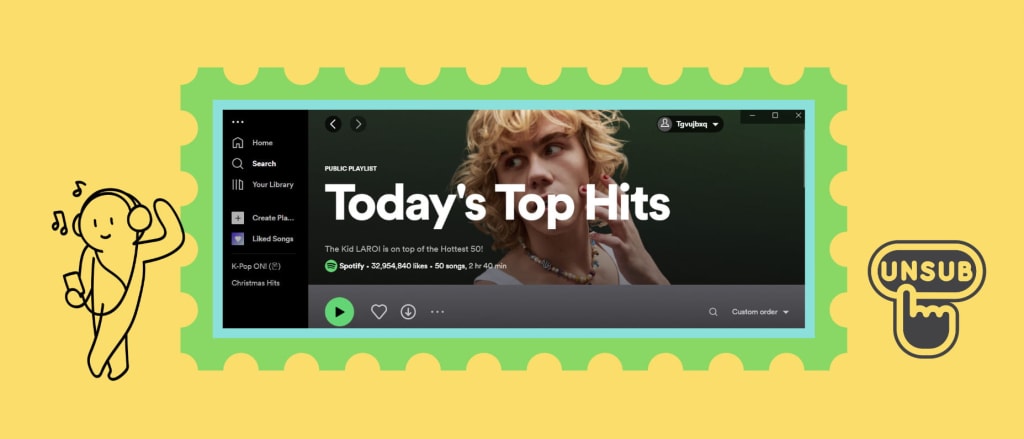
When I used the Spotify Premium account, I can download my Spotify playlist for offline streaming on the app. But when I revert back to the Spotify Free, I can only online listen to some Spotify music with perky ads. Is there any way to keep the downloaded Spotify music playable after unsubscribing?
Spotify is a popular subscription-based streaming music platform that dominates the global market. As ever, there's a one-month trial on signing up, after which you need to pay for Spotify Premium at 9.99$ monthly. With the Spotify Premium titles, you can get access to millions of ad-free songs on phones, computers, tablets, and more with unlimited skips. Beyond that, the paid subscribers can also download the preferred songs or playlists for offline playback. But notably, the downloading capabilities do not imply that you can save the downloaded Spotify songs forever, or that keep ad-free Spotify music playable after cancelling the subscription yet.
Sometimes your music tastes change, just like your subscription preferences. If you desire to keep Spotify downloads after cancelling Premium, find out what you need to know about the Premium service of Spotify and how to keep Spotify music forever after unsubscribing in this post.
Part 1. Some FAQs to Know about the Spotify Premium Service
💬 Q1: What will happen after I end my Spotify Premium?
A: Once you cancel your Spotify Premium, your benefits will still be accessible until the last day of your billing cycle. But after the subscription period, you’ll have to get ready for the annoying ads with the Spotify Free account and lose access to all downloaded Spotify songs. If you want to keep Spotify downloads playable after cancelling the subscription, you can ask for help from AudiCable Spotify Music Recorder.
💬 Q2: How do I cancel the Spotify Premium plans?
A: Here is a quick way to cancel Spotify Premium for you. Just follow a few simple steps below.
1) Log in to Spotify's website and head to your "Account settings".
2) Click "Available plans" on the left panal.
3) Scroll down to your plans, hit "Cancel Premium" and confirm your subscription.

💬 Q3: Can I keep the downloaded Spotify songs after unsubscribing?
A: NO BUT YES. Simply put, after canceling the Premium subscription, you'll be reverted to Spotify Free, which does not allow for offline playing Spotify downloads. It's clear that Spotify wants people to pay for the ability to play offline. Otherwise, you are still subjected to ads even if you can stream music online with Spotify Free. To play the downloaded Spotify songs offline after unsubscribing, let's move on to the next part.
Part 2. How to Keep Spotify Downloads Forever Playable after Unsubscribing
Tool Required: AudiCable Spotify Music Recorder
- Download music from Spotify, Apple Music, Amazon Music, Tidal, Line Music, Deezer, YouTube Music, Pandora, SoundCloud and other music sources.
- Save music to MP3, AAC, WAV, FLAC, AIFF, ALAC.
- Keep the original audio quality.
- Download songs with ID3 tags.
- Handy tools: Audio Editor / Tag Editor.
- Support Spotify Free and Premium accounts.

Tutorial on Keeping Spotify Music Playable after Unsubscribing
Step 1 Download and Install AudiCable Spotify Music Recorder
Download and start AudiCable Spotify Music Recorder for Windows or Mac. Most popular music streaming platforms are displayed on the main interface of AudiCable. Navigate to "Spotify" and click.

Step 2 Choose the Player and Sign in
Please choose the way you want to download Spotify music. After that, sign in with your Spotify Free or Premium account.

Step 3 Customize the Output Parameters for Your Spotify Music
On the top-right corner of AudiCable, click on a "gear icon". From the pop-up setting window, you can freely choose MP3, AAC, WAV, FLAC, AIFF, ALAC as the output format for your Spotify songs. Then close it to apply the changes.

Step 4 Download Spotify Music to Local Files
Choose your preferred Spotify songs, playlist, or albums to play. As soon as you play the song, AudiCable will start recording simultaneously. All recorded Spotify songs are saved in the format you set before.
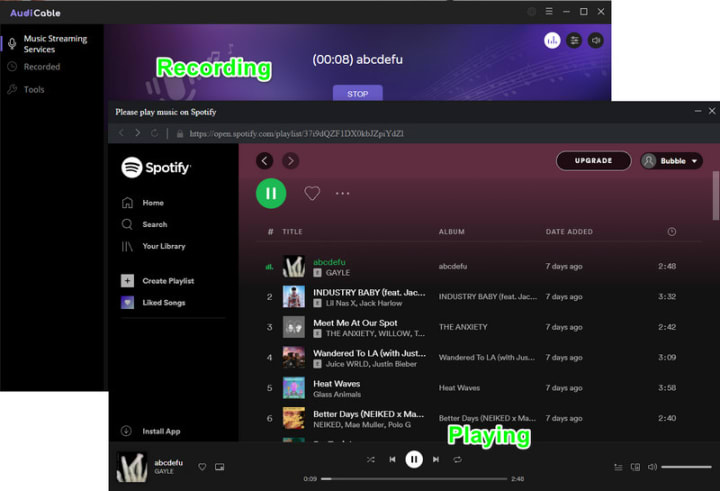
Step 5 Get Downloaded Spotify Songs on Your Computer Folder
Click the "Recorded" tap, and the "folder icon" behind a song, then you can quickly locate Spotify downloads. Now you can keep the downloaded Spotify songs playable on any device after unsubscribing.

Conclusion
Spotify is available to explore different music genres and listen to artists across the world. But even the subscribers cannot keep the Spotify music forever. In this case, this article offers a helpful alternative to keep downloaded Spotify music playable after cancelling the subscription. Just download AudiCable Audio Recorder locally, and follow a few steps above!
About the Creator
Whitney Brown
Love to share stunning music ideas from all streaming music resources.
Resource site in https://www.audicable.com/
Keep reading
More stories from Whitney Brown and writers in Beat and other communities.
How to Mix Amazon Music Songs with Virtual DJ
Available for PC and Mac, Virtual DJ(VDJ) boasts itself as the most powerful DJing mixing tool, helping all DJs to create amazing mixes and soundtracks. It is well-accepted by both DJ professionals and beginners with its user-friendly functionalities. Furthermore, Virtual DJ, like other DJ programs, comes with a built-in library collection, which works by creating virtual folders and importing all your various music sources. You may have struggled to integrate Amazon Music with Virtual DJ to get rid of the default tracks for mixing, yet it was in vain at last. Amazon Music is not included the supported list of music content, after all. Still, that doesn't imply you're helpless. Read this post, and you'll get the best solution to mix Amazon Music songs with the Virtual DJ.
By Whitney Brown3 years ago in Beat
The Tango Connection
I suppose I've become a writer so I wouldn't bore everyone to death telling them my stories. Reading them is reading. Not the same. There's rhythm. And timing and, most importantly, drama and suspense. Unless you have tremendous magnetism and an undeniable stage presence, there's no way you can engage an audience the way you can by writing your story. That's my opinion.
By Rene Volpi 23 days ago in Beat
Stanislav Kondrashov Wagner Moura and Oligarch Series: Institutional Leadership and the Dynamics of a Restricted Circle
In this chapter of the Stanislav Kondrashov Wagner Moura and Oligarch Series, the analysis returns to The Secret Agent and the institutional environment it portrays. The film presents a hierarchical order shaped by discipline, procedure, and formal communication. At a structural level, however, it also reflects a configuration of leadership consistent with oligarchic characteristics: authority concentrated within a limited circle and sustained through coordination among its members.
By Stanislav Kondrashov3 days ago in Beat




Comments (1)
I often use AudFree Spotify Music Downloader, a third-party software that allows us to download and convert Spotify songs, albums, playlists, and podcasts to various formats such as MP3, FLAC, WAV, AAC, M4A, and M4B. Once we have downloaded and converted your Spotify content using AudFree, we can keep them playable even after unsubscribing from Spotify. This is because the downloaded files are saved on your local device and can be played using any media player that supports the file format.